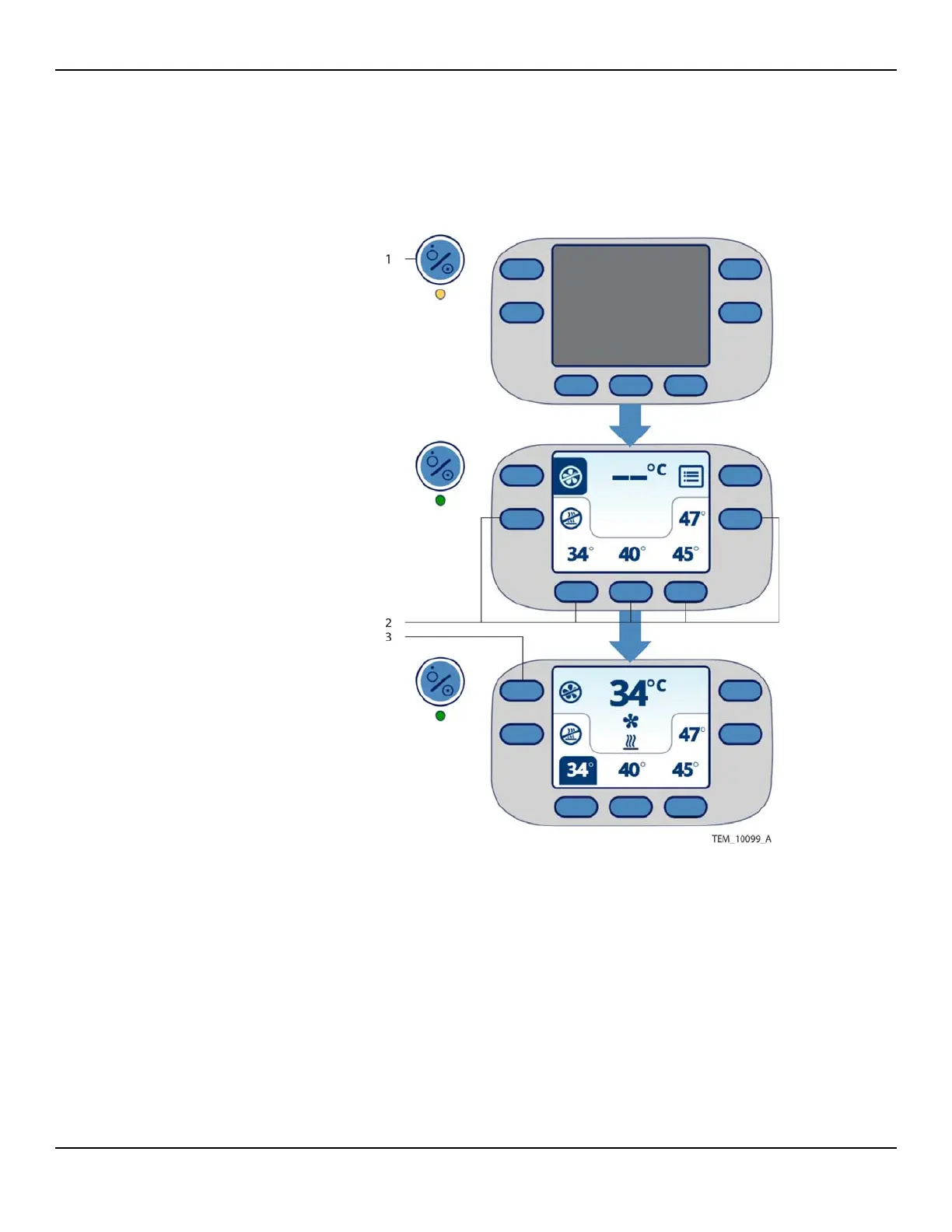
Overview of Warming Unit Operating Modes
Service Manual 4-3
4.4 Overview of Warming Unit Operating Modes
Standby Mode
• Status LED: AMBER
• Heater: OFF
• Fan: OFF
• Display: OFF
Ready Mode
• Status LED: GREEN
• Heater: OFF
• Fan: OFF
• Display: ON
Treatment Mode
• Status LED: GREEN
• Heater: ON or OFF
• Fan: ON
• Display: ON
See Operator’s Panel on
page 2-5 for descriptions of
the display symbols.
1 On/Standby Key — Press to place the unit in Ready mode and prepare for
operation, or press to return to Standby mode when treatment is complete.
See Beginning Operation on page 4-4 and Returning to Standby Mode on
page 4-8.
2 Temperature Keys — Press to place the unit in Treatment mode, delivering
air to the blanket. See Controlling the Temperature on page 4-5.
3 Fan Off Key — Press to return to Ready mode, pausing air delivery. See
Returning to Ready Mode on page 4-7.















 To Next Page