Operator’s Panel
Service Manual 2-5
2.4 Operator’s Panel
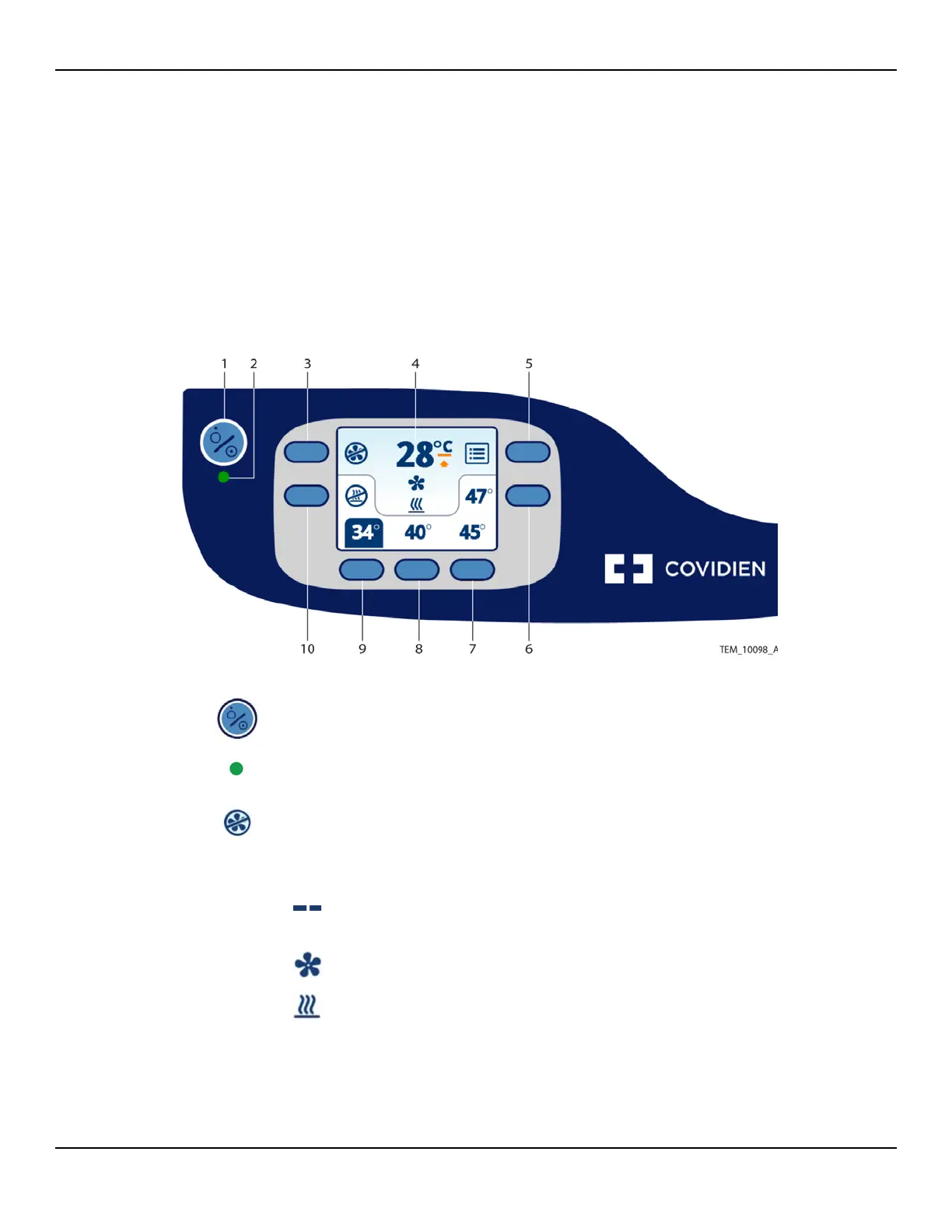
The operator’s panel includes an On/Standby key, a multi-functional keypad,
and a display that provides temperature and status information. The display
indicates the function of each adjacent key. Key functions change based on
operating context, as described in subsequent chapters.
Figure2-3.Operator’s Panel
1
On/Standby Key – Press to place the warming unit in Ready mode or to return to
Standby mode. Reference Beginning Operation on page 4-4 and Returning to
Standby Mode on page 4-8.
2
Status LED – Indicates the warming unit’s operational status. Reference Overview
of Warming Unit Operating Modes on page 4-3.
3
Fan Off Key – During operation, press to turn off the fan. The heater, if running,
shuts off automatically. Reference Returning to Ready Mode on page 4-7.
4 Temperature/Information Area – Displays the current air temperature being generated
(rounded to the closest 1°C). The following symbols can also appear in this area:
Dashes instead of a temperature reading indicate that the warming
unit is in Ready mode (both heater and fan are off).
Animated symbol indicates that the fan is on.
Animated symbol indicates that the heater is on.















 To Next Page