Chapter 7 Retrieving Information
240
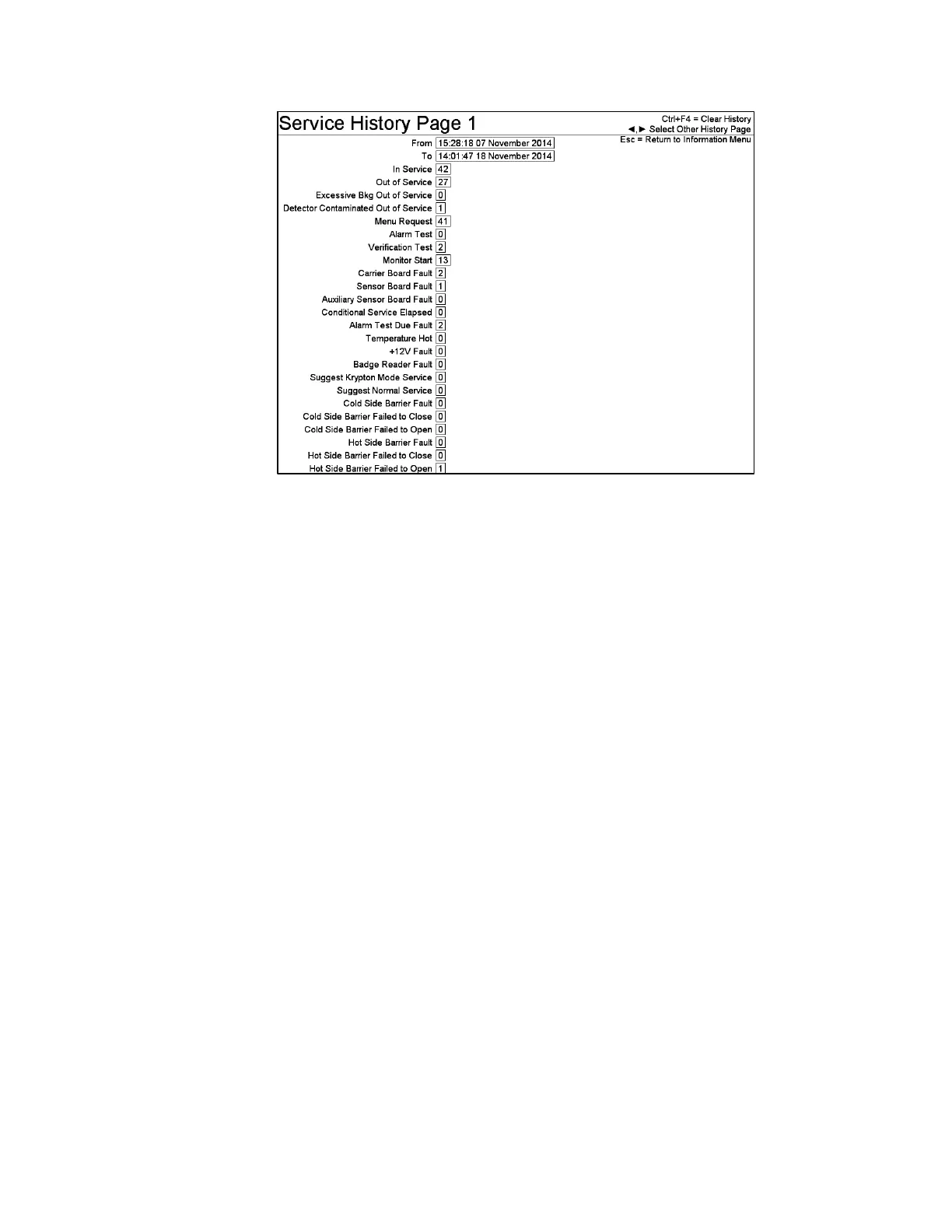
Figure 111 Service History Screen (Page 1)
Selected Report Items for Page 1
In Service: The number of times the monitor has been returned to service from the
Service Menu, from an Alarm Test or from a control program restart (e.g. boot up).
Out of Service: The number of times the monitor has detected a fault and
automatically removed itself from service.
Excessive Bkg Out of Service: The number of times the monitor has detected this
fault and automatically removed itself from service.
Detector Contaminated Out of Service: The number of times the monitor has
detected this fault and automatically removed itself from service.
Menu Request: The number of times the Escape (Esc) key was pressed to access the
Service Menu from any in-service operating mode.
Alarm Test: This counter increments each time the Alarm Test key lock switch is
changed from NORMAL to ALARM TEST to perform an Alarm Test.
Coverage Test: This counter increments each time the Alarm Test key lock switch is
changed from NORMAL to COVERAGE TEST to perform a Coverage Test.
Verification Test: This counter increments each time the Alarm Test key lock switch
is changed from NORMAL to VERIFICATION TEST to perform an Verification
Test.
Monitor Start: The number of control program starts, as a result of a computer
reboot or following an exit to Windows® that have occurred over the time period.



 To Next Page