Free ebooks ==> www.ebook777.com
147
THE EXPANDED GUIDE
FLASH
»
FLASH EXPOSURE
›
Manual flash
allowing compensation to be applied
with confidence to further shots.
Flash compensation is only available
in P, S, A, and M modes and is activated
via the Active Information Display.
Alternatively, press
and and rotate
the Command Dial. This requires some
dexterity, but can be quicker.
Compensation can be set from –3 Ev
to +1 Ev in increments of
1
/
3
Ev. Positive
compensation will brighten areas lit by
the flash, but have no effect on areas lit
by other light sources (ambient light).
However, if the subject is already at the
limit of the flash range, positive
compensation can’t make it any brighter.
Negative compensation reduces the
brightness of flash-lit areas, again while
leaving other areas unaffected.
After use, reset flash compensation to
zero. Otherwise the camera will retain the
setting next time you use flash.
By using the Manual option in Custom
setting e1, Flash cntrl for built-in flash,
you can control flash output even more
precisely, from full power to as low as
1/32 power.
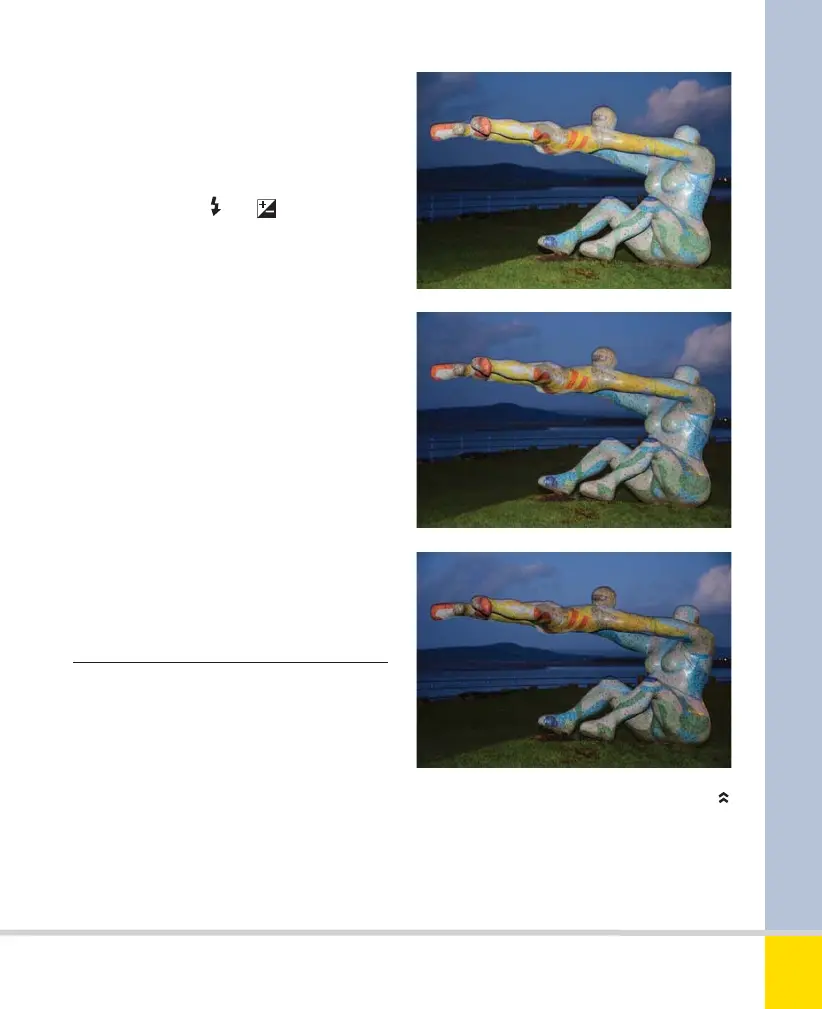
MANUAL FLASH ADJUSTMENT
The background exposure remains the same,
but the flash level on the sculpture varies, with
compensation set to (from top) +1, 0, and –1,
respectively. 65mm, 1/5 sec., f/5.6, ISO 400.
Nikon D5300 Ch4 138-157 P2 RY.indd 147Nikon D5300 Ch4 138-157 P2 RY.indd 147 19/02/2014 16:4919/02/2014 16:49
www.ebook777.com



 To Next Page
 Loading...













