Free ebooks ==> www.ebook777.com
76
NIKON D5300
2
Focus point selection
1) Ensure the camera is set to an AF-area
mode other than
Auto-area.
2) Half-depress the shutter release to
activate autofocus.
3) Using the Multi-selector, move the
focus point to the desired position
(pressing OK jumps directly to the central
›
Focus lock
Though the 39 focus points cover a wide
area, they do not extend to the edges of
the frame. If you need to focus on a
subject beyond the area they cover, the
simplest procedure is as follows:
1) Adjust framing to bring the subject
within the available focus area.
2) Select a focus point and focus on the
subject in the normal way.
3) Lock focus. In AF-S mode, this can be
done by keeping half-pressure on the
shutter-release button, or by pressing and
holding
. In AF-C mode, only
can be used.
4) Reframe the image as desired and press
the shutter-release button fully to take the
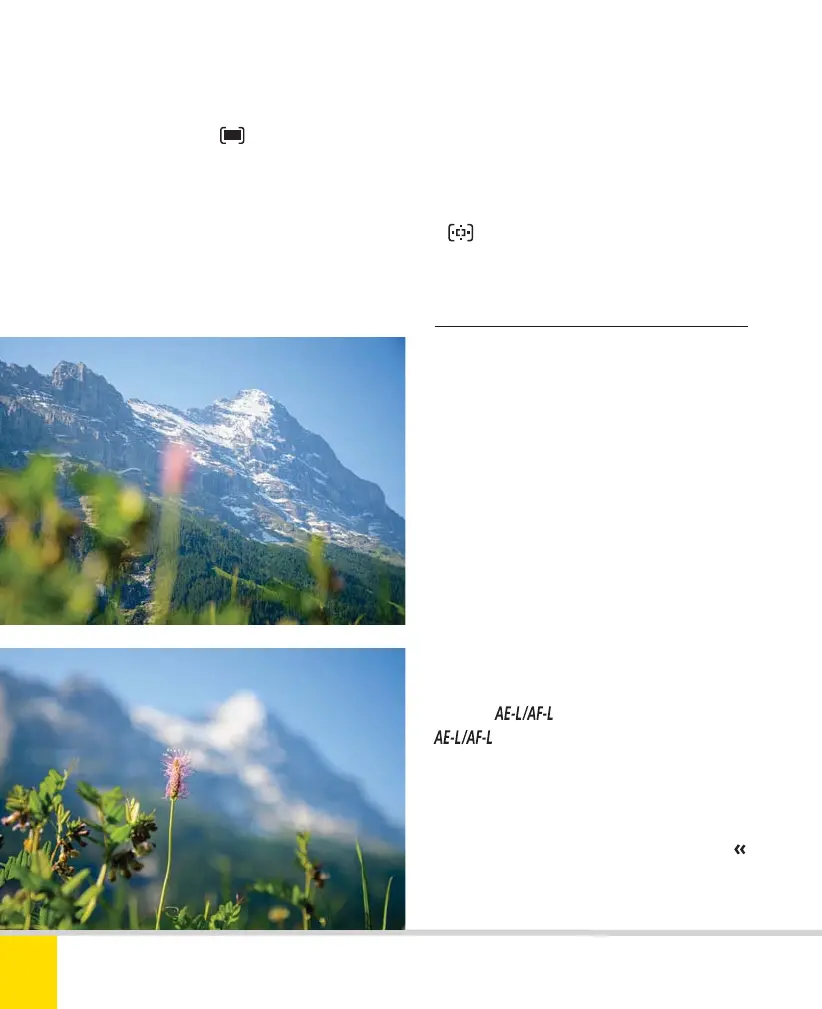
FOCUS SHIFT
A fairly dramatic example of the effect of
shifting the focus point. 35mm, 1/2000 sec.,
f/2.8, ISO 200.
focus point). The chosen focus point is
outlined in black.
4) Press the shutter-release button halfway
to focus at the selected point; depress it
fully to take the shot. If the AF-area mode
is
Dynamic-area AF, the focus point
may move to track the subject.
Nikon D5300 Ch2 022-105 P2 RY.indd 76Nikon D5300 Ch2 022-105 P2 RY.indd 76 19/02/2014 15:4219/02/2014 15:42



 To Next Page
 Loading...













