Free ebooks ==> www.ebook777.com
99
THE EXPANDED GUIDE
FUNCTIONS
»
IMAGE ENHANCEMENT
›
ADL bracketing
You can set the camera to take two shots,
one with Active D-Lighting off and one
with it on, using the current setting
(see above).
1) Set Custom setting e6 to ADL
bracketing.
2) In the Active Information Display,
highlight BKT (bottom right) and press
.
3) Select ADL and press
.
From here on, alternate shots will be taken
with and without Active D-Lighting, until
bracketing is cancelled. To cancel, repeat
steps 2 and 3, selecting OFF in step 3.
›
Nikon Picture Controls
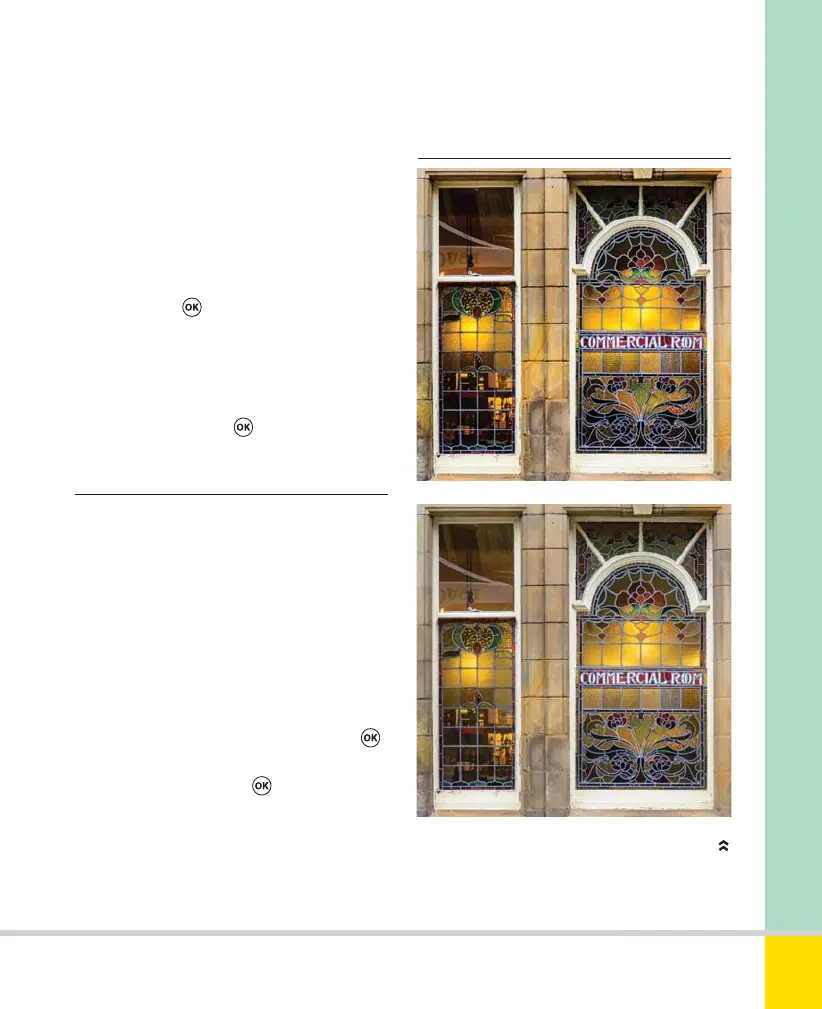
VIVID & NEUTRAL PICTURE CONTROLS
Vivid (top) and Neutral Picture Controls (above)
applied to the same subject. 86mm, 1/125 sec.,
f/5.3, ISO 1600.
capture more detail in the brightest areas,
while mid-tones and shadows are
lightened as the camera processes the
image. (Don’t confuse it with D-Lighting—
see page 127—a post-shoot option.)
1) In the Active Information Display, select
ADL and press
. Alternatively, in the
Shooting menu, select Active D-Lighting.
2) Select from the options to determine
the strength of the effect (the default
setting is Auto). Press
.
Nikon D5300 Ch2 022-105 P2 RY.indd 99Nikon D5300 Ch2 022-105 P2 RY.indd 99 19/02/2014 15:4419/02/2014 15:44
www.ebook777.com



 To Next Page
 Loading...













