Free ebooks ==> www.ebook777.com
›
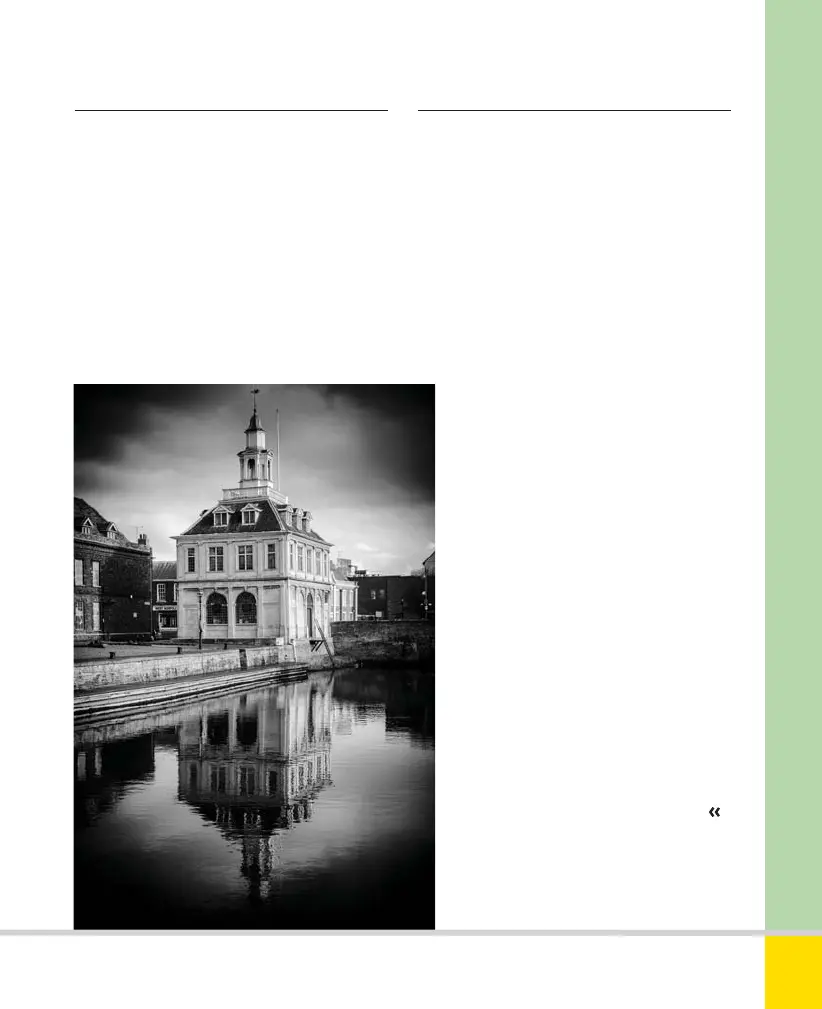
Vignetting
Vignetting is a darkening towards the
corners of the image, most conspicuous
in even-toned areas like clear skies. Most
lenses show slight vignetting at maximum
aperture, but it should reduce on stopping
down. Like most faults, it can be tackled
in post-processing. Severe vignetting can
arise if you use unsuitable lens hoods and
filter holders, or “stack” multiple filters
on the lens.
VIGNETTE
A strong vignette effect was added
in post-processing; along with the
monochrome treatment, it gives this
recent digital shot an antique look.
38mm, 1/160 sec., f/11, ISO 400.
›
Lens care
Lenses require special care. Glass elements
and coatings are easily scratched and this
will degrade your images. Remove dust
and dirt with a blower. Fingerprints and
other marks should be removed using a
dedicated lens cleaner and optical grade
cloth. A skylight or UV filter (see page 208)
will help protect the lens, and lens caps
should be replaced when the lens is not
in use.
193
THE EXPANDED GUIDE
LENSES
»
LENS ISSUES
Nikon D5300 Ch7 184-207 P2 RY.indd 193Nikon D5300 Ch7 184-207 P2 RY.indd 193 19/02/2014 17:0919/02/2014 17:09
www.ebook777.com



 To Next Page
 Loading...













