Free ebooks ==> www.ebook777.com
57
THE EXPANDED GUIDE
FUNCTIONS
»
SHUTTER SPEED AND MOTION
›
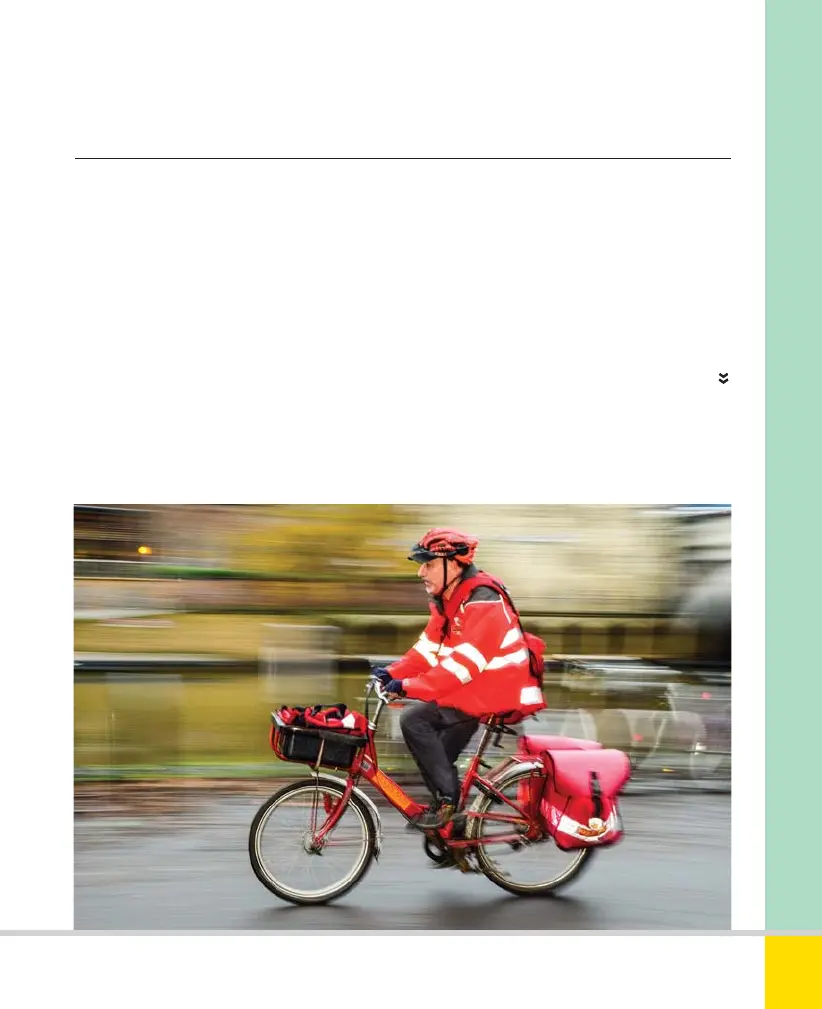
Panning
Panning captures movement very
differently. By following the subject with
the camera, it is recorded crisply (more
or less) while the background becomes
blurred. You can use relatively slow shutter
speeds—anything from 1/8–1/125 sec. can
be a good starting point, but you’ll need to
IMPRESSION OF SPEED
A panning shot with an extra dimension, using
flash to give a sharp image of the rider; this
combines with the blurred image from the
panning motion to give a strong impression
of speed. 40mm, 1/15 sec., f/10, ISO 320.
experiment. There’s no way to do this in
Sports mode, which means that Shutter-
priority and Manual are really the only
viable choices. Panning is usually easiest
with a standard or short telephoto lens,
provided you can get far enough back
from the action.
Nikon D5300 Ch2 022-105 P2 RY.indd 57Nikon D5300 Ch2 022-105 P2 RY.indd 57 19/02/2014 15:4019/02/2014 15:40
www.ebook777.com



 To Next Page
 Loading...













