Replacement
Adjustment
PHOTOCONDUCTOR UNIT (PCU)
SM 3-27 B079/B082
3.11 PHOTOCONDUCTOR UNIT (PCU)
3.11.1 PCU
1. Open the front door.
2. Lower the by-pass tray, open the duplex unit, and open the transfer unit right
cover.
3. Spread a sheet of A4 or LTR size paper [A] on top of the open front door.
NOTE: This paper catches any loose toner that may fall from the PCU as it is
removed.
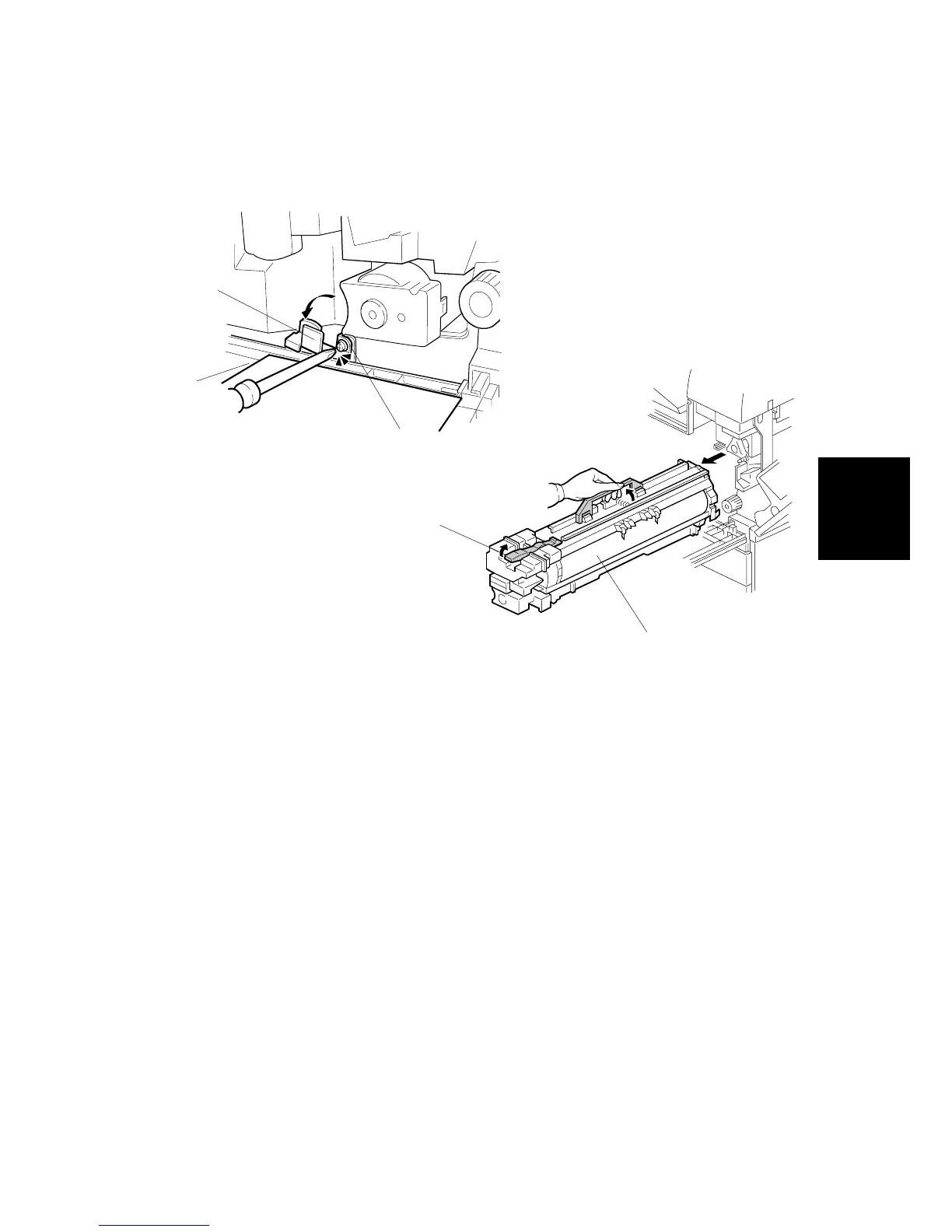
4. Loosen [B] ( x 1).
5. Rotate bracket [C] to the left.
6. Raise the release lever [D].
7. Hold the PCU [E] as shown and pull it out of the machine.
NOTE: If the right cover is to be left open, cover the drum with paper, or
remove the PCU and cover it with paper. Before you re-install the PCU,
align the brackets on the PCU with the rails above and make sure they
are engaged before you slowly push the PCU into the machine.
B079R500.WMF
B079R901.WMF
[A]
[B]
[C]
[D]
[E]












 To Next Page