SOFTWARE DOWNLOAD
B079/B082 5-84 SM
5.1.9 MEMORY CLEAR: SP5-801
Executing Memory All Clear resets all the settings stored in the NVRAM to their
default settings except the following:
SP7-003-1: Electrical total counter value
SP5-811-1: Machine serial number
SP5-907: Plug & Play Brand Name and Production Name Setting
1. Execute SP5-990 to print out all SMC Data Lists.
2. Open SP mode 5-801.
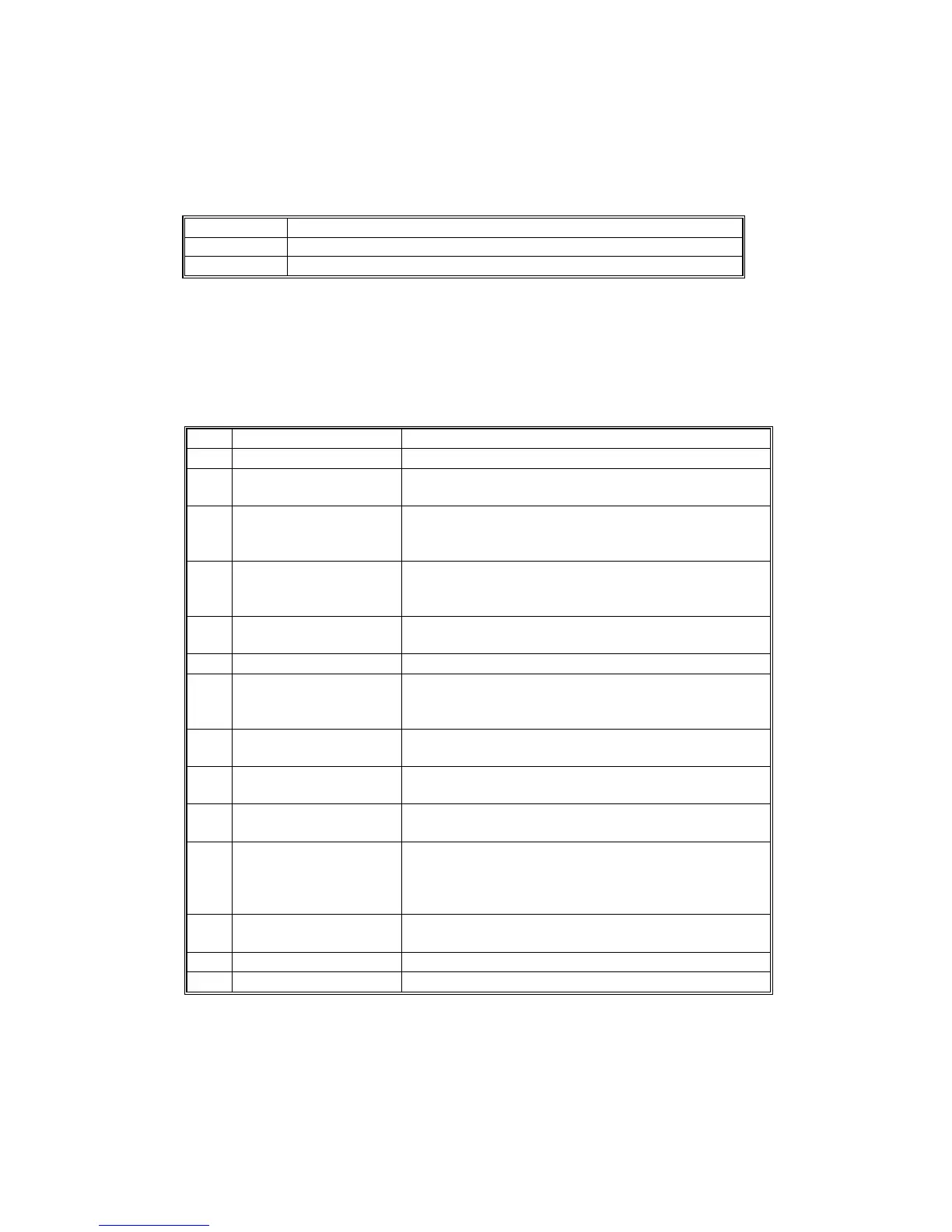
3. Press the number for the item that you want to initialize. The number you select
determines which application is initialized. For example, press 1 if you want to
initialize all modules or select the appropriate number from the table below.
No. What It Initializes Comments
1 All modules Initializes items 2 ~ 12 below.
*1
2 Engine
Initializes all registration settings for the engine and
processing settings.
*1
3
SCS (System Control
Service)/SRM
Initializes default system settings, CSS settings,
operation display coordinates, and ROM update
information.
*1
4
IMH (Image Memory
Handler)
Initializes the registration setting for the image
memory handler by deleting all image files on the
HDD.
5
MCS (Memory Control
Service)
Initializes the automatic delete time setting for
stored documents.
6 Copier application Initializes all copier application settings.
7 Fax application
Initializes the fax reset time, job login ID, all TX/RX
settings, local storage file numbers, and off-hook
timer.
8 Printer application
Initializes the printer defaults, programs registered,
the printer SP Bit SW, and printer CSS counter.
9 Scanner application
Initializes the scanner defaults for the scanner and
all the Scanner SP modes.
10 Network application
Deletes the NFA management files and thumbnails,
and initializes the JOB login ID.
11
NCS (Network Control
Service)
Initializes the system defaults and interface settings
(IP addresses also), the SmartNetMonitor for
Admin, WebStatusMonitor settings, and the
TELNET settings.
12 R-FAX
Initializes the Job login ID, SmartNetMonitor for
Admin, Job History, and local storage file numbers.
14 DCS Initialization
15 UCS Initialization
1*
: Resetting 1~3 resets the operation panel screen coordinates, so after executing 1, 2, or 3,
you must re-calibrate the screen.












 To Next Page