Replacement
Adjustment
HARD DISK, CONTROLLER BOARD
SM 3-81 B079/B082
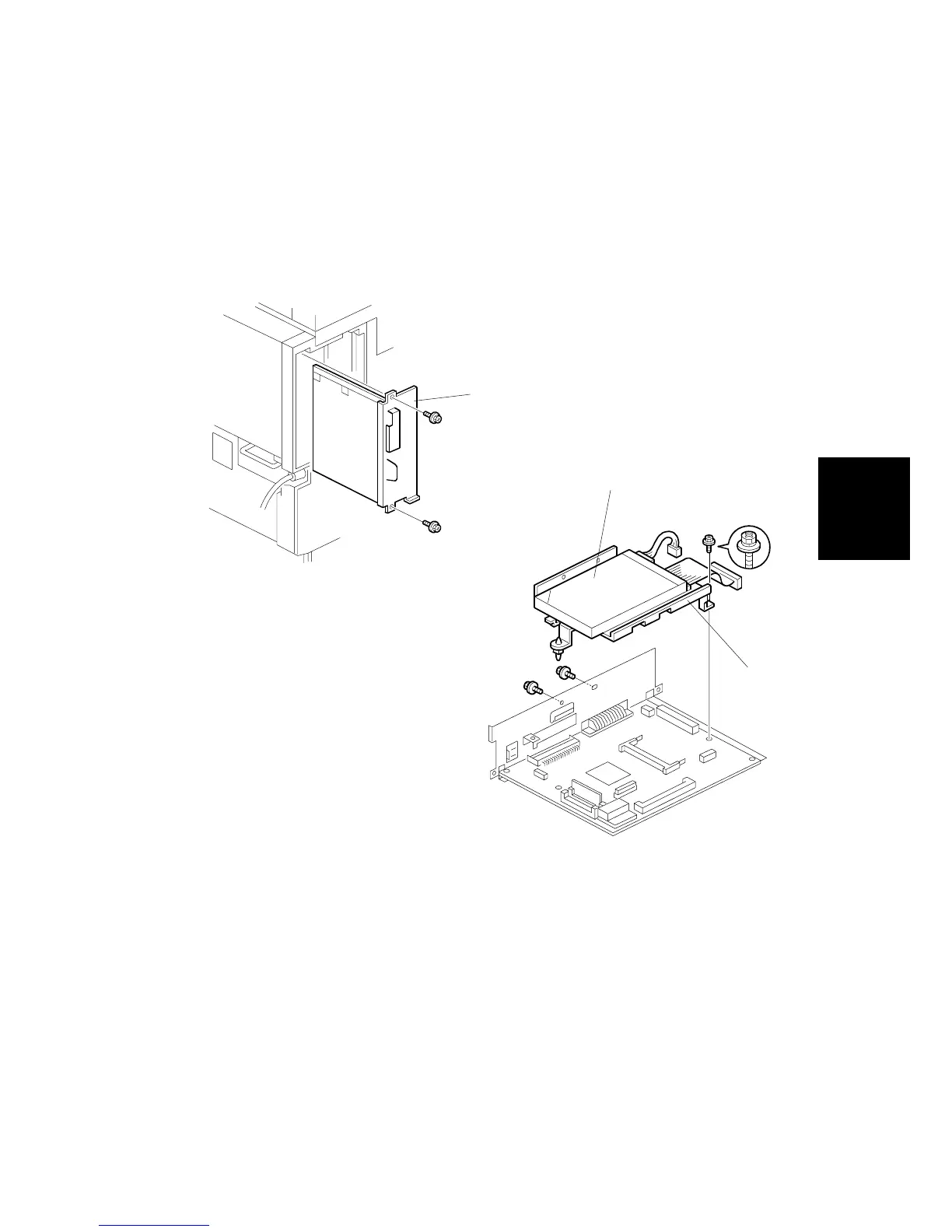
3.20 HARD DISK, CONTROLLER BOARD
NOTE: The controller boards are machine specific, i.e. the controller board for the
B079 (35 cpm) must be installed in the B079 copier, and the controller
board for the B082 (45 cpm) must be installed in the B082 copier. These
controller boards are not interchangeable.
1. Controller board [A] ( x 2)
NOTE: Use the wire handle to slide the HDD out of the expansion box.
2. HDD unit bracket [B] ( x 3, x 2)
3. HDD unit [C] ( x 4)
NOTE: Work carefully to avoid dropping or hitting the HDD.
After replacing the HDD, execute SP 5853 to copy the stamp data from the
firmware ROM to the new disk. No flash card is needed.
B079R913.WMF
B079R914.WMF
[B]
[C]
[A]












 To Next Page