SCANNER SERVICE MODE
B548 22 SM
3. SERVICE TABLES
3.1 SCANNER SERVICE MODE
3.1.1 SCANNER PROGRAM MODE TABLE
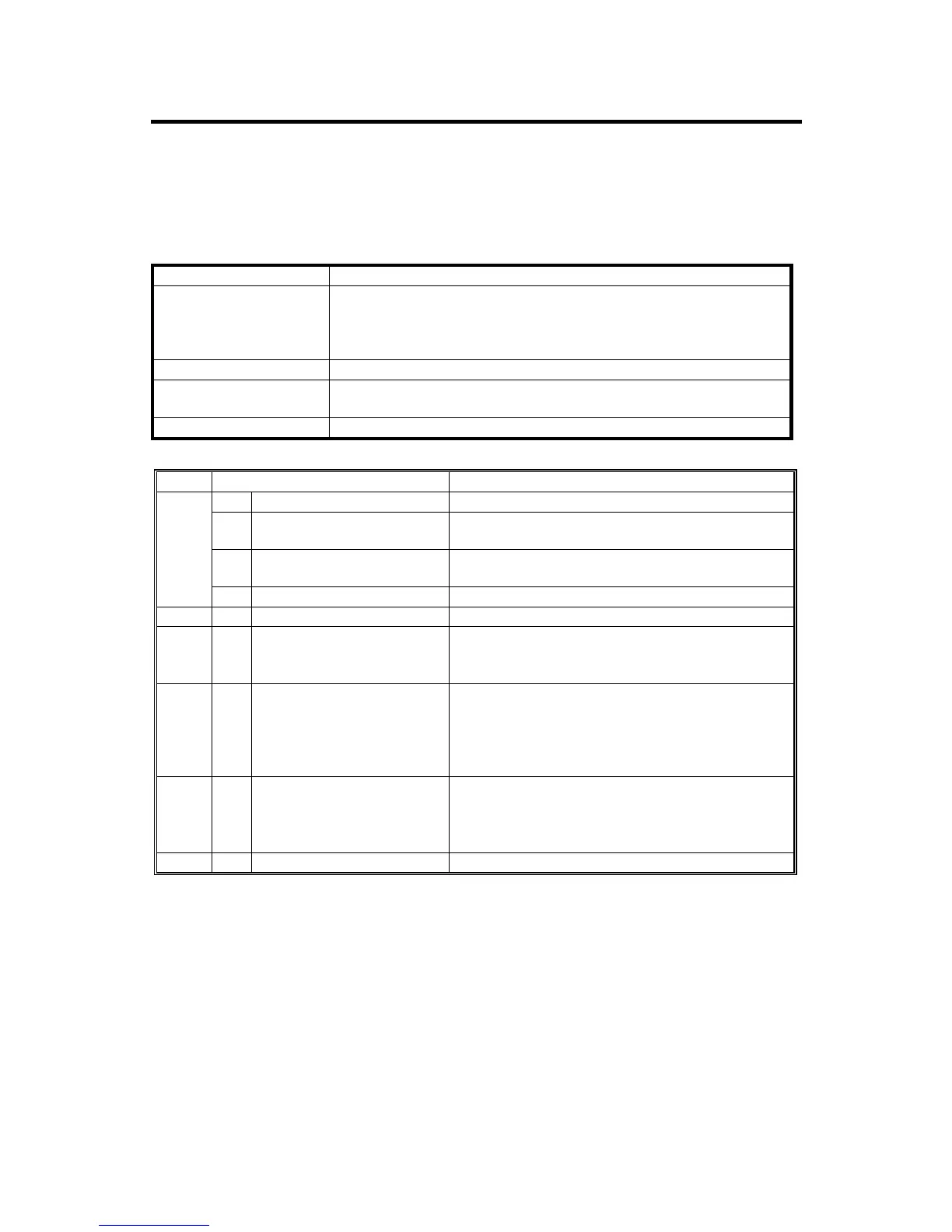
Service Table Key
Notation: What it means
[range / default / step]:
Example: [-9 ~ +9 / +3.0 / 0.1 mm step]. The setting can be
adjusted in the range ±9, value reset to +3.0 after an NVRAM
reset, and the value can be changed in 0.1 mm steps with each
key press.
Italics: Comments added for your reference.
*:
This value is stored in NVRAM. After a RAM reset, the default
value (factory setting) is restored.
DFU: Denotes “Design or Factory Use”. Do not change this value.
SP1 Mode Number Function and [Setting]
1 Model Name Displays the model name.
2
Scanner Firmware
Version
Displays the scanner firmware version.
3
Scanner Firmware
Number
Displays the firmware’s part number.
1001
4 Detail Model Name Displays the detail model name.
1002 Error Log Display Displays the error log data.
1004* Compression Type
Selects the compression type for binary picture
processing.
[1: MH, 2: MR, 3: MMR]
1005* Erase Margin
Creates an erase margin for all edges of the
scanned image.
If the machine has scanned the edge of the
original, create a margin.
[0 – 5 / 0mm / 1mm step]
1006* Auto Reset Timer
Adjusts the auto reset timer for the scanner
function.
If this is “0”, the auto reset function is disabled.
[0, 10 – 999 / 60s / 1s step]
1007 Store Priority 1: Send 2:Store Only 3: Send & Store












 To Next Page