SERVICE PROGRAM MODE TABLES
B079/B082 5-18 SM
SP4-xxx: Scanner
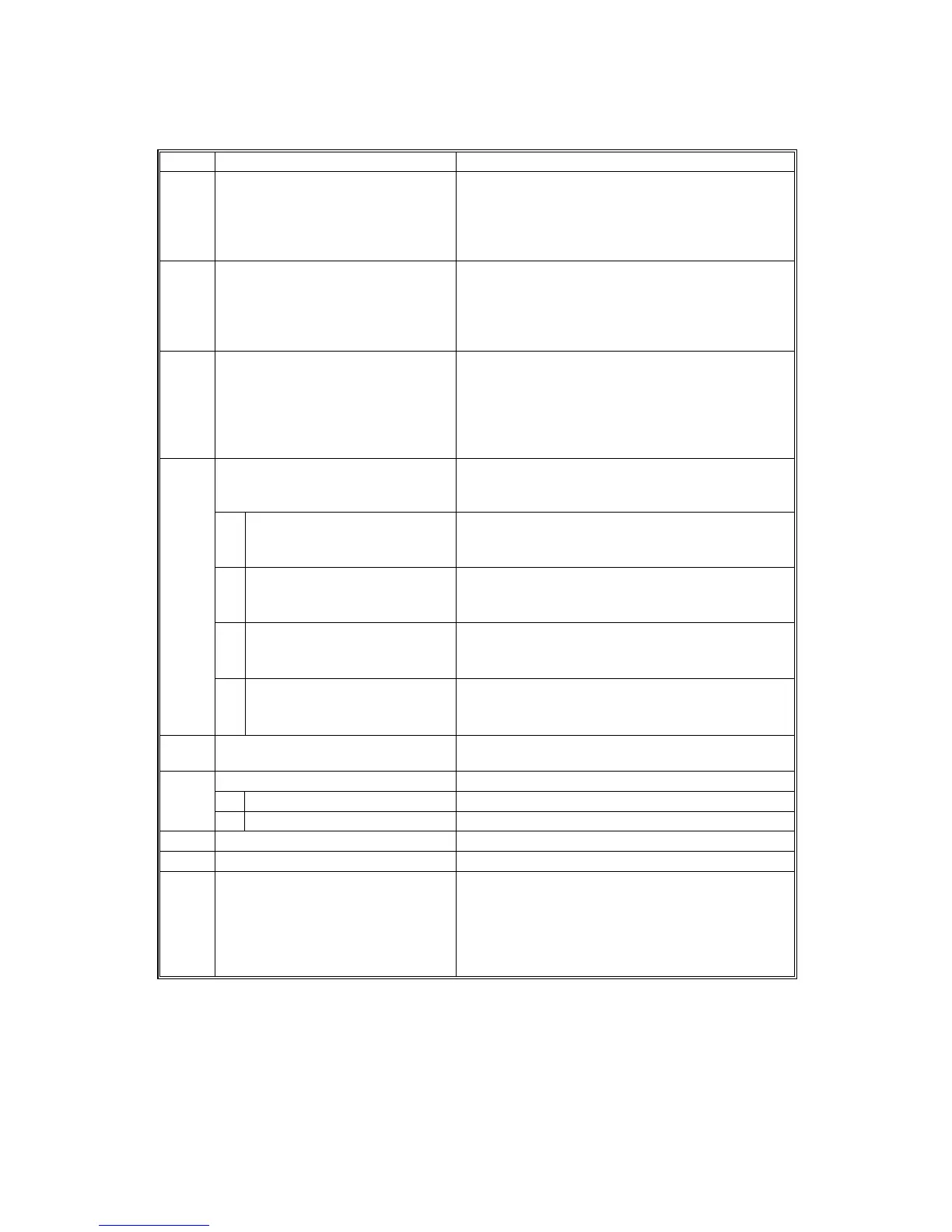
SP4 Mode Number Function and [Setting]
4008* Scanner Sub Scan Magnification Adjusts the magnification of the sub scan
direction during scanning. Changing this value
changes the scanner motor speed. Press to
toggle ±.
[–0.9 ~ 0.9 / 0.0 / 0.1% step]
4010* Scanner Leading Edge
Registration
Adjusts the leading edge registration for
scanning. Press to toggle ±.
As you enter a negative value, the image moves
toward the leading edge.
[–0.9 ~ 0.9 / 0.0 / 0.1 mm step]
4011* Scanner Side-to-Side Registration Adjusts side-to-side registration for scanning.
Press to toggle ±.
As you enter negative values, the image will
disappear at the left, and as you enter positive
values, the image will appear at the left.
[–4.6 ~ +4.6 / 0.0 / 0.1 mm step]
Scanner Erase Margin Adjusts scanning margins for the following items.
Do not adjust unless the customer desires a
scanner margin greater than the printer margin.
1* Leading Edge Adjusts leading edge erase margin for sub
scanning. Specification: 3 ± 2 mm
[0 ~ 9 / 1.0 / 0.1 mm step]
2* Trailing Edge Adjusts trailing edge erase margin for sub
scanning. Specification: 2 ± 2 mm
[0 ~ 9 / 0.5 / 0.1 mm step]
3* Right Adjusts right margin for main scanning.
Specification: +2.5 ~ -1.5 mm
[0 ~ 9 / 0.5 / 0.1 mm step]
4012*
4* Left Adjusts left margin for main scanning.
Specification: 2 ± 1.5 mm
[0 ~ 9 / 1.0 / 0.1 mm step]
4013 Scanner Free Run Performs a scanner free run with the exposure
lamp off.
White Board Read Adjust
1 Read Start Position Initial: 0.0 mm
4016
2 Read Width Initial: 0.0 mm
4018 Scanner Optical Axis Adjust Initial: 0.0 mm
4019 Scanner Read Position Initial: 0.0 mm
4301 APS Sensor Output Display Displays the time required to detect the size of
the paper on the scanner exposure glass.
Asterisks (*) are displayed if the size cannot be
detected.
Dimensions are displayed in inches for North
America and in mm for other areas.












 To Next Page