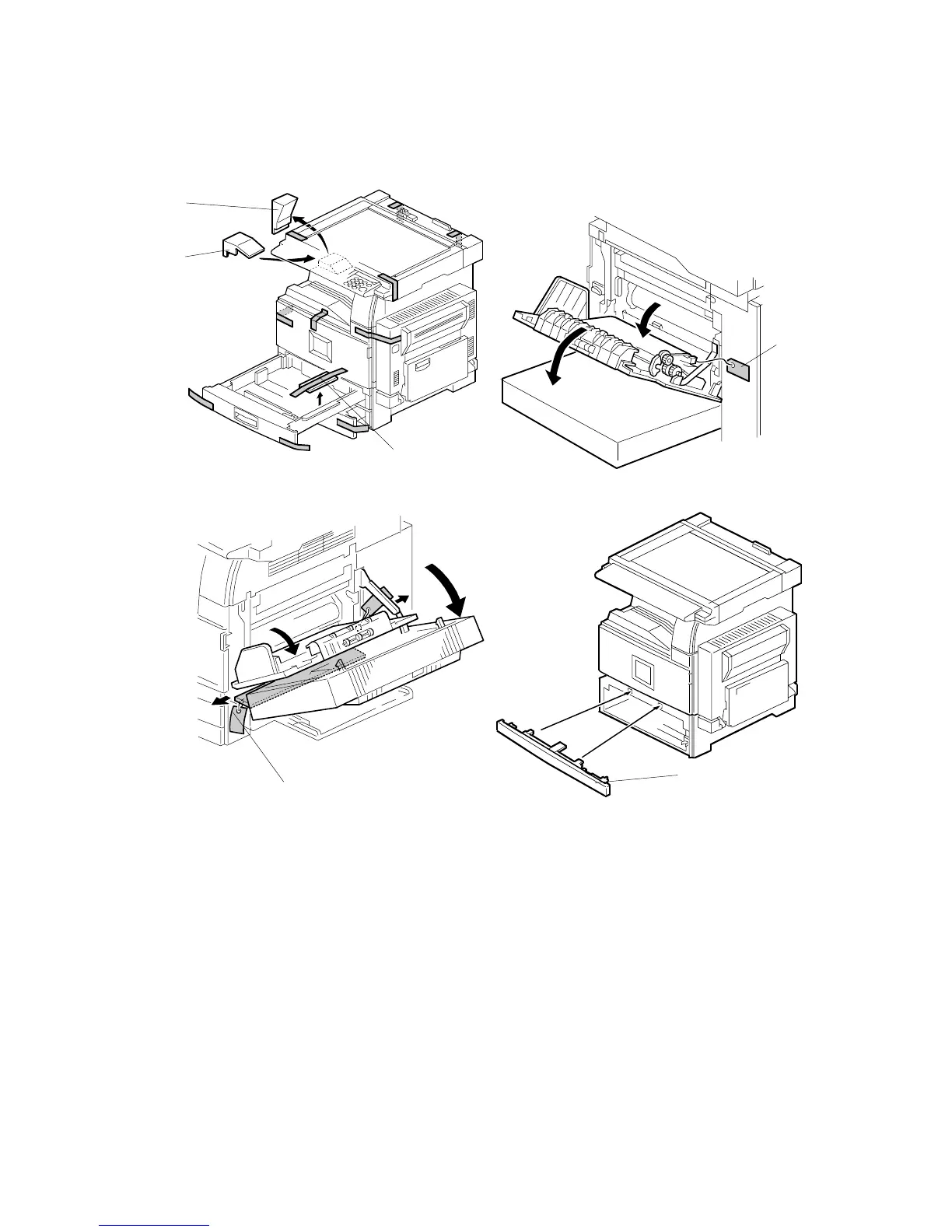
MAIN MACHINE INSTALLATION
B079/B082 1-8 SM
1.3.2 INSTALLATION PROCEDURE
1. Remove the main machine from the box, and remove all shipping retainers and
tapes.
NOTE: Store all shipping retainers as you remove them. You will need them if
the machine is moved to another location in the future.
2. Remove scanner cushion [A], and install the end fence [B].
3. Pull out the paper trays and remove all tape and bottom plate stoppers [C].
4. On the right side of the machine, open the by-pass tray, duplex unit, and
transfer right cover, and then remove all the shipping retainers [D]
NOTE: If the paper tray unit is to be installed, do this now. (!1.4)
5. If the paper tray unit is not to be installed, install the middle front cover [E]
(provided in the second paper tray).
B079I100.WMF
B079I102.WMF
B079I101.WMF
B079I103.WMF
[B]
[A]
[C]
[E]
[D]
[D]












 To Next Page