SERVICE CALL CONDITIONS
B079/B082 4-14 SM
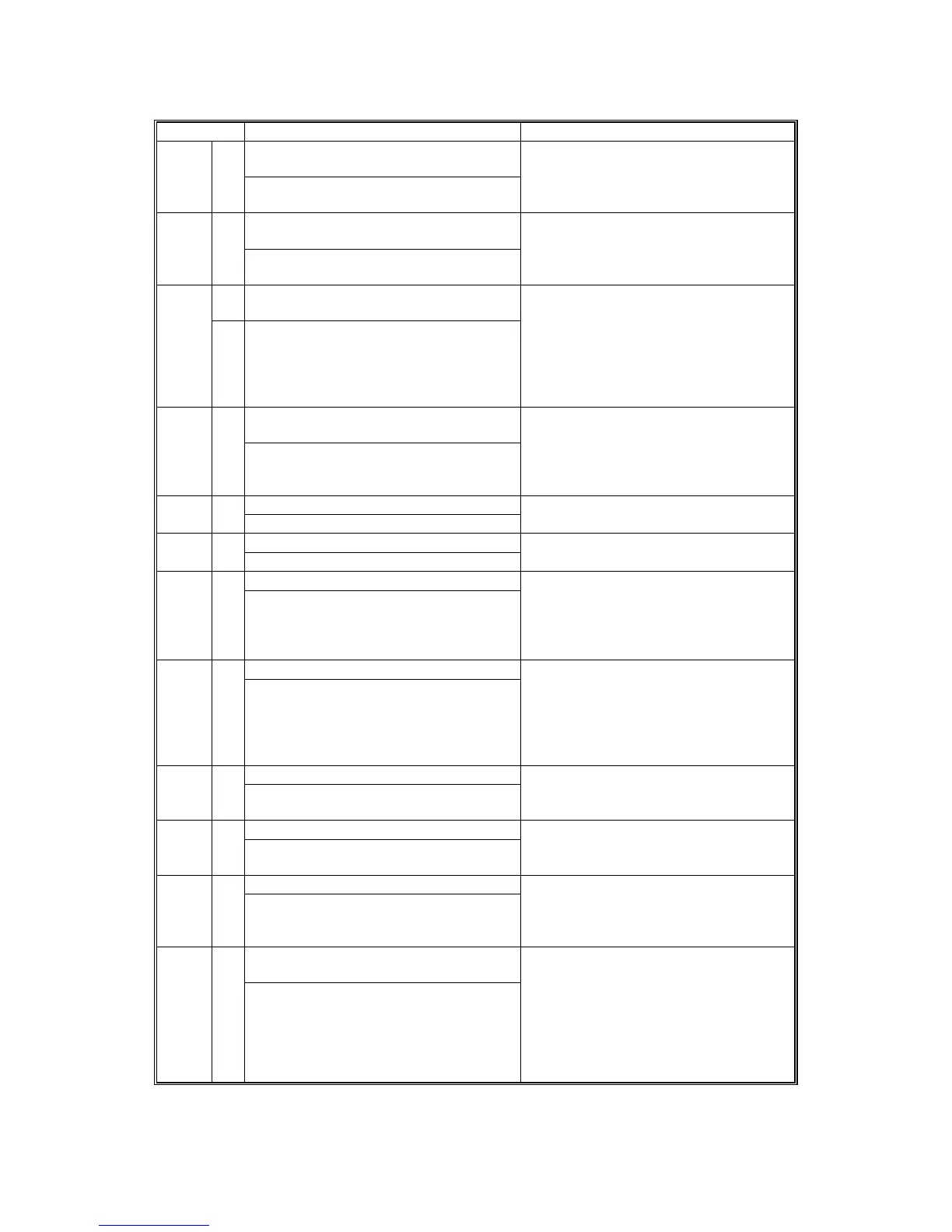
Code No. Symptom Possible Cause
Self-diagnostic Error: Resident Font
ROM
836 B
The resident font ROM returned an
error during the self-diagnostic test.
Font ROM defective
Self-diagnostic Error: Optional Font
ROM
837 B
The optional font ROM returned an
error during the self-diagnostic test.
Font ROM defective
C Self-Diagnostic Error 1: EEPROM
Access Error
840
During input/output with the EEPROM,
one of the following errors occurred:
A read error occurred, then continued
after 3 retries.
Write error occurred.
EEPROM defective
EEPROM worn out
Self-Diagnostic Error 2: EEPROM
Read/Write Data Error
841
C
The values of the data written and
“mirrored” in 3 errors are all detected as
not matching..
The data is being written into the 3
designated errors differently
Network I/F Abnormal 850 B
NIB interface error.
NIB defective
Controller board defective
IEEE 1394 I/F Abnormal 851 B
IEEE1394 interface error.
• IEEE1384 interface board defective
Controller board defective
853 Wireless LAN Error: Card Error 1
B
The wireless LAN board can be
accessed, but the wireless LAN card
(IEEE 802.11b or Bluetooth) cannot
access the board.
Wireless LAN card not inserted into the
wireless LAN board
854 Wireless LAN Error Card Error 2
B
The board that holds the wireless LAN
card can be accessed, but the wireless
LAN card (802.11b/Bluetooth) itself
cannot be accessed while the machine
is operating
Wireless LAN card has been removed
855 Wireless LAN Error 3: Card Error 3
B
An error is detected for the wireless
LAN card (802.11b or Bluetooth).
Wireless LAN card defective
Wireless card connection not tight
856 Wireless LAN Error 4: Board
An error is detected for the wireless
LAN card (802.11b or Bluetooth).
Wireless LAN card board defective
PCI connector loose
857 USB I/F Error
B
The USB driver is unstable and
generated an error. The USB I/F cannot
be used.
The USB driver can generate three
types of errors: RX, CRC, and STALL
errors. Only the STALL error can
generate this SC code.
Startup without HD connection at main
power on
860 C
The hard disk connection is not
detected.
Cable between HDC and HD loose or
defective
HD power connector loose or defective
HD defective
HDC defective












 To Next Page