Service
Tables
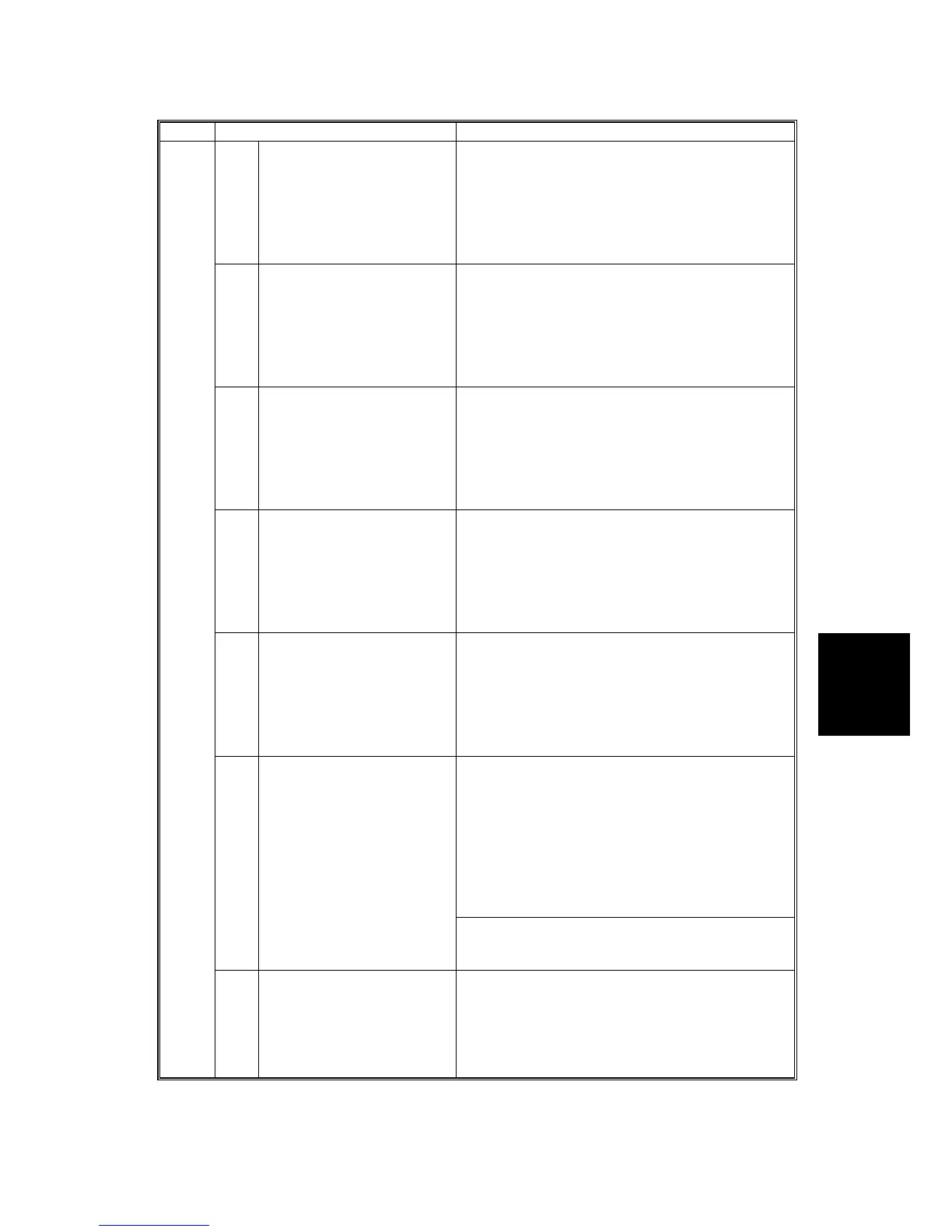
SERVICE PROGRAM MODE TABLES
SM 5-27 B079/B082
SP4 Mode Number Function and [Setting]
65* Background Erase Level:
Text Mode
Adjusts the threshold for background erase in
originals scanned in the Text mode. A higher
setting reduces more dirty background, but a very
high setting can cause the image to reverse or
cause other unexpected results.
[0~255 / 0 / 1 step]
0: Off
66* Background Erase Level:
Photo Mode
Adjusts the threshold for background erase in
originals scanned in the Photo mode. A higher
setting reduces more dirty background, but a very
high setting can cause the image to reverse or
cause other unexpected results.
[0~255 / 0 / 1 step]
0: Off
67* Background Erase Level:
Text/Photo Mode
Adjusts the threshold for background erase in
originals scanned in the Text/Photo mode. A
higher setting reduces more dirty background, but
a very high setting can cause the image to
reverse or cause other unexpected results.
[0~255 / 0 / 1 step]
0: Off
68* Background Erase Level:
Light Original
Adjusts the threshold for background erase in
originals scanned in the Pale mode. A higher
setting reduces more dirty background, but a very
high setting can cause the image to reverse or
cause other unexpected results.
[0~255 / 0 / 1 step]
0: Off
69* Background Erase Level:
Generation Copy
Adjusts the threshold for background erase in
originals scanned in the Generation Copy mode.
A higher setting reduces more dirty background,
but a very high setting can cause the image to
reverse or cause other unexpected results.
[0~255 / 0 / 1 step]
0: Off
75* Line Width Correction:
Generation Mode
Enter the appropriate number with the 10-key pad
then press . This SP determines whether line
thickness is adjusted in the main and/or sub scan
direction.
[0~3 / 2 / 1]
0: None
1: Thin
2: Thin
3: Thick
To adjust the level of adjustment in the main
scan/sub scan direction, use SP4903 076/SP4903
077.
4903*
76* LWC Threshold (Main
Scan): Generation Mode
Selects the threshold for line width detection in
the main scan direction in originals copied in the
Generation Copy mode.
[0~5 / 1 / 1 step]
Low: More difficult to thicken thin lines.
High: Easier to thicken thin lines.












 To Next Page