IEEE 802.11B B515 (WIRELESS LAN)
SM 15 B548
Printer Option
B548
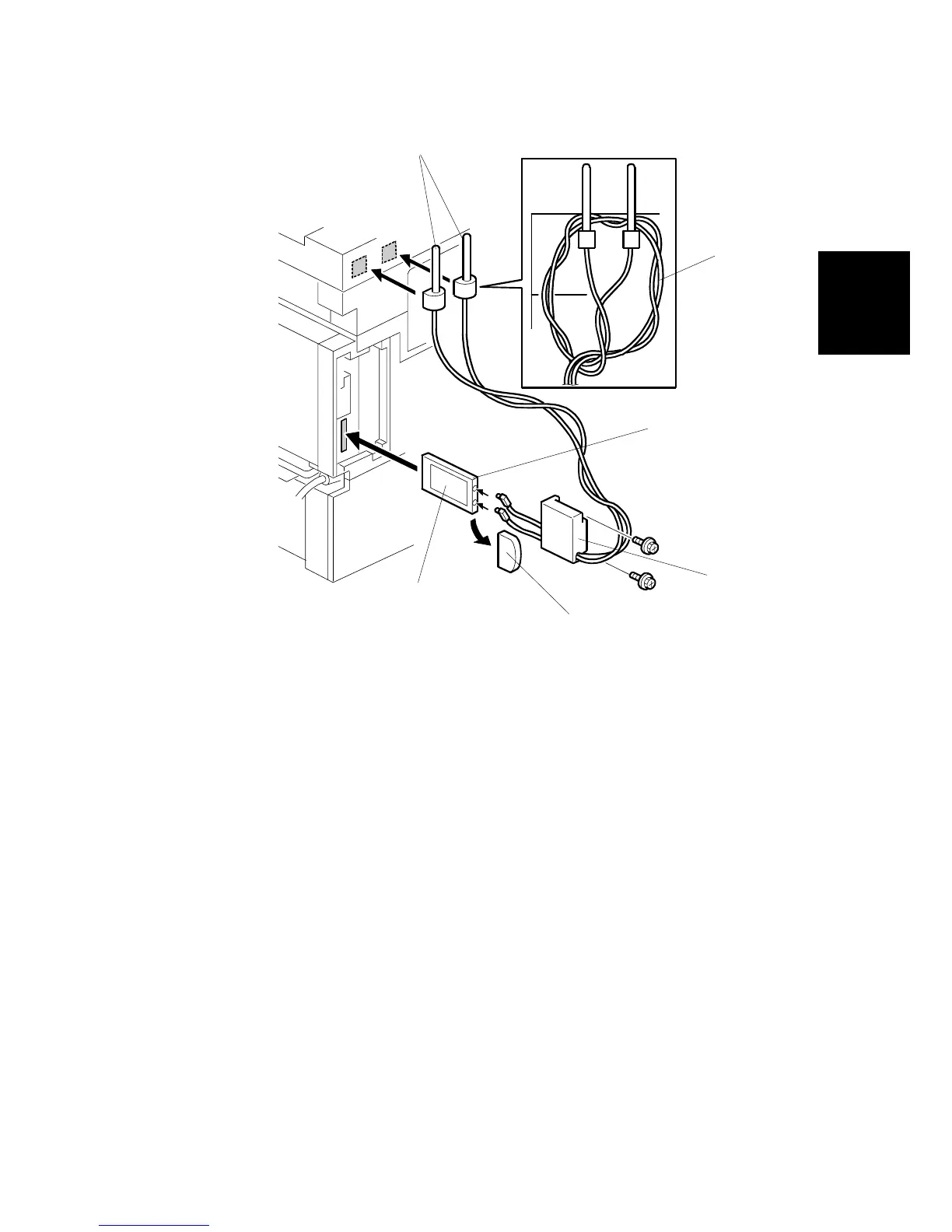
6. Pull off the edge connector protector [A] off the card and discard it.
7. With the card label facing left, insert the card [B] into the PCI slot.
8. Use the Velcro pads to install the antennas [C] on the left rear corner of the
machine.
NOTE: The antennas should be separated by at least 40 ~ 60 mm (1.5~2.5”).
Always detach the antennas from the corners of the machine and
disconnect them before moving the machine.
9. Connect the antennas to the terminals [D].
10. Coil the cables [E] and hang them over the antennas as shown.
11. Attach the cover [F] ( x2).
12. If reception is poor, you may need to move the machine:
• Make sure that the machine is not located near an appliance or any type of
equipment that can generate a strong magnetic field.
• Position the machine as close as possible to the access point.
B548I109.WMF
[A]
[B]
[C]
[D]
[E]
[F]



 To Next Page