SCANNER SERVICE MODE
SM 27 B548
Printer Option
B548
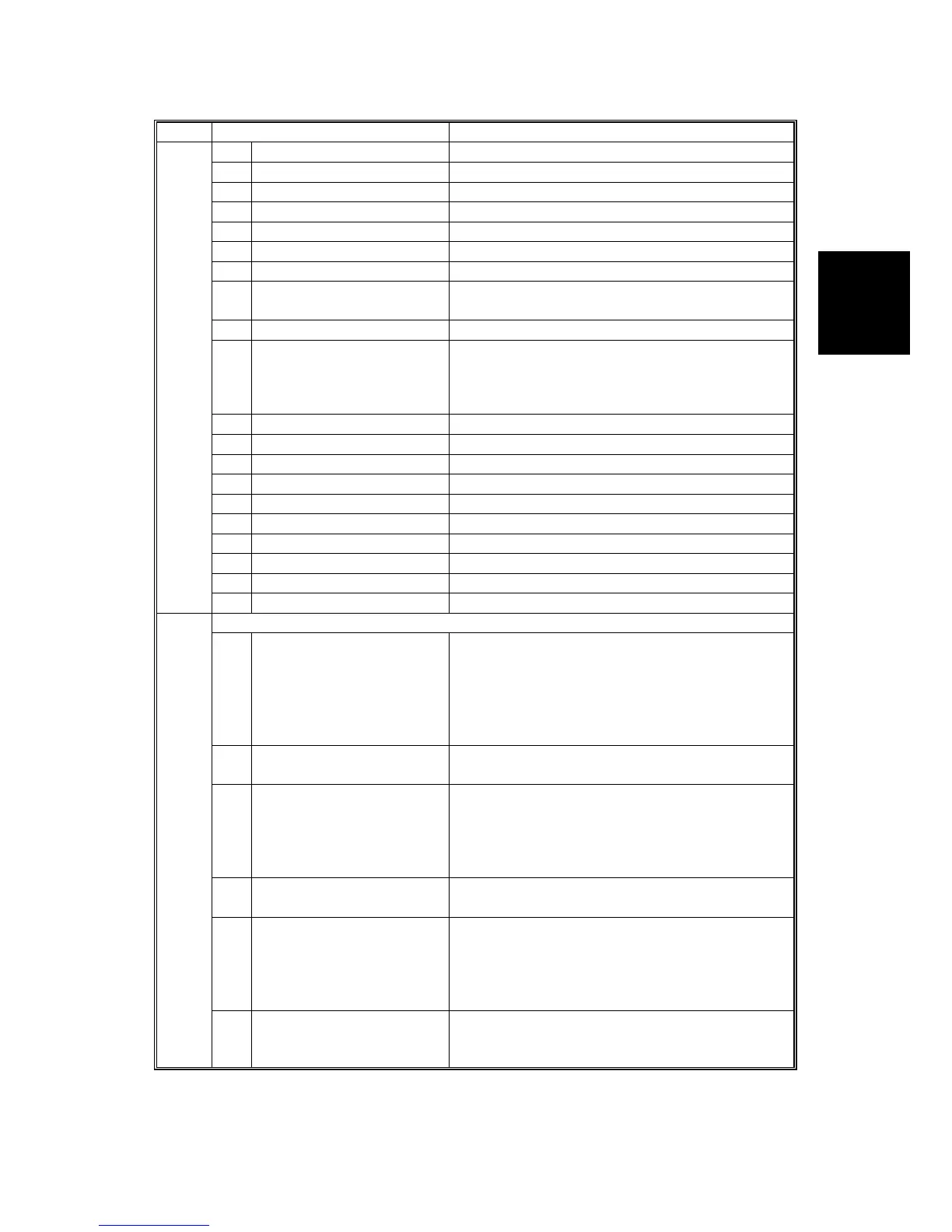
SP2 Mode Number Function and [Setting]
2005 9* Contrast – Notch 7 [0-255 / 128 / 1 step]
10* Threshold Level – Notch 7 [0-255 / 128 / 1 step]
11* Brightness – Notch 6 [0-255 / 128 / 1 step]
12* Contrast – Notch 6 [0-255 / 128 / 1 step]
13* Threshold Level – Notch 6 [0-255 / 128 / 1 step]
14* Brightness – Notch 5 [0-255 / 128 / 1 step]
15* Contrast – Notch 5 [0-255 / 128 / 1 step]
16* Threshold Level – Notch Not available.
[0-255 / 128 / 1 step]
17* Brightness – Notch 4 [0-255 / 128 / 1 step]
18* Contrast – Notch 4
Adjusts the image density for each image
density level for Photo mode when using binary
picture processing mode.
[0-255 / 128 / 1 step]
19* Threshold Level – Notch 4 [0-255 / 128 / 1 step]
20* Brightness – Notch 3 [0-255 / 128 / 1 step]
21* Contrast – Notch 3 [0-255 / 128 / 1 step]
22* Threshold Level – Notch 3 [0-255 / 128 / 1 step]
23* Brightness – Notch 2 [0-255 / 128 / 1 step]
24* Contrast – Notch 2 [0-255 / 128 / 1 step]
25* Threshold Level – Notch 2 [0-255 / 128 / 1 step]
26* Brightness – Notch 1 [0-255 / 128 / 1 step]
27* Contrast – Notch 1 [0-255 / 128 / 1 step]
28* Threshold Level – Notch 1 [0-255 / 128 / 1 step]
2006 [Grayscale Mode Settings]
1* MTF Filter Coefficient
Selects the MTF filter coefficient in the main
scan direction when using grayscale processing
mode.
Select a higher number for a stronger filter.
If this is “0”, the MTF filter is not applied
[0-15 / 0 / 1 step]
2* MTF Filter Coefficient As above, for sub scan
[0-13 / 0 / 1 step]
3*
MTF Filter Strength
(Main Scan)
Selects the MTF filter strength in the main scan
direction when using grayscale processing
mode.
Select a higher number for a stronger filter.
[0-7 / 0 / 1 step]
4*
MTF Filter Strength
(Sub scan)
As above, for sub scan
[0-7 / 0 / 1 step]
5* Smoothing Filter
Selects the smoothing pattern when using
grayscale processing mode.
A larger value could cause moiré to appear in
the image.
[0-7 / 0 / 1 step]
6* Scanner Gamma
Selects the scanner gamma type when using
grayscale processing mode.
[0-6 / 3 / 1 step]












 To Next Page