Installation
1000 SHEET FINISHER (B408)
SM 1-61 B079/B082
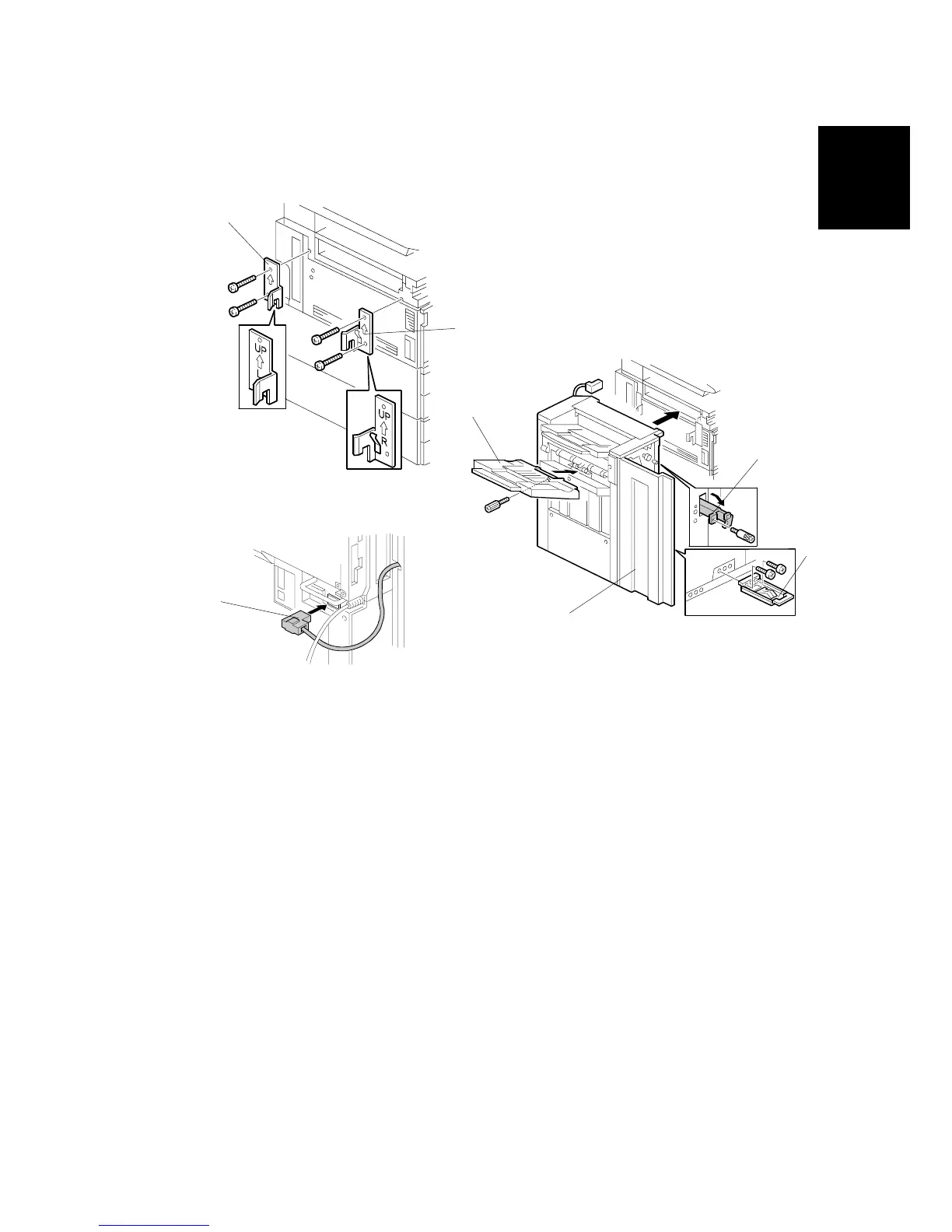
2. Install the front joint bracket [A] (2 screws - M4 x 14) and rear joint bracket [B]
( x2 M4 x 14).
3. Install the grounding plate [C] to the finisher ( x2 M3 x 8).
NOTE: Use the screw removed in step 1 and the screw from the accessory
box.
4. Open the front door [D] then pull the locking lever [E].
5. Align the finisher on the joint brackets, and lock it in place by pushing the
locking lever.
6. Secure the locking lever ( x 1 knob screw M3 x 8).
7. Close the front door.
8. Install the copy tray [F] ( x 1 knob screw M4 x 10).
9. Connect the finisher cable [G] to the main machine below the right rear handle.
B408I503.WMF
B408I201.WMF
B408I504.WMF
[A]
[B]
[C]
[D]
[E]
[F]
[G]












 To Next Page