INSTALLATION, Power ON and System Setup
Sysmex SF-3000 Operator's Manual -- Revised September 1995 B-35
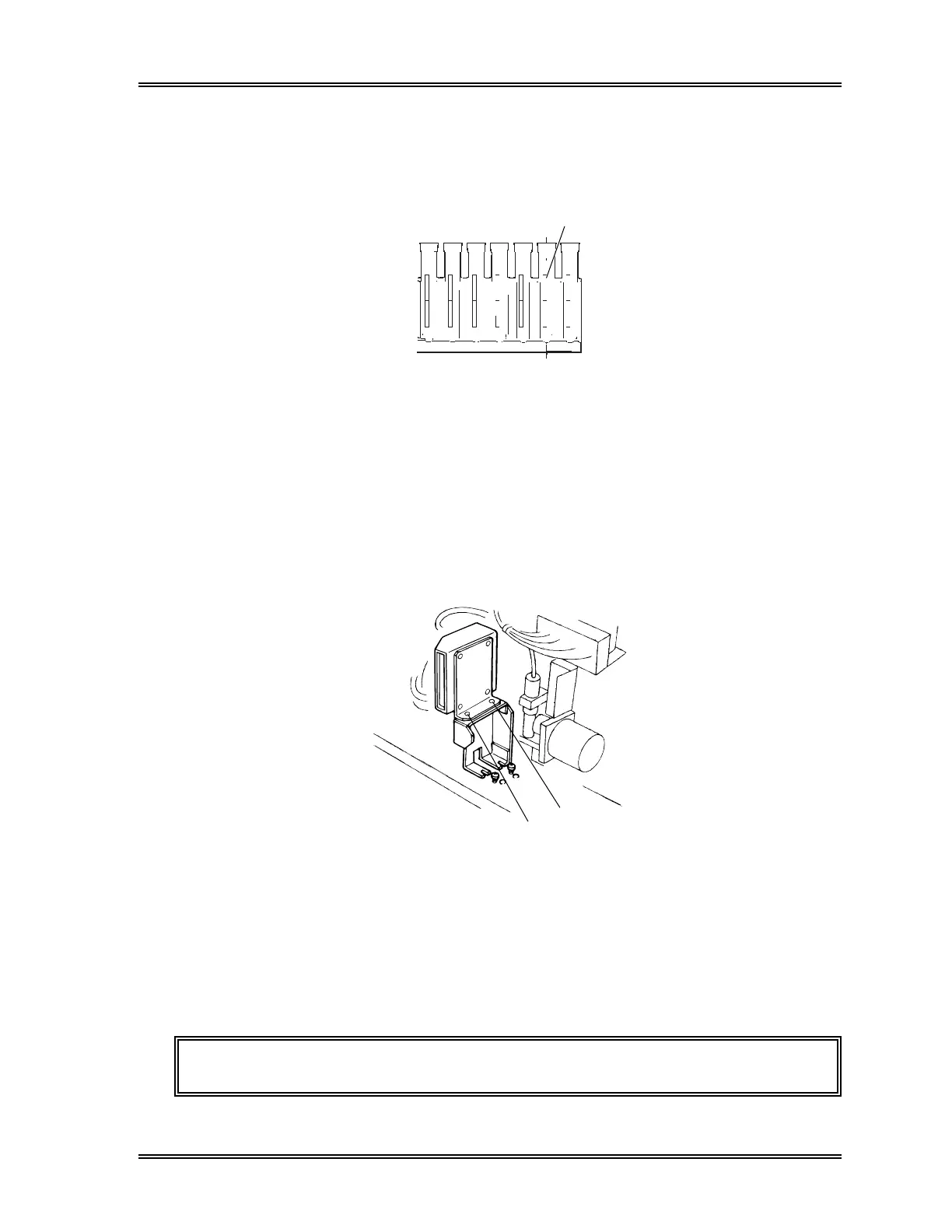
(3) Prepare the sample racks containing blood collection tubes with the 2 mm wide ID
bar-code labels attached properly. See Figure B-45.
Align the right end of the 2 mm-
wide barcode with the center of
the rack slit on a 15 mmOD
collection tube.
Figure B-45: Affixing the Bar-Code Labels
(4) Perform the ID reader test program by pressing [Mainte.], [Test] and [ID Read]
keypads. When "Set Rack and press Start Switch" appears, press the Start Switch.
(Refer to Chapter 8, Section 3.7: Test Bar Code Reader for the procedures.)
(5) Verify that the ID bar-codes are read correctly.
(6) If the bar-code reading failed, adjust the position of the ID Reader.
Loosen the fixing screws A and B shown in Figure B-46, and move the ID Reader
screw B side while fixing the screw A position.
Fixing Screw B
Fixing Screw A
Figure B-46: Adjusting the Bar-Code Reader Position
(7) Repeat the ID read test program to verify the bar-codes are read correctly.
(8) When the adjustment is complete, pull out the Sampler Unit by approx. 10 cm, and
refit the Front Panel-B Assy.
(9) Refit the Sampler Unit.
CAUTION: When refit the Sampler Unit, take care not to pinch the tubing.



 To Next Page