TEEJET 5000 OPERATORS MANUAL GENERAL FUNCTIONS
2.21
TEST INPUT/OUTPUT
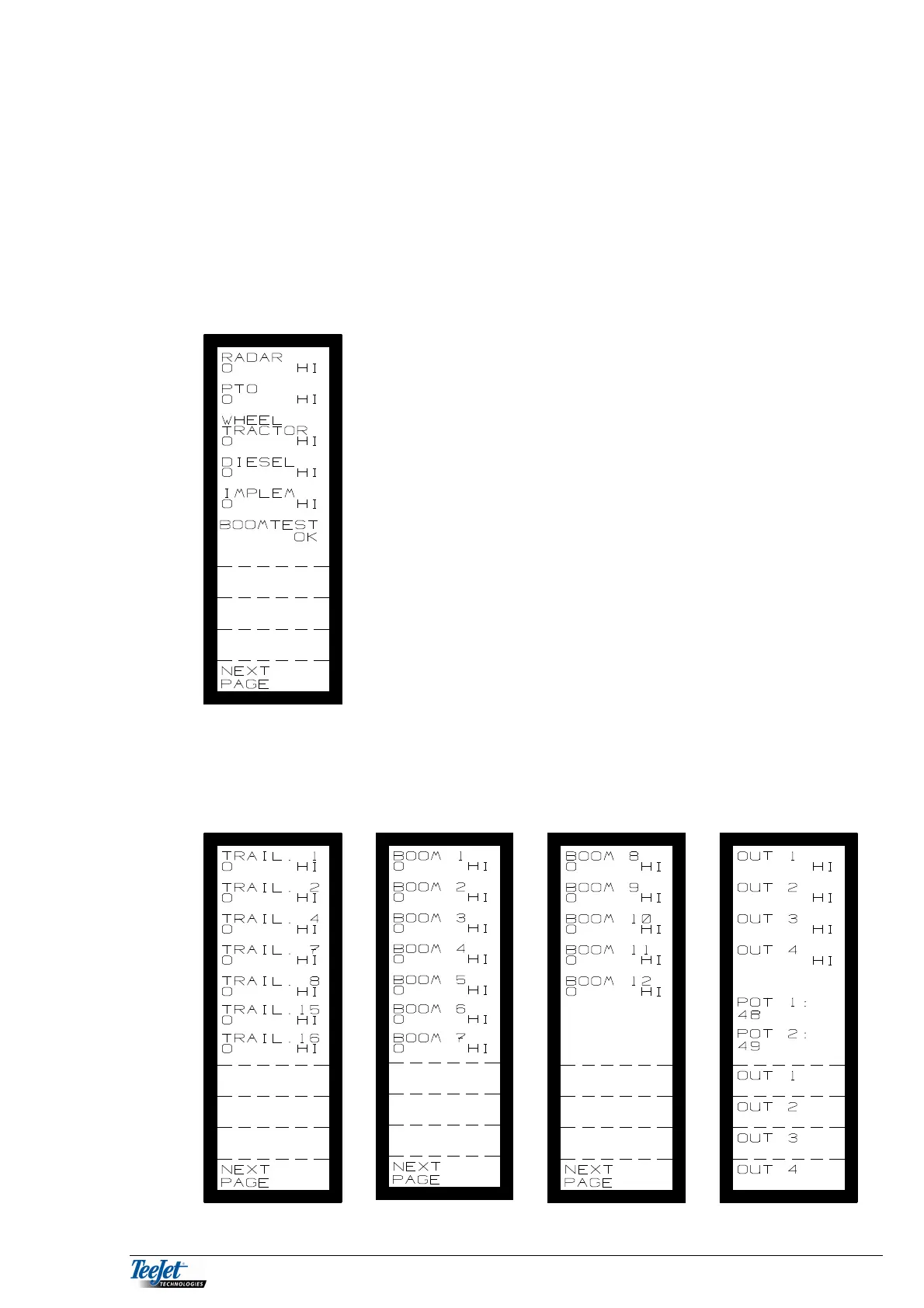
Use test input if you suspect defect sensors.
There is a counter underneath each “input description” on the left-hand side, that
registers the number of times that the input has been activated (the counter is
reset each time you leave the TEST INPUT menu).
The right-hand side of the screen displays the status of the input (HI/LO).
Page through the screens by pressing “NEXT PAGE” (total 4 screens).
RADAR: Signal from the radar when driven
slowly forward.
PTO: Signal from the PTO axle when
turning.
WHEEL
TRACTOR: Signal from the wheel sensor when
driven slowly forward.
DIESEL: Signal from the diesel flowmeter when
diesel is being used.
IMPLEM: Signal from the implement sensor
when raised, e.g. the lift switch or a
sensor fitted on the lift-arms.
BOOMTEST: One of the two following can be
displayed:
OK: The boom section interface is
connected correctly.
ERROR: No boom section interface
connected or when there is a fault in
the system.



 To Next Page