TEEJET 5000 OPERATORS MANUAL DGPS
9.3
SELECTING THE DGPS FUNCTIONS
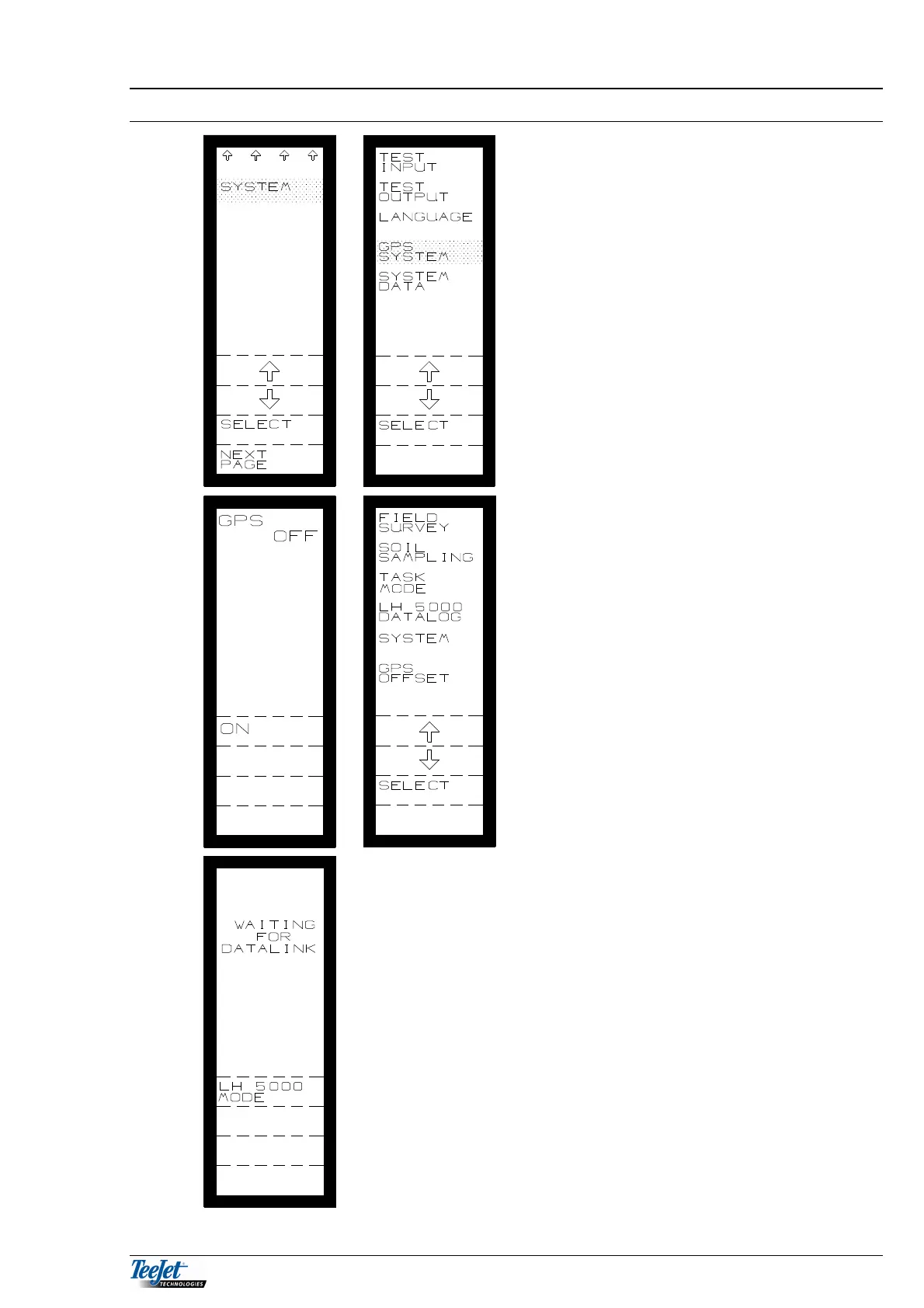
The DGPS menu is selected thus:
1. Using the arrow keys, move the cursor
to “SYSTEM”. When this is done press
the “SELECT” key.
2. Main menu
- Selecting system
3. System menu
- Selecting DGPS system
4. Pressing “ON” displays the available
DGPS functions (main DGPS menu).
5. Returning to this screen at any time and
pressing “OFF” will switch the DGPS
functions off and the TeeJet 5000 will
function as normal.
6. Moving the cursor with the arrow keys
to the required function and pressing
the “SELECT” key will display the
function.
7. Each function will be described later in
this section.
The picture to the left is displayed the next
time the TeeJet 5000 is switched on.
Communication between the DataLink
module and the TeeJet 5000 is being
established.
If DGPS functions are not required then
pressing the “TeeJet 5000 MODE” key will
allow the TeeJet 5000 to operate as
normal.
When DGPS functions are required again,
following the procedure described from the
top of this page will switch the DGPS
functions on again.



 To Next Page