EasyManua.ls Logo

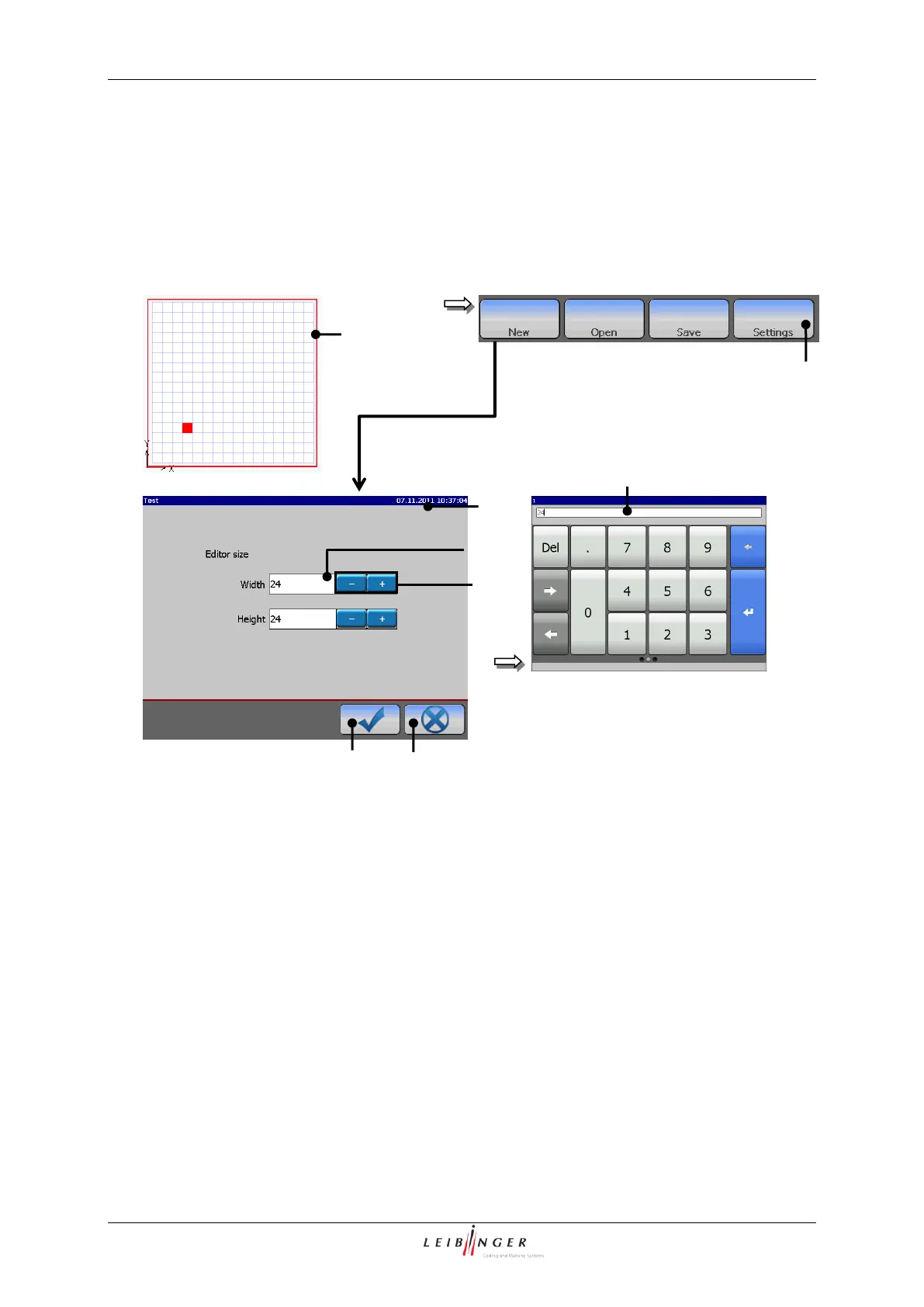
Leibinger JET2neo - Figure 46 - Graphic Editor (Set Editor Size); Set Editor Size

Leibinger JET2neo
294 pages
Print Icon
To Next Page IconTo Next Page
To Previous Page IconTo Previous Page
Loading...
Page 98 Data entry/Programming Group 7
Release R1.12 en JET2 neo
7.2.2.1.8 Set editor size
With the button <Settings> you can set the editor size (width and height of the drawing
area).
Figure 46
Graphic editor (Set editor size)
1 Button <Settings>
5 Number block
2 Menu <Editor settings>
6 Button <OK ()>
3 +/- buttons
7 Button <Cancel>
4 Display fields
Proceeding:
Press the button <Settings> (1) in the menu bar.
The menu <Editor settings> (2) is faded in.
With the +/- buttons (3) you can increase or reduce the values of the editor size by
one step.
alternatively
Click in the appropriate display field (4) of the value which you would like to change.
A number block (5) opens for input. Now enter the requested value.
2
5
6
4
3
Editor size
1
7

Table of Contents

Other manuals for Leibinger JET2neo

Related product manuals