EasyManua.ls Logo

Leibinger JET2neo - Figure 69 Set IP-Address

Leibinger JET2neo
294 pages
Print Icon
To Next Page IconTo Next Page
To Previous Page IconTo Previous Page
Loading...
Page 124 Data entry/Programming Group 7
Release R1.12 en JET2 neo
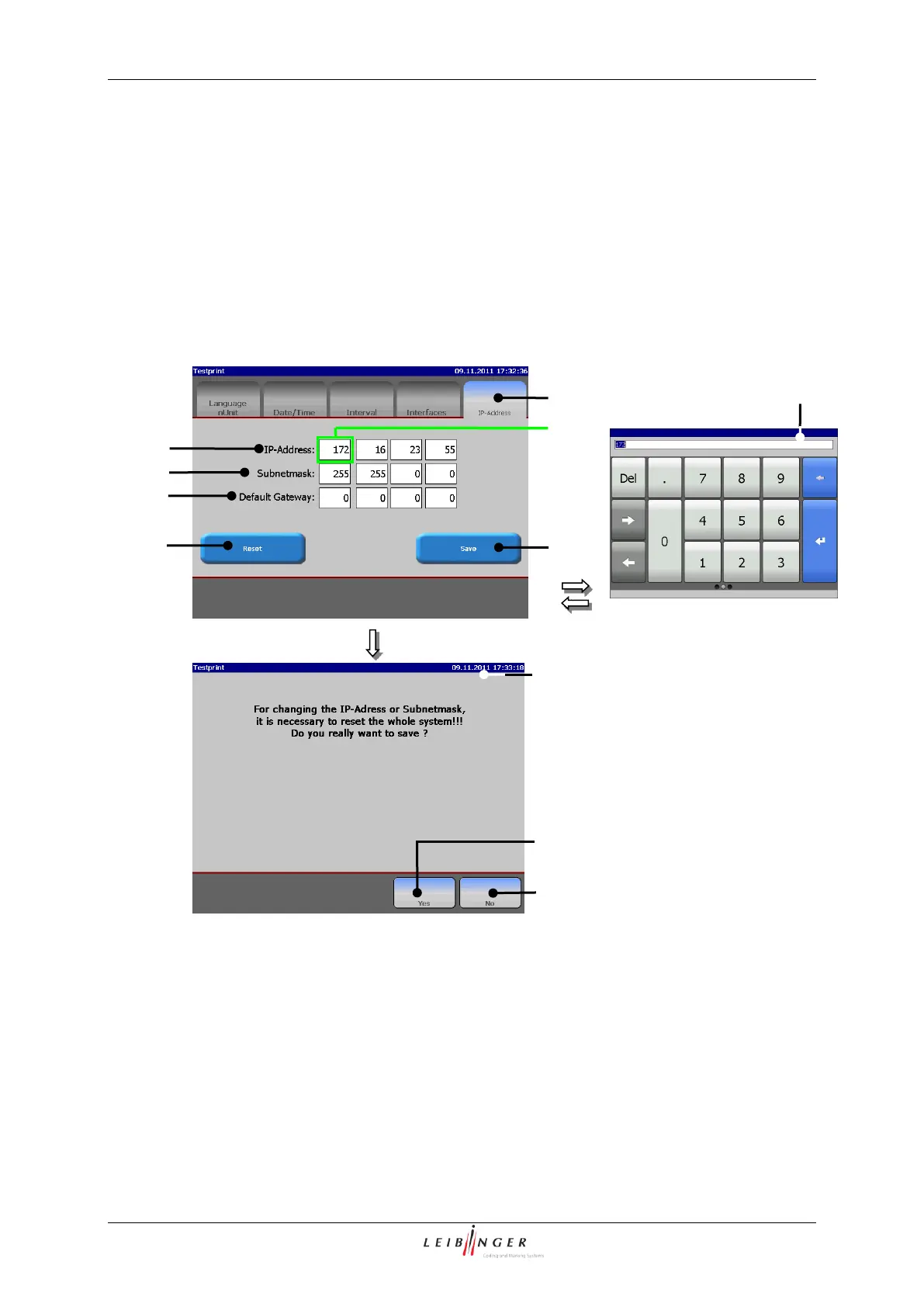
Press the button <Save> (7) to save the settings or press the button <Reset> (8) to
reset the values to the last settings.
If the settings are to be saved, the message <Restart/ Save> (9) is displayed.
Confirm saving by pressing the button <Yes> (10) or pressing the button <No> (11) to
cancel the process and return to the menu.
After confirmation, the device is shut down automatically and reinitialized to save the
IP settings. Then the JET2neo must be restarted.

Figure 69
Set IP-address
1 Register card <IP-Address>
7 Button <Save>
2 Setting field <IP-Address>
8 Button <Reset>
3 Setting field <Subnet mask>
9 Message <Restart/Save>
4 Setting field <Standard gateway>
10 Button <Yes>
5 Address block (Example)
11 Button <No>
6 Number block
6
9
11
10
2
7
3
4
8
1
5

Table of Contents

Other manuals for Leibinger JET2neo

Related product manuals