EasyManua.ls Logo

Leibinger JET2neo - Figure 98 Touch Calibration; Touch-Calibration

Leibinger JET2neo
294 pages
Print Icon
To Next Page IconTo Next Page
To Previous Page IconTo Previous Page
Loading...
Page 164 Data entry/Programming Group 7
Release R1.12 en JET2 neo
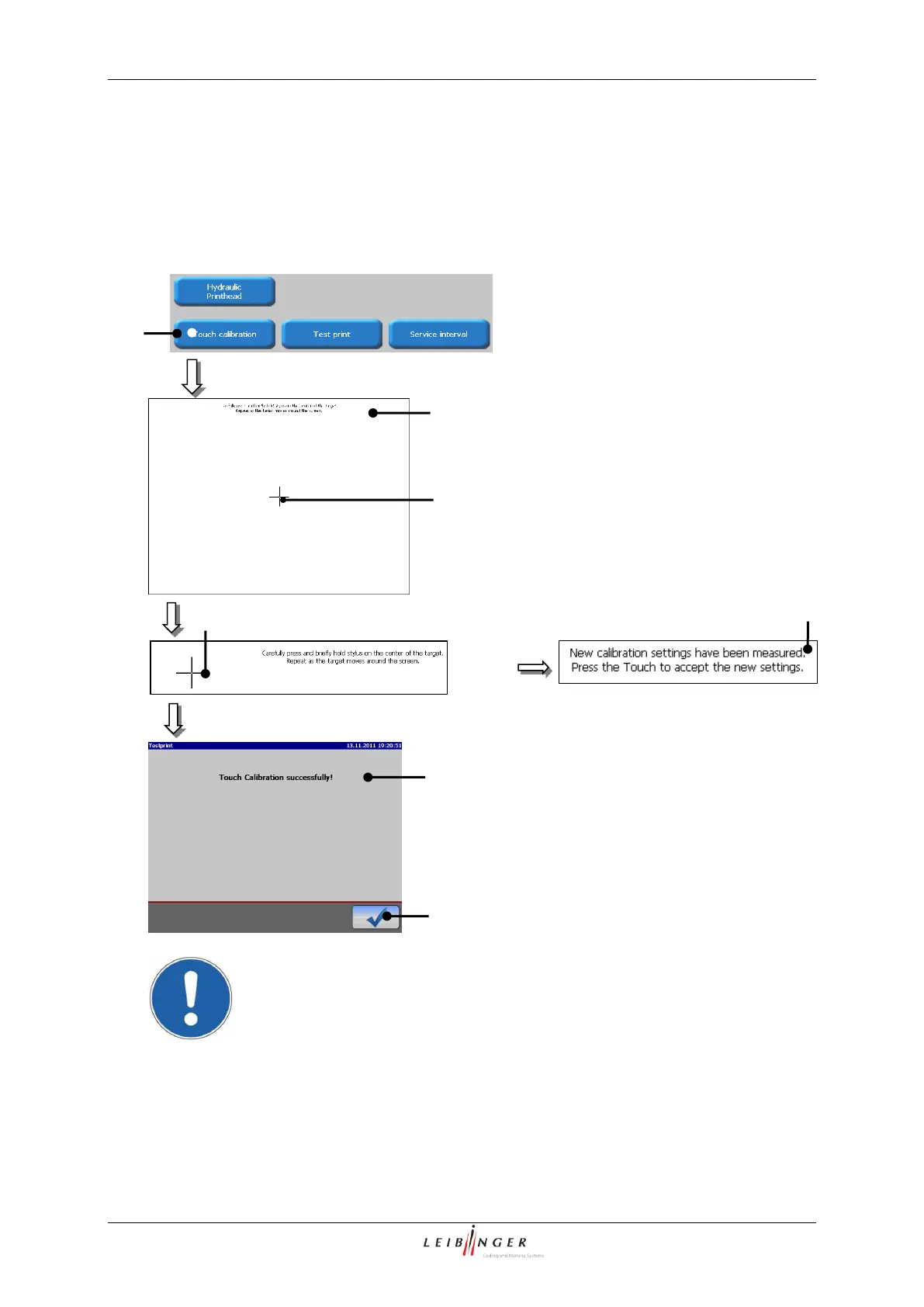
7.2.4.5 Touch-calibration
The function provides a calibration of the TFT-Touch-Display. For delivery of the device
the display has been already calibrated.
Figure 98
Touch calibration
1 Button <Touch calibration>
2 Calibration window
3 Calibration point)
4 Message <Setting calculation>
5 Message
<Touch calibration successfully>
6 Button <OK ()>
Attention! To avoid faulty operation you have to carry out the calibration
carefully!
Proceeding:
Press the button <Touch calibration> (1).
The calibration window (2) opens.
1
2
3
4
3
6
5

Table of Contents

Other manuals for Leibinger JET2neo

Related product manuals