EasyManua.ls Logo

Leibinger JET2neo - Switch on Device; Figure 22 - Switch-On Procedure Without Password Protec; Switching on Without Password Protection

Leibinger JET2neo
294 pages
Print Icon
To Next Page IconTo Next Page
To Previous Page IconTo Previous Page
Loading...
Page 64 Operation Elements and procedures Group 6
Release R1.12 en JET2 neo
6.5.3 Switch on device
6.5.3.1 Switching on without password protection
Proceeding:
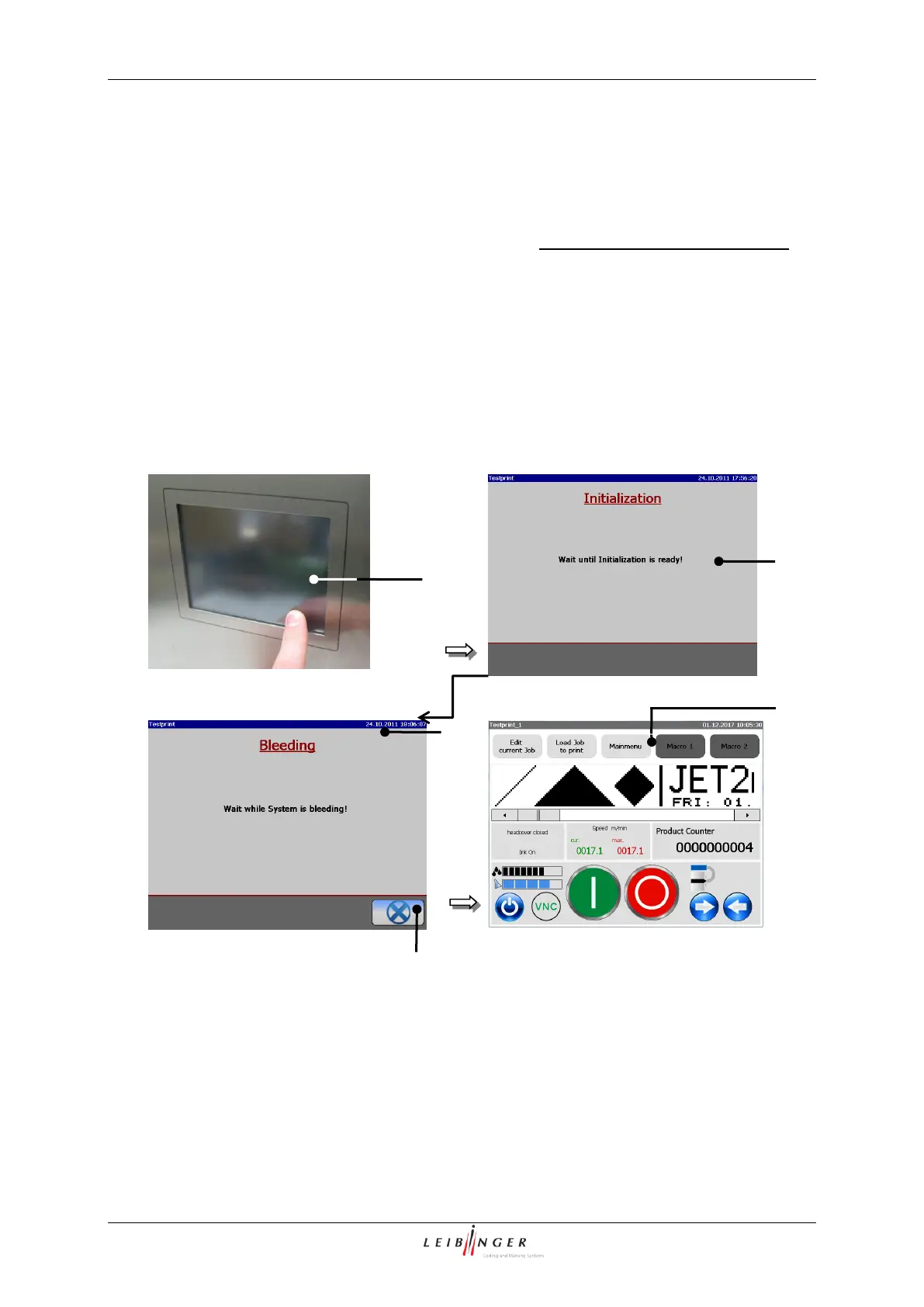
Touch the dark Touch-Display (1) at any point. Period of touching approx. 2 sec..
The devices turns on and the message <Initialization> (2) is displayed.
After the initialization the device starts with the bleeding of the system automatically.
During the process the message <Bleeding> (3) is displayed. The bleeding takes
between 1 5 min. The process can be canceled by pressing the button <Cancel>
(4).

Figure 22
Switch-on procedure without password protection
1 TFT-Touch-Display
4 Button <Cancel>
2 Message <Initialization>
5 Basic menu
3 Message <Bleeding>
2
5
4
3
1

Table of Contents

Other manuals for Leibinger JET2neo

Related product manuals