EasyManua.ls Logo

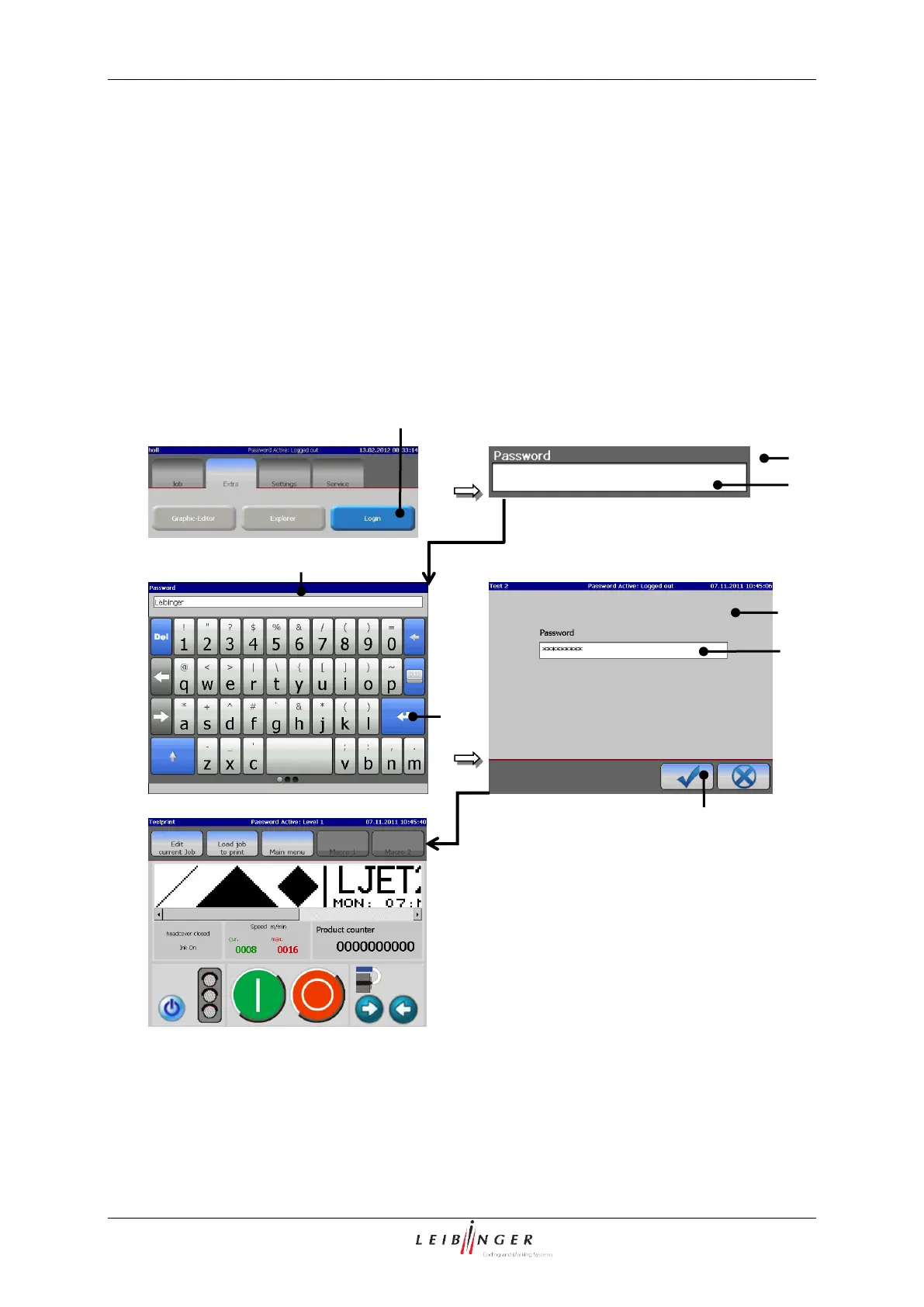
Leibinger JET2neo - Login;Logout; Login User and Carry out User Change; Figure 51 - Login (Login User;Change User)

Leibinger JET2neo
294 pages
Print Icon
To Next Page IconTo Next Page
To Previous Page IconTo Previous Page
Loading...
Group 7 Data entry/Programming Page 103
JET2 neo Release R1.12 en
7.2.2.3 Login/Logout
With the button <Login> the user can log in when starting the device or a new user can
log in during operation to perform functions for which the originally logged in operator is
not authorized for example. Further more the logged in user can logout also during the
operation with the button <Logout> and can therefore prevent a change of the settings by
unauthorized staff.
7.2.2.3.1 Login user and carry out user change
Figure 51
Login (Login user/change user)
1 Button <Login>
5 Button <Return >
2 Window <Password query>
6 Input field <Password>
3 Input field <Password>
7 Button <OK ()
4 Keyboard field
6
3
2
2
7
5
4
1

Table of Contents

Other manuals for Leibinger JET2neo

Related product manuals