Group 7 Data entry/Programming Page 167
JET2 neo Release R1.12 en
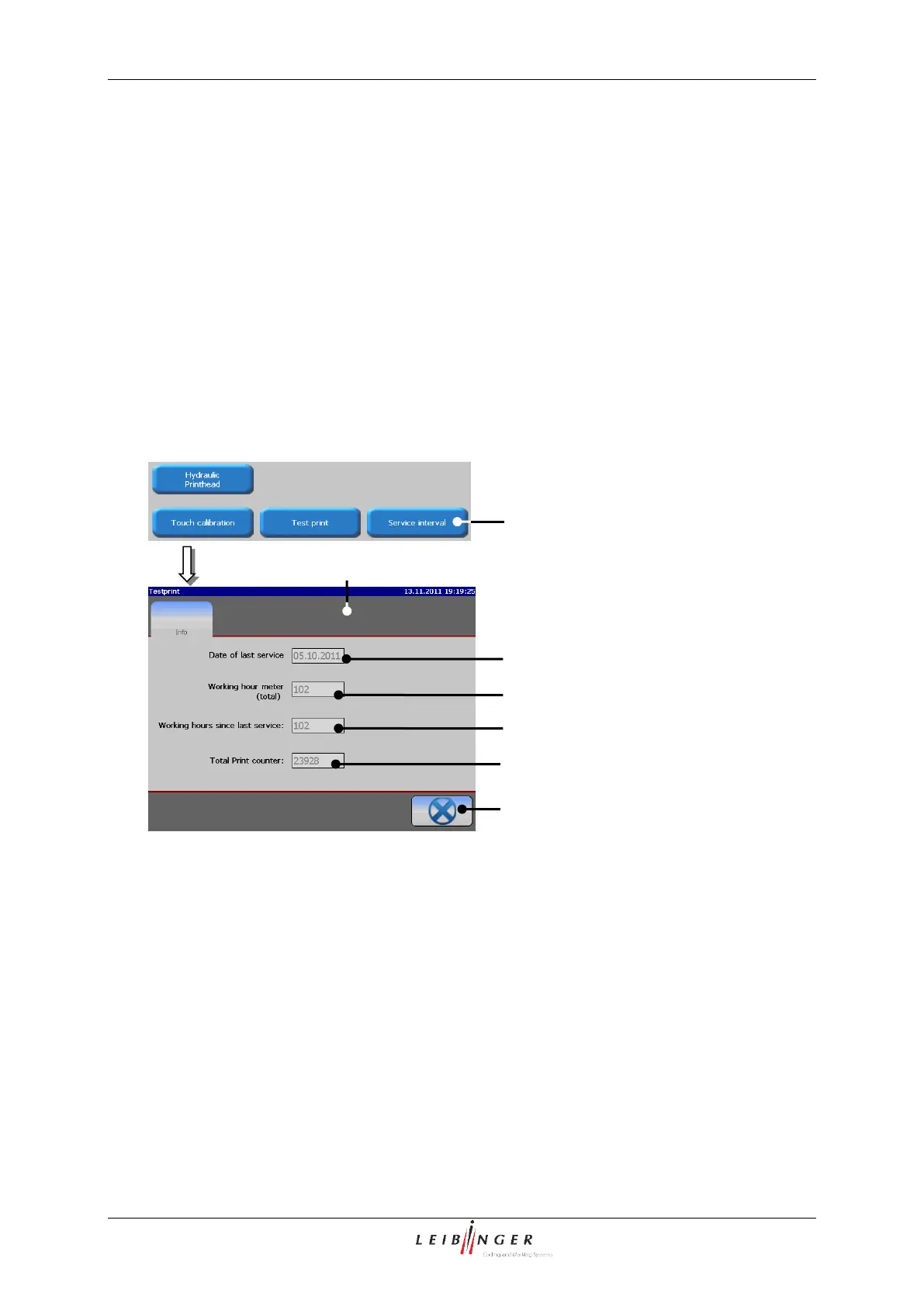
With the button <Service interval> (1) you can open the display window „Service“ (2).
The following parameters are displayed in this window:
Date of the last inspection (3)
Total amount of operation hours of device (4)
Operation hours since the last inspection (5)
Total print counter (6)
Thee button <Close> (7) closes the window.
1 – Button <Service interval>
5 – Display<Operation hours since ...>
2 – Display window <Service>
6 – Display <Total print counter>
3 – Display <Date of inspection>
4 – Display <Total operation hours>
7.2.4.8 Start remote screen
A click on the VNC button starts the VNC server of the JET2neo printer.
A running VNC server is indicated in the status field of the main Window.
Please see chapter 7.2.3.1.7 Fehler! Verweisquelle konnte nicht gefunden werden.for d
etails.



 To Next Page