Page 132 Data entry/Programming Group 7
Release R1.12 en JET2 neo
7.2.3.3 Hydraulic settings
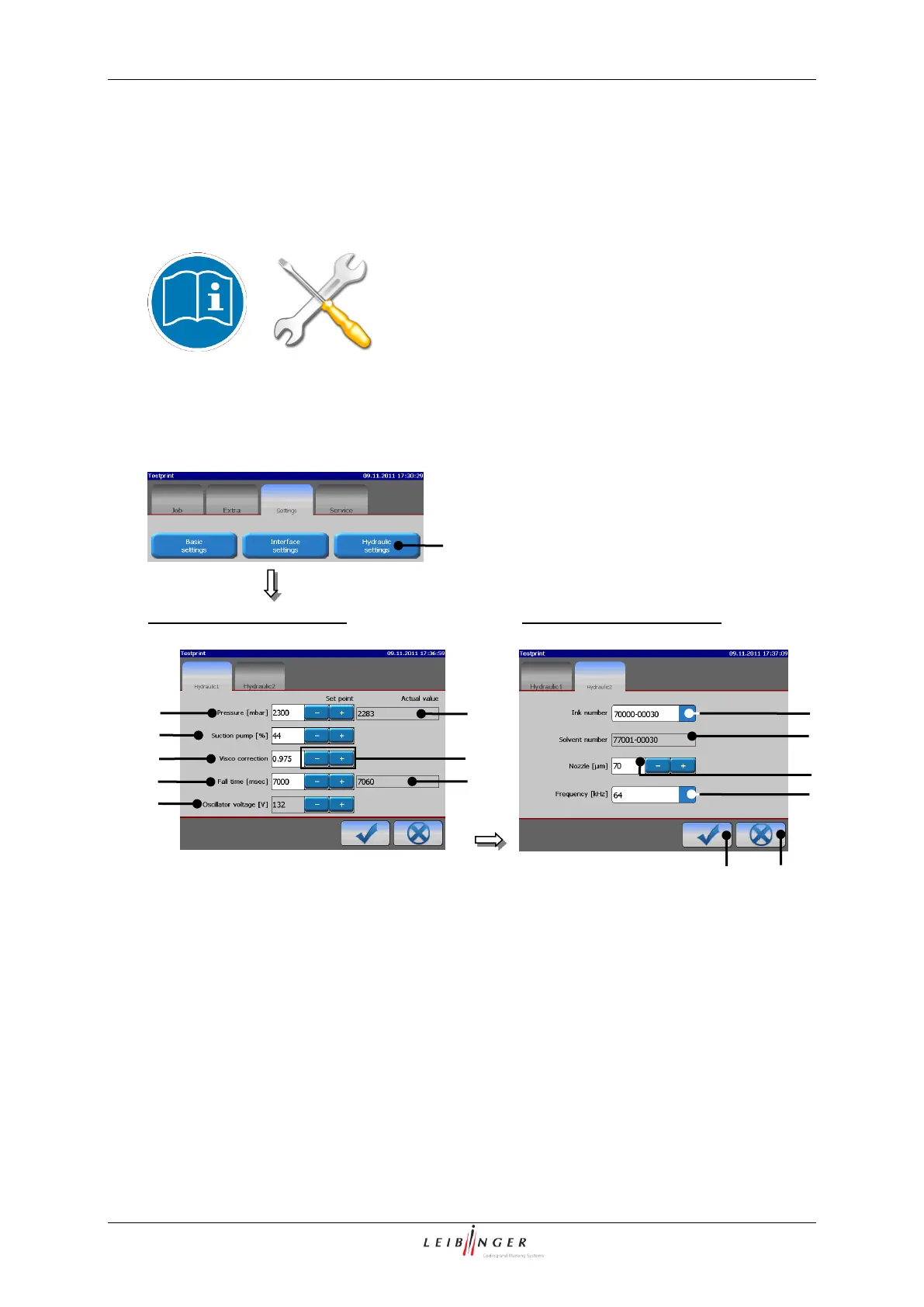
With the button <Hydraulic settings> (1) the menu „Hydraulic settings“ will be displayed.
In this menu the basic hydraulic parameters of the device are set. The menu is divided
into 2 function areas for better clarity.
Changing the preset parameters can cause serious
malfunctions!
This work must only be carried out by trained
personnel or by Leibinger service technicians!
Menu „Hydraulic settings“
Funktional area „Hydraulic 1“
Funktional area „Hydraulic 2“
1 – Button <Hydraulic settings>
9 – Pop-up window <Ink number>
2 – Display field <Pressure (Set point)>
10 – Display field <Solvent number>
3 – Display field <Pressure (Act. value)>
11 – Display field <Nozzle>
4 – Display field <Suction pump>
12 – Pop-up window <Freqency>
5 – Display field <Visco correction>
6 – Display field <Fall time (Set point)>
7 – Display field <Falltime (Act. value)>
8 – Display field <Oscillator voltage>



 To Next Page