Page 212 Job editor Group 8
Release R1.12 en JET2 neo
8.5.4 Date changing parameter
In the functional area <Date change> you can postpone the date changing to an earlier
or later point of time.
Note:
The postponement happens in hours- and minutes. The max. possible post
ponement is 23 hours and 59 minutes.
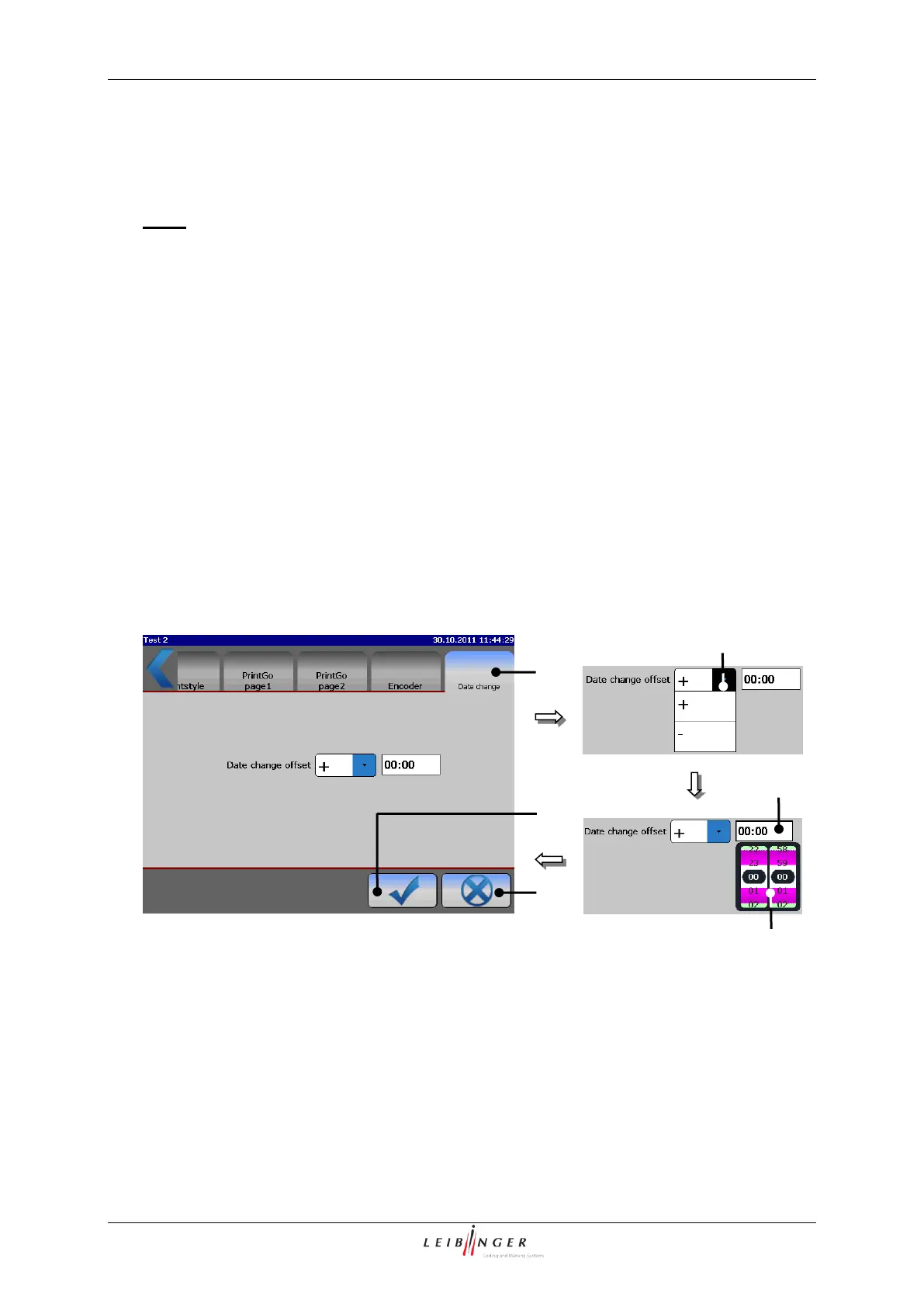
Press the register card <Date change> (1) to select the functional area.
Select in the pop-up window <Offset-direction> (2) the direction (+/-) of the shifting.
Press on the display field <Offset-value> (3). A setting block (4) opens.
Select the desired value by scrolling the hour and minute block. The setting block is
closed by clicking on the block again or on the display field <Offset-value> and the
value is saved.
Press the button <OK ()> (5) to take over the settings and to close the menu or press
the button <Close> (6) to leave the menu without saving the changes.
Job editor (Set date change offset)
1 – Functional area < Datumswechselparameter>
2 – Pop-up window <Offset-direction>
3 – Display field <Offset-value>



 To Next Page