EasyManua.ls Logo

Leibinger JET2neo - Figure 79 Define Password

Leibinger JET2neo
294 pages
Print Icon
To Next Page IconTo Next Page
To Previous Page IconTo Previous Page
Loading...
Group 7 Data entry/Programming Page 139
JET2 neo Release R1.12 en
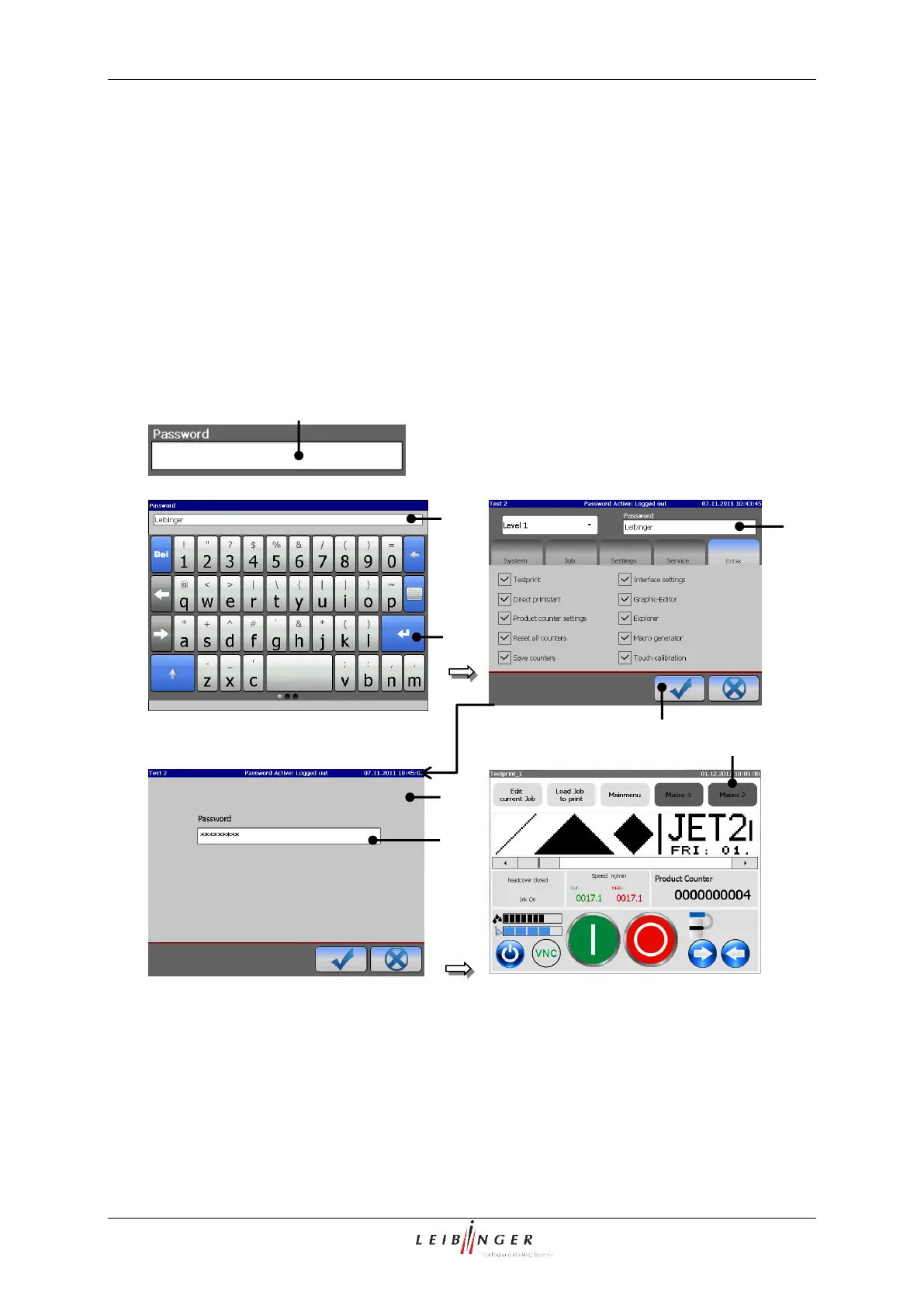
Click into the input field <Password> (6) of the window. A keyboard field (2) opens for
input.
Enter the defined password of the access authorization.
Press the button <Return > (3) of the keyboard field to finish the input.
Now the input is displayed with placeholders (wildcards) in the input field <Password>
(6.
Finally press the button <OK ()> (4) to carry out the login process. The window is
closed and the user is logged in.

Figure 79
Define password
1 Input field <Password>
5 Window <Password query>
2 Keyboard field
6 Input field <Password>
3 Button <Return >
7 Basic menu with password level display
4 Button <OK ()>
2
1
2
4
1
7
5
3
6

Table of Contents

Other manuals for Leibinger JET2neo

Related product manuals