EasyManua.ls Logo

Leibinger JET2neo - Figure 43 - Graphic Editor (Save Graphic); Save Graphic

Leibinger JET2neo
294 pages
Print Icon
To Next Page IconTo Next Page
To Previous Page IconTo Previous Page
Loading...
Group 7 Data entry/Programming Page 93
JET2 neo Release R1.12 en
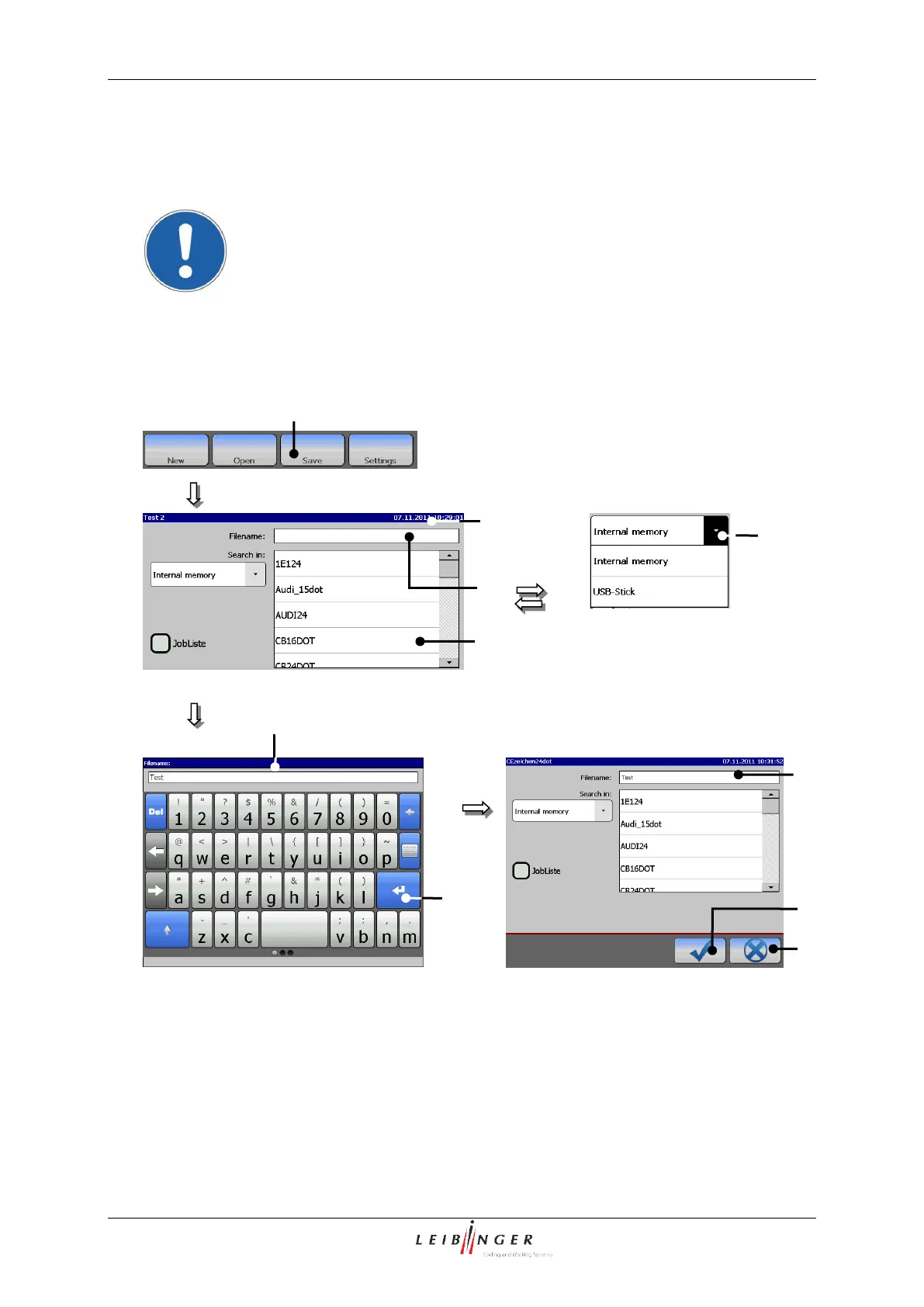
7.2.2.1.6 Save graphic
With the button <Save> an open graphic is saved under the current name or a new created
graphic is saved under a new name.
Attention!
If the graphic is saved under an existing filename, no safety query is
generated. The existing data will be overwritten.
Figure 43
Graphic editor (Save graphic)
1 Button <Save>
6 Keyboard field
2 Window <Save graphic>
7 Button <Return >
3 Selection field <Graphic list>
8 Button <Cancel>
4 Pop-up window <Search in>
9 Button <OK ()>
5 Display <Filename>
3
5
2
5
8
9
7
6
1
4

Table of Contents

Other manuals for Leibinger JET2neo

Related product manuals