Group 8 Job editor Page 241
JET2 neo Release R1.12 en
Example for <Character offset> and <Wildcards>:
Set wildcards:
Set offset:
3
Print preview of the main window as long as there were no data received:
XXX
Received data:
Used data (regarding the offset (O) and the wildcards (W)):
Display of the received data in the print preview of the main window:
456
Result:
Due to the set offset the first 3 characters of the received character string will not be used.
Due to the wildcards only the first 4 characters of the remaining character string are used.
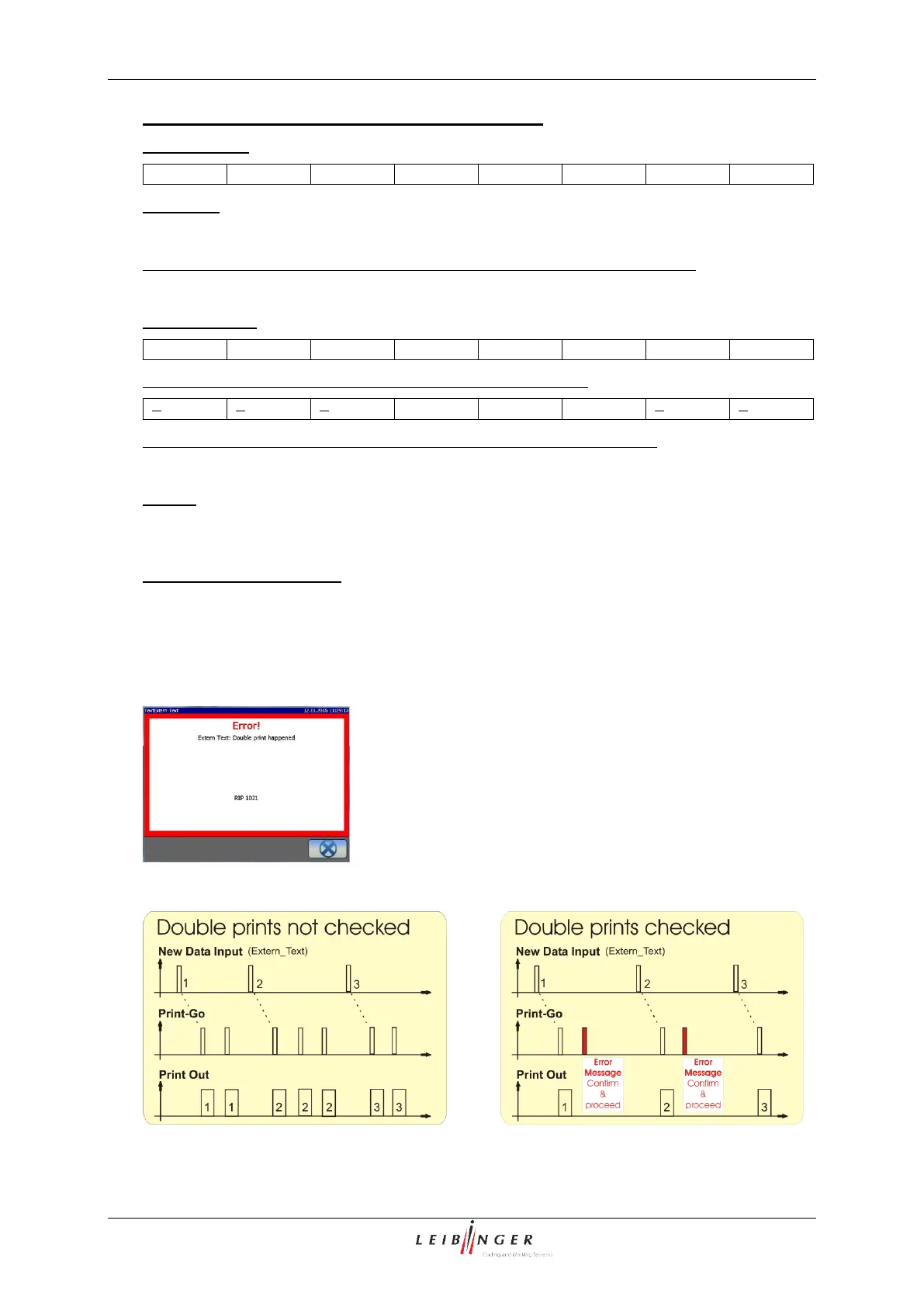
Setting for double prints
With the checkbox checked off (11) each received character string will only be printed
once. In case there is another PrintGo signal received before any new data were received
the printer will switch to <Print Stop>: the green <Print Start> button switches off and the
red <Print Stop> button switches on. Additionally a message box is displayed:
You will have to confirm the error message
and restart the print-out again by pressing
the green <Print Start> button.
Example: diagrams with and without double prints checked



 To Next Page