Replacement
Adjustment
SCANNER UNIT
SM 3-19 B079/B082
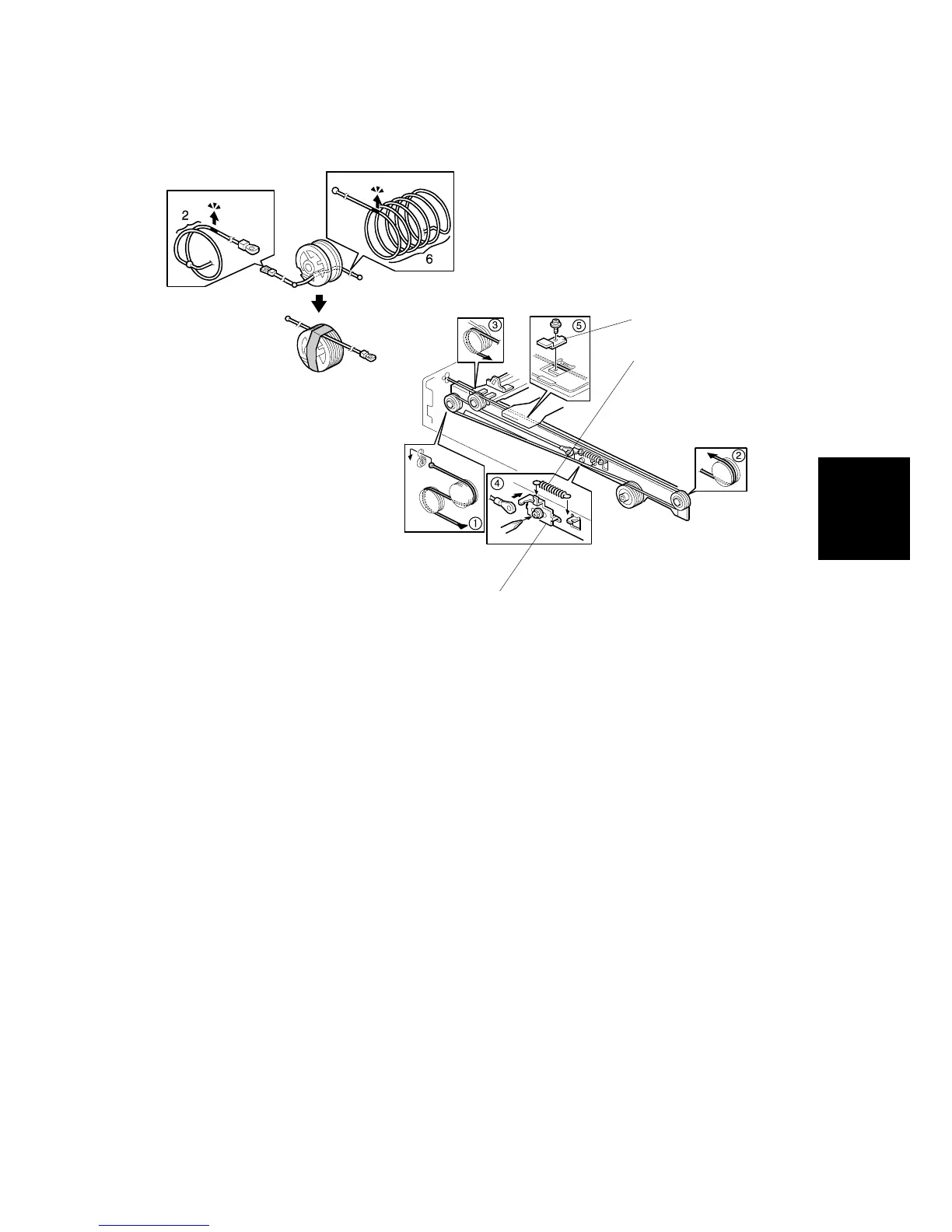
To replace the scanner wire:
1. Front and rear scanner wire bracket [A] ( x1 ea.)
2. Tension spring [B]
3. Tension bracket [C] ( x1). Loosen and do not remove!
4. Remove wires, front and rear.
5. Attach the new wires.
NOTE: Illustration above shows the front wire.
6. Pass the wire through the pulleys as shown in the illustration, and then pass
the bead-end of the wire through the slot in the pulley.
7. Turn the pulley until you see the red mark on the wire. 2 turns and 6 turns (see
top illustration)
8. Without allowing the wire to loosen, tape the wire to the pulley.
9. Pass the wire through !.
10. Complete threading the wire:
"#$#%#Tension spring#Screw
11. Scanner wire bracket
& ( x1)
B004R111.WMF
B004R112.WMF
[A]
[B]
[C]












 To Next Page