SERVICE PROGRAM MODE TABLES
B079/B082 5-42 SM
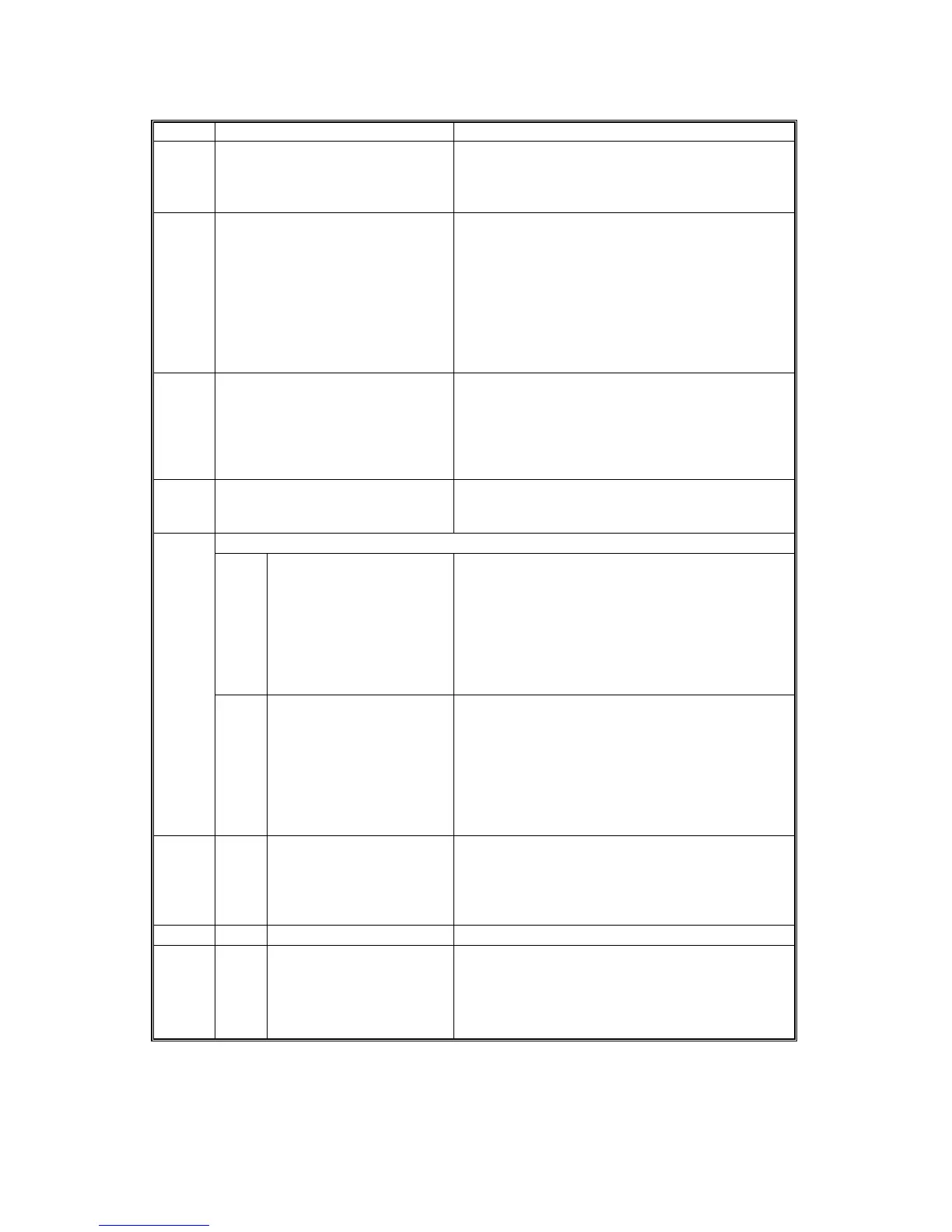
SP5 Mode Number Function and [Setting]
5127* APS Mode Selects whether the APS function is enabled or
disabled with the contact of a pre-paid card or
coin lock.
0: Enabled, 1: Disabled
5131* Paper Size Type Selection Selects the paper size (type) for both originals and
copy paper.
[0~2 / DIP SW setting / 1 step]
0: Japan
1: North America
2: Europe
After changing the setting, turn the copier off and
on. If the paper size of the archive files stored on
the HDD is different, abnormal copies could result.
5150* By-Pass Wide Paper Mode Determines whether the transfer sheet from the
by-pass tray is used or not.
0: Off, 1: On
Normally the paper length for sub scanning paper
from the by-pass tray is limited to 600 mm, but
this can be extended with this SP to 1260 mm.
5162 Application Switching Method Determines whether the application screen is
switched with a hardware switch or software switch.
[0~1 / 0 / 1]
5212* Page Stamp
3* Duplex Printout Right/Left
Position
Determines how horizontal printing is executed
during duplex printing. Sets the upper right corner
of the front side and the upper left corner of the
backside so the starting points for horizontal
printing are the same on both sides DFU.
[–10~+10 / 0 / 1 mm step]
–10: Extreme right
+10: Extreme left
4* Duplex Printout High/Low
Position
Determines how vertical printing is executed
during duplex printing. Sets the upper right corner
of the front side and the upper left corner of the
backside so the starting points for vertical printing
are the same on both sides. DFU
[–10~+10 / 0 / 1 mm step]
–10: Extreme top
+10: Extreme bottom
5302* 2* Set Time Adjusts the RTC time setting for the local time
zone.
[–1440~+1440 / 1 min. step]
Example: For Japan (+9 GMT), enter 540 (9 hours
x 60 min.)
5404 User Code Count Clear Execute
5501* 1* PM Alarm Interval Sets the PM alarm interval.
[0~9999 / 0 / 1 step]
0: Alarm off
1~9999: Alarm goes off when
Value (1~9999)
≥
PM counter












 To Next Page