Service
Tables
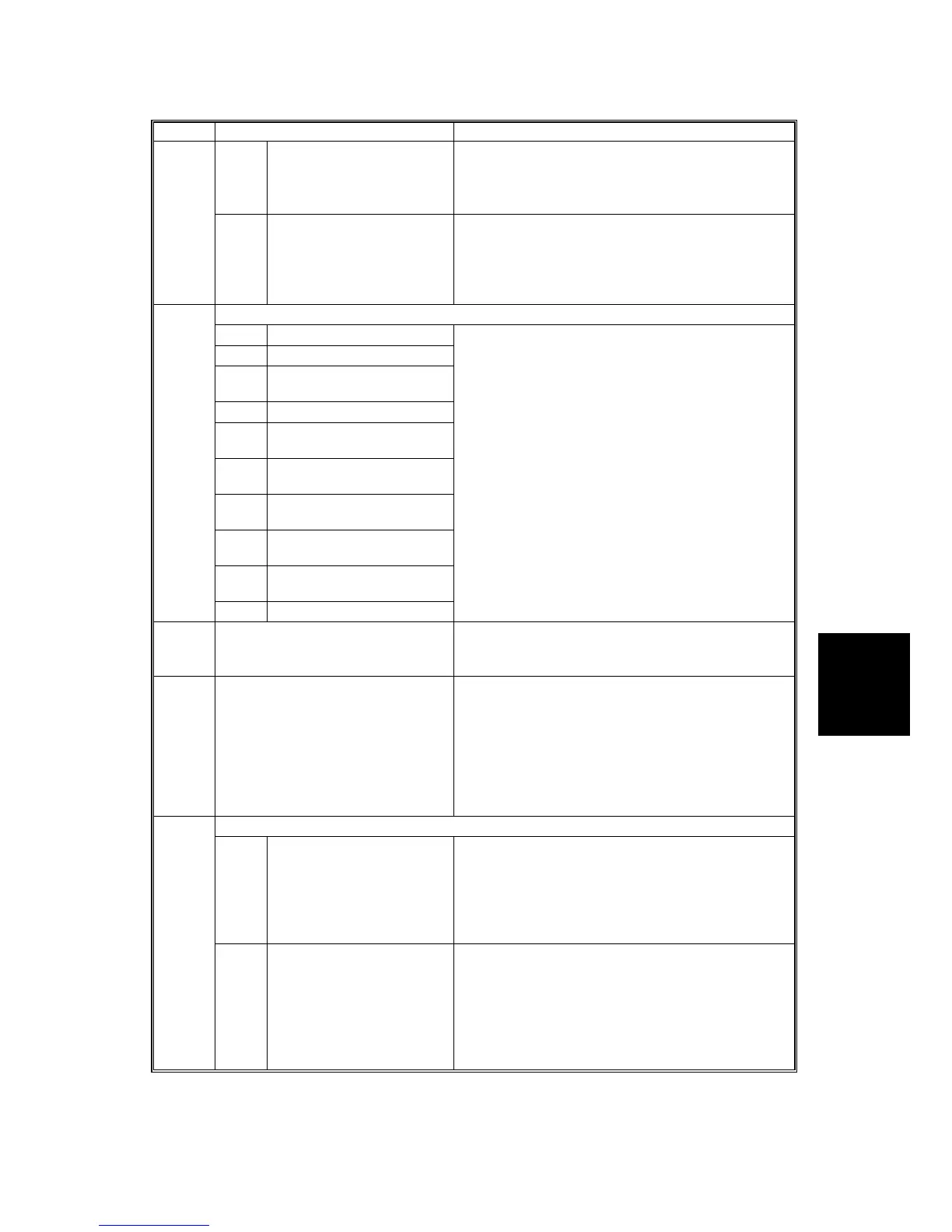
SERVICE PROGRAM MODE TABLES
SM 5-47 B079/B082
SP5 Mode Number Function and [Setting]
90* Use Telnet This setting determines whether Telnet is started or
not.
[0~1 / 1 / 1]
If not started, the Telnet port is closed.
5828*
91 Web Monitor Image Determines whether Web Image Monitor is enabled
or disabled.
[0~1 / 1 / 1]
1: Enabled
0: Disabled
HDD
1 HDD Formatting (ALL)
2 HDD Formatting (IMH)
3 HDD Formatting
(Thumbnail)
4 HDD Formatting (Job Log)
5 HDD Formatting (Printer
Fonts)
6 HDD Formatting (Address
Book)
7 HDD Formatting (Mail RX
data)
8 HDD Formatting (Mail TX
data)
9 HDD Formatting (Data for a
Design)
5832
11 HDD Formatting (Ridoc I/F)
Enter the SP number for the partition to initialize,
then press #. When execution ends, cycle the
machine off and on.
5833 Job Log Transfer On/Off Setting Switches the job log transfer on/off for Poplar
server.
0: Off (disable), 1: On (enable)
5834
Enable Operation Panel Image
Settings
Enables and disables the operation panel read
(dump) feature. After powering on the machine,
set this option to 1 to enable this feature.
0: Off (disable), 1: On (enable)
To reset the machine to 0, the machine must be
turned off and on again. Selecting 0 for this option
without cycling the power off and on does not
restore the default setting (0).
Capture Setting
1* Capture Function (0:Off
1:On)
With this function disabled, the settings related to
the capture feature cannot be initialized, displayed,
or selected.
[0~1/0/1]
0: Disable
1: Enable
5836
2* Panel Setting Determines whether each capture related setting
can be selected or updated from the initial system
screen.
[0~1/0/1]
0: Disable
1: Enable
The setting for SP5836 001 has priority.












 To Next Page