Service
Tables
SERVICE PROGRAM MODE TABLES
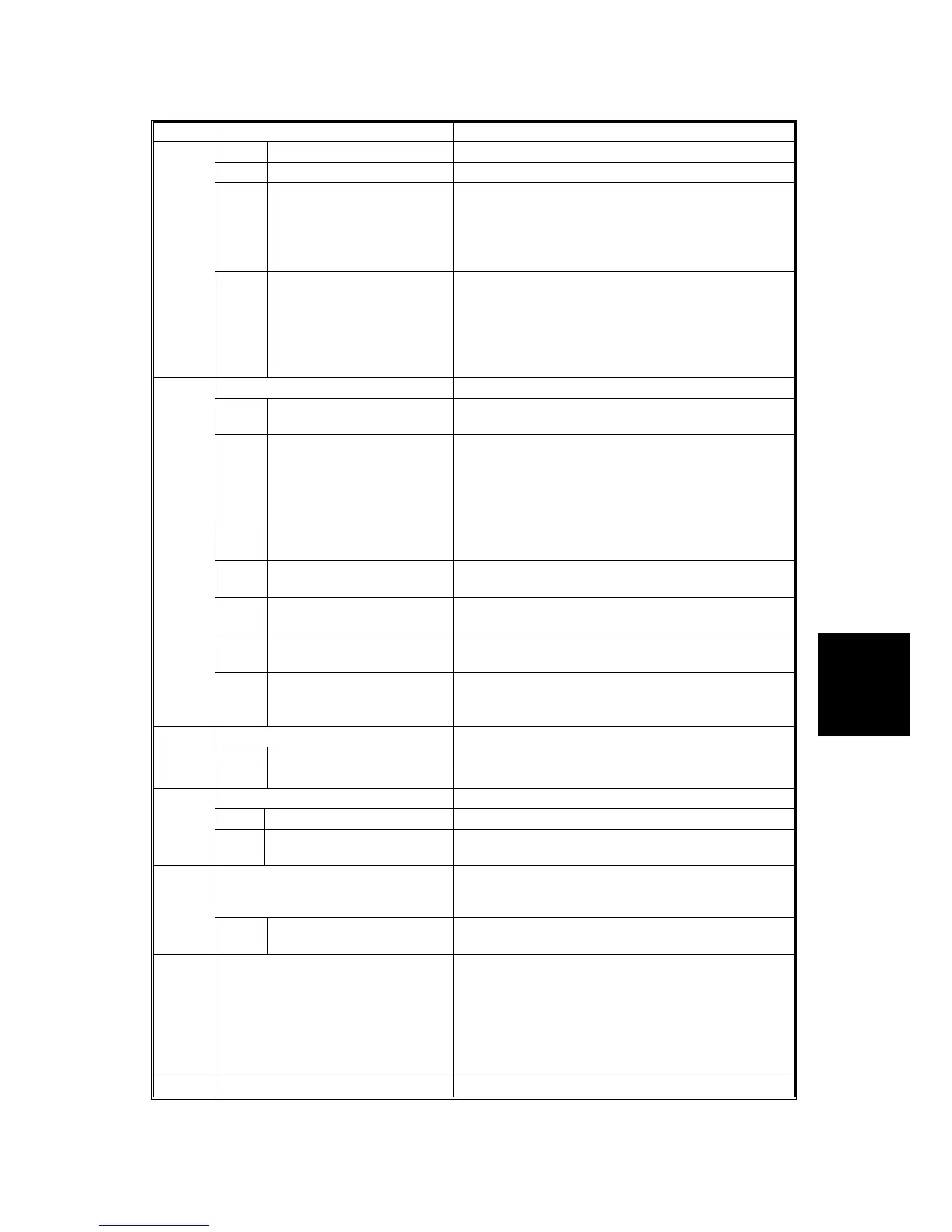
SM 5-55 B079/B082
SP5 Mode Number Function and [Setting]
4 Printer: Color [0~2 / 2 / 1]
5 Printer: B&W Binary [0~2 / 0 / 1]
6 Printer: B&W Dither 1: ½x
2: ¼x
“Net files” are jobs to be printed from the document
server using a PC and the DeskTopBinder
software.
5847
21 NetFile Default for JPEG Sets the default for JPEG image quality of image
files handled by NetFile. Currently not used.
[5~95 / 50 / 1]
“Net files” are jobs to be printed from the document
server using a PC and the DeskTopBinder
software.
Web Service
1 Network Quality DeFault
For JPEG
[5~95 / 50 / 1] Currently not used.
2
ccess Control: Repository
(Lower 4 Bits)
Sets the 4-bit switch assignment for the access
control setting. Currently not used.
0000: No access control
0001: Denies access to Desk Top Binder. Has no
effect on access and delivery from Scan Router .
3 Doc. Svr. Print (Lower 4
Bits)
Switches access control on and off.
0000: OFF
4 User Directory (Lower 4
Bits)
Switches access control on and off.
0000: OFF
5 Delivery Input (Lower 4
Bits)
Switches access control on and off.
0000: OFF
6 Access Control: (Lower 4
Bits)
Switches access control on and off.
0000: OFF
5848
100 Repository: Max. Size of
Download Image
Sets the maximum size allowed for downloaded
images. The default is equal to 1 gigabyte.
[1~1024 / 1024 / 1K]
Installation Date
1 Indication
5849
2 Switch to Print
Sets the delivery date for the machine. DFU
Address Book Function
1 Switch Module Initial: 1
5850
3 Replacement of Circuit
Classifications
Replacement
SMTP Simple Mail Transfer Protocol. The protocol for
communication between Internet main MTAs
(Message Transfer Agents).
5852
2 Port Number Sets the port number
[0~65535 / 25 / 1]
5853 Stamp Data Download Use this SP to download the fixed stamp data
stored in the firmware the ROM and copy it to the
HDD. This SP can be executed as many times as
required. This SP must be executed after replacing
or formatting the hard disks.
This SP can be executed only with the hard disks
installed.
5856 Remote ROM Update Initial: 0











 To Next Page