Installation
MAIN MACHINE INSTALLATION
SM 1-11 B079/B082
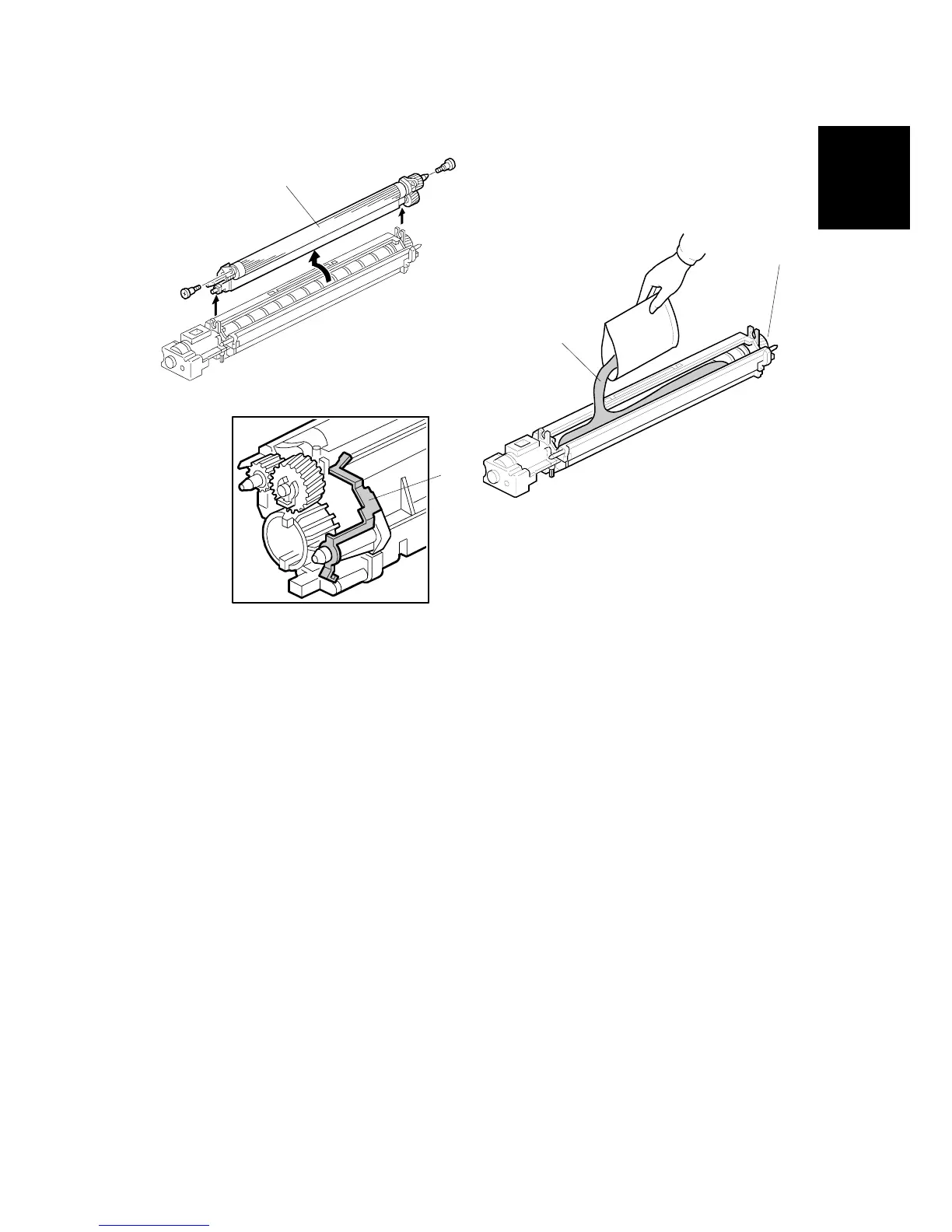
11. Remove the development roller unit [A], and set it on the paper.
12. Pour the developer [B] into the development unit.
NOTE: The developer lot number is embossed on the end of the developer
package. Do not discard the package until you have recorded the lot
number. (!1-15)
1) Pour approximately 1/3 of the developer evenly along the length of the
development unit.
2) Rotate the drive gear [C] to work the developer into the unit.
3) Repeat until all the developer is in the development unit.
4) Continue to turn the drive gear until the developer is even with the top of the
unit.
13. Reassemble the development unit.
NOTE: Make sure that the earth plate [D] is positioned correctly.
14. Re-install the development unit and PCU.
B079I106.WMF
B079I513.WMF
B079I019.WMF
[A]
[D]
[B]
[C]












 To Next Page