G3 INTERFACE UNIT TYPE 2045
SM 13 B547
Fax Option
B547
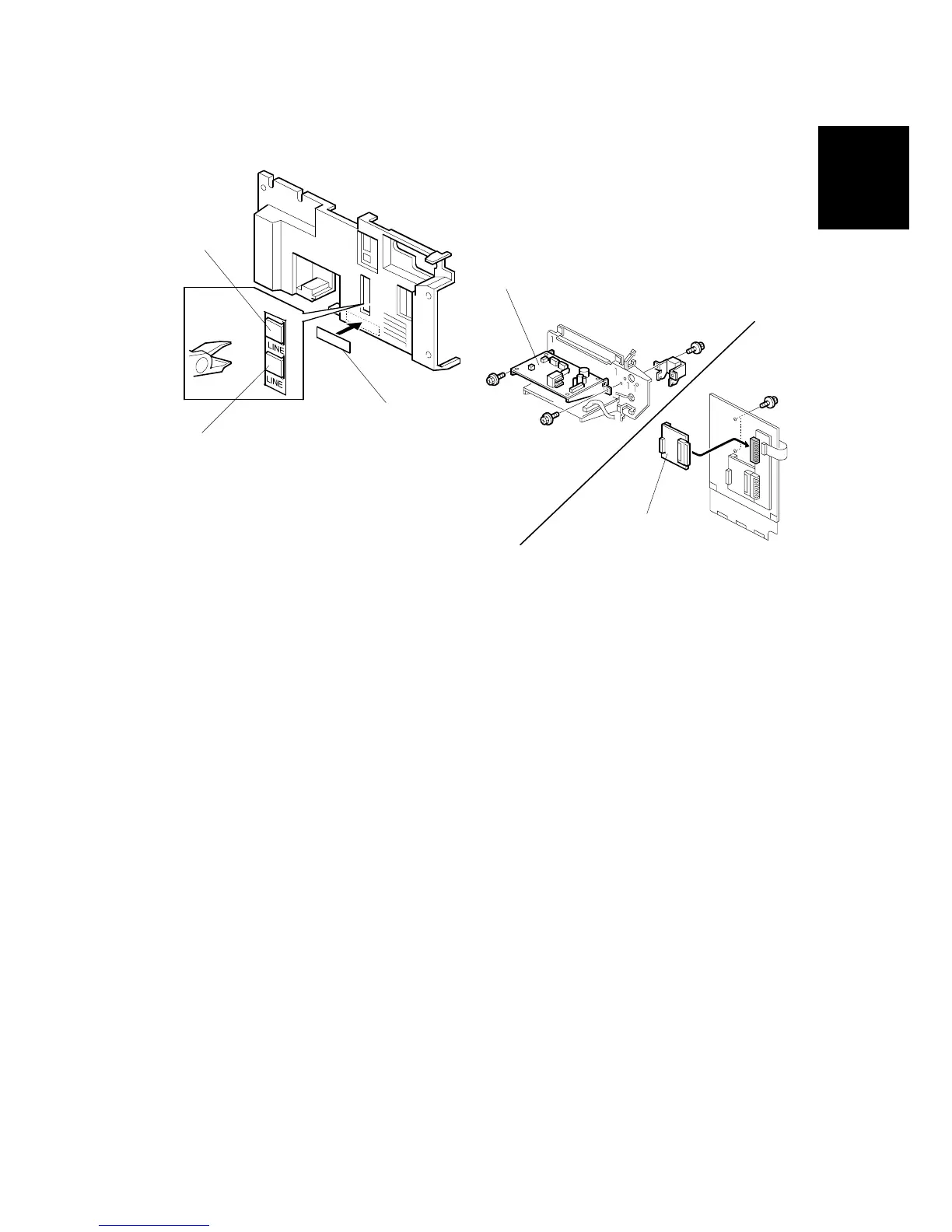
19. Cut away the small cover [A] for the first option G3 unit.
NOTE: If there is another G3 option unit, cut away the upper small cover [B].
20. Attach the FCC decal [C] to the rear cover.
21. Reattach the covers.
NOTE: Attach the second option NCU board [D] and the second option G3
board [E] to the upper side as shown.
22. Connect the telephone line to the LINE2 jack, then plug in the machine and turn
the main switch on.
NOTE: The copier must be connected to a properly - grounded socket outlet.
23. Enter service mode. Set bit 1 of communication switch 16 to “1” for the first
option G3 unit. Set bit 3 of communication switch 16 to “1” for the second option
G3 unit. After that turn the main switch off and on.
24. Print the system parameter list and ensure that “SG3-V34” is listed as an option.
25. Set up and program the items required for PSTN-2 communications.
B547I917.WMF
B547I919.WMF
[D]
[E]
[A]
[B]
[C]












 To Next Page