Installation
ARDF INSTALLATION (B541)
SM 1-47 B079/B082
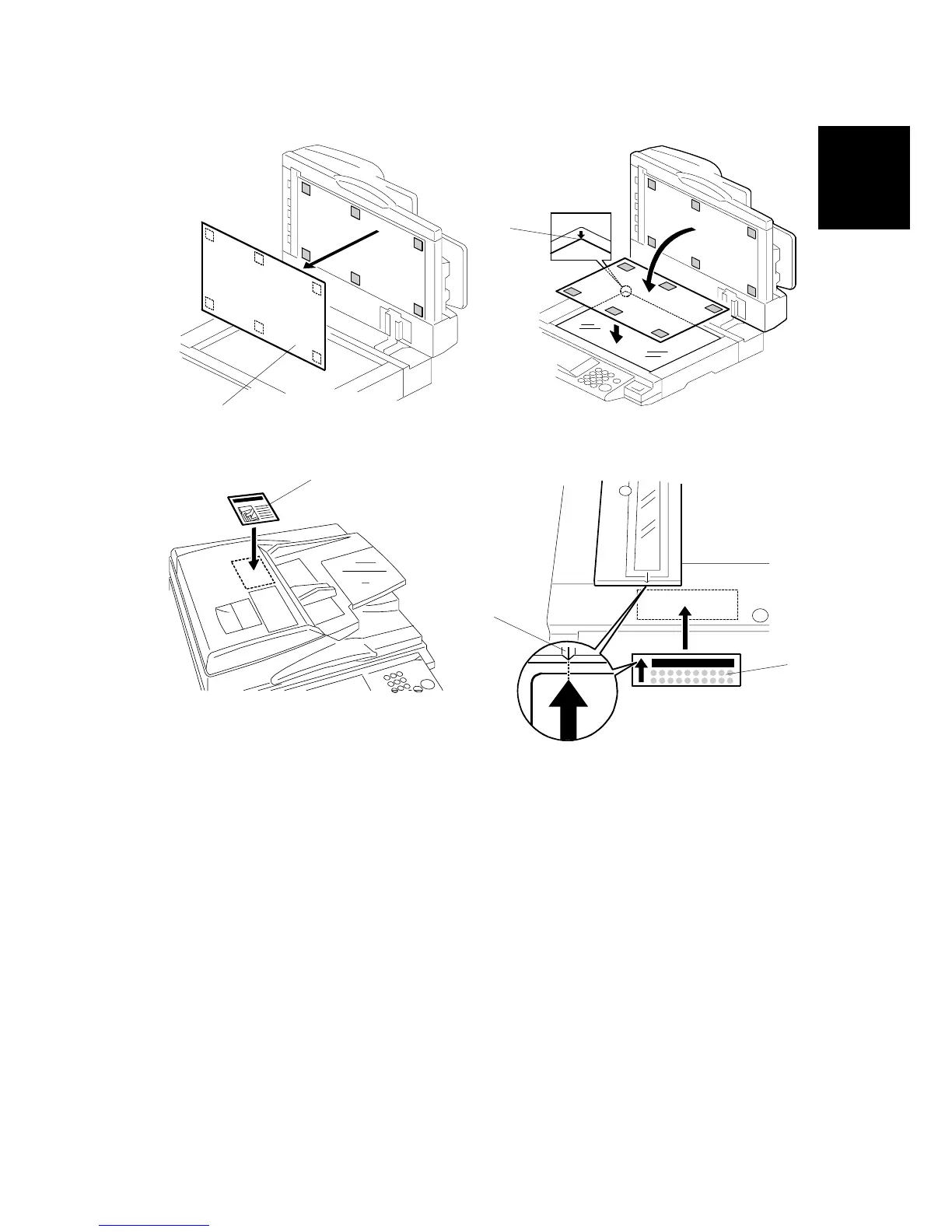
6. Peel off the platen sheet [A] and place it on the exposure glass.
7. Line up the rear left corner of the platen sheet flush against corner [B] on the
exposure glass.
8. Close the ARDF.
9. Attach the decal [C] to the top cover as shown, choosing the language most
suitable for the machine installed.
10. Attach the decal [D] to the cover so that the arrow on the decal lines up with the
groove [E] of the left scale as shown. As with step 9, choose the language most
suitable for the machine installed.
11. Turn on the main switch.
12. Check the ARDF operation and copy quality. Be sure to check and adjust the
registration for the ARDF with the SP modes
B541I902.WMF
B541I901.WMF
B541I903.WMF
B541I906.WMF
[A]
[B]
[D]
[E]
[C]












 To Next Page