MEASurement Commands 2
Keysight N8262A Programming Guide 169
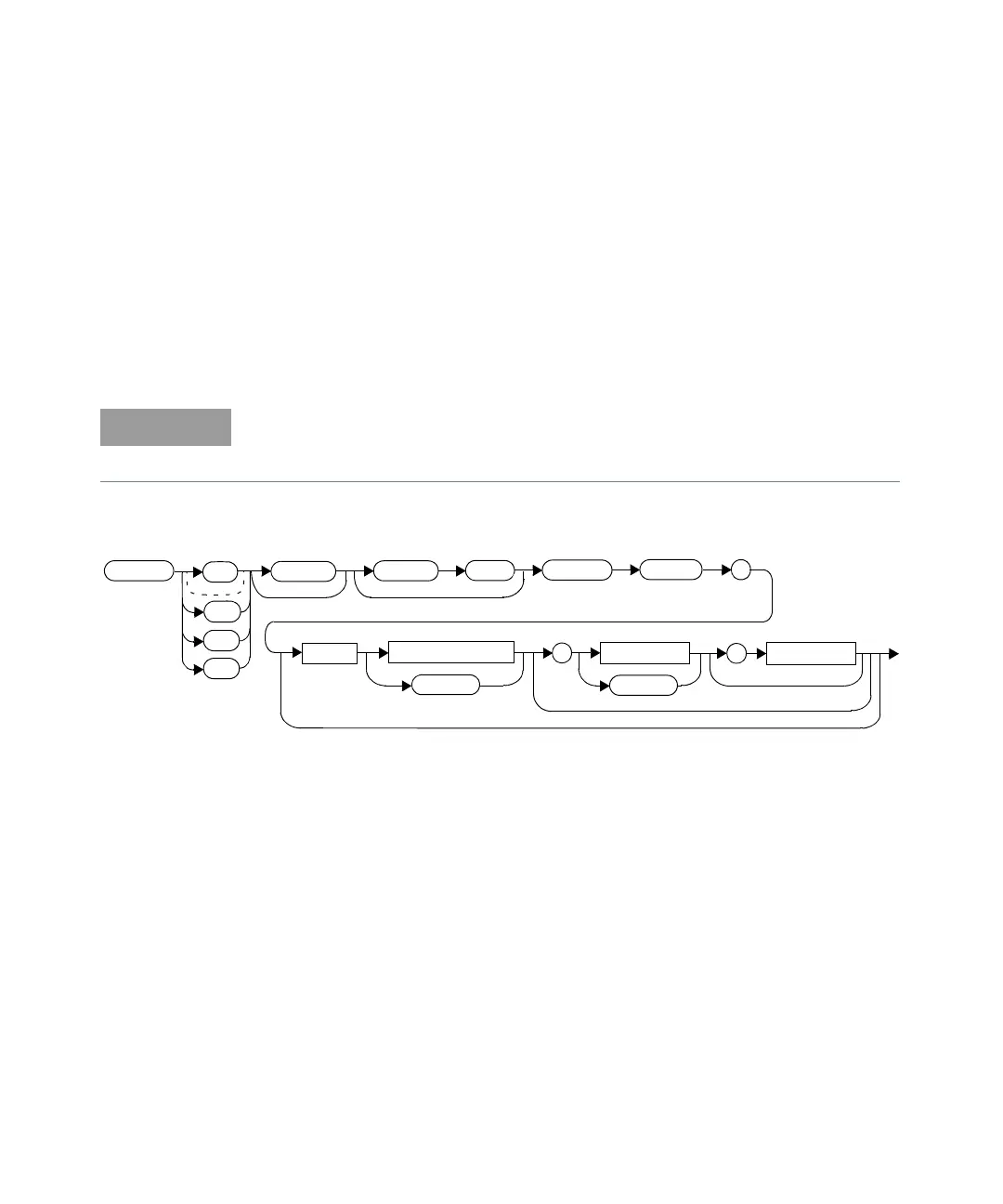
READ[1]|2|3|4[:SCALar][:POWer:AC]:RATio:RELative?
[<expected_value>[,<resolution>[,<source list>]]]
This command sets the specified window’s measurement function to ratio mode
with relative mode on, aborts then initiates both Channel A and B, calculates the
ratio measurement result using the new sensor data and places the result on the
bus. The result is a ratio based measurement and is expressed in the units defined
by UNIT[1]|2|3|4:POWer:RATio. The relative value used is that set by the
CALCulate:RELative:MAGNitude:AUTO command.
Syntax
Parameters
Refer to “Optional Parameters” on page 126 for additional details on the
parameters in this command.
IINITiate:CONTinuous must be set to OFF on both channels, otherwise error
–213, “INIT ignored” occurs. If TRIGger:SOURce is set to BUS on either channel,
error –214, “Trigger deadlock” occurs.
:POW
:AC
:SCAL
:RAT
:REL
?
Space
expected_value
DEF
resolution
,
DEF
source list
,
READ
1
2
3
4












 To Next Page