Page 186 Job editor Group 8
Release R1.12 en JET2 neo
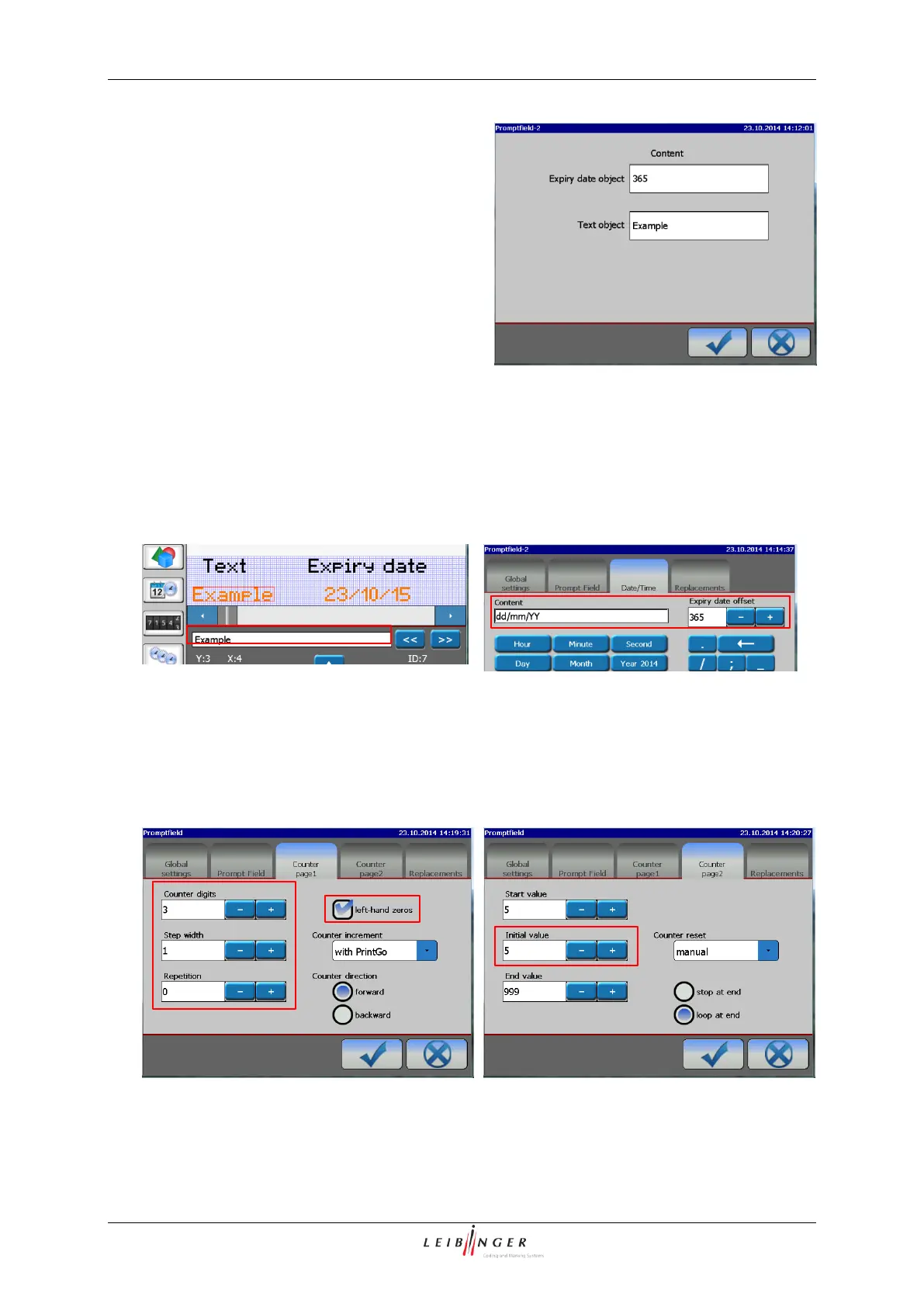
The button “Show prompt” opens a dialog
box that shows a list of all <Prompt fields> of
the current print job with the respective
contents.
It is also possible to change the current
content of each <Prompt field>.
All changes have to be confirmed with the
OK button.
Changes will be showed immediately in the
WYSIWYG window.
The same dialog box will show up when
you open a job with <Prompt fields>.
Dialog box of the <Prompt field>
Overview Settings and Changes
First time settings are made in the respective object settings menus
Date object (Expiry date)
For the first time the content of the text
object is set directly in the JET2neo editor.
This first setting defines the maximum
length of an input! It is possible to use
blanks.
The content of a date object is set in the
object settings for the first time. The value
that can be changed using the <Prompt
Field> is the <Expiry Date Offset>
The content and the format of a counter is
set in the object settings for the first time.
The value that can be changed using the
<Prompt field> is the <Initial value>



 To Next Page