Page 202 Job editor Group 8
Release R1.12 en JET2 neo
Parameter settings
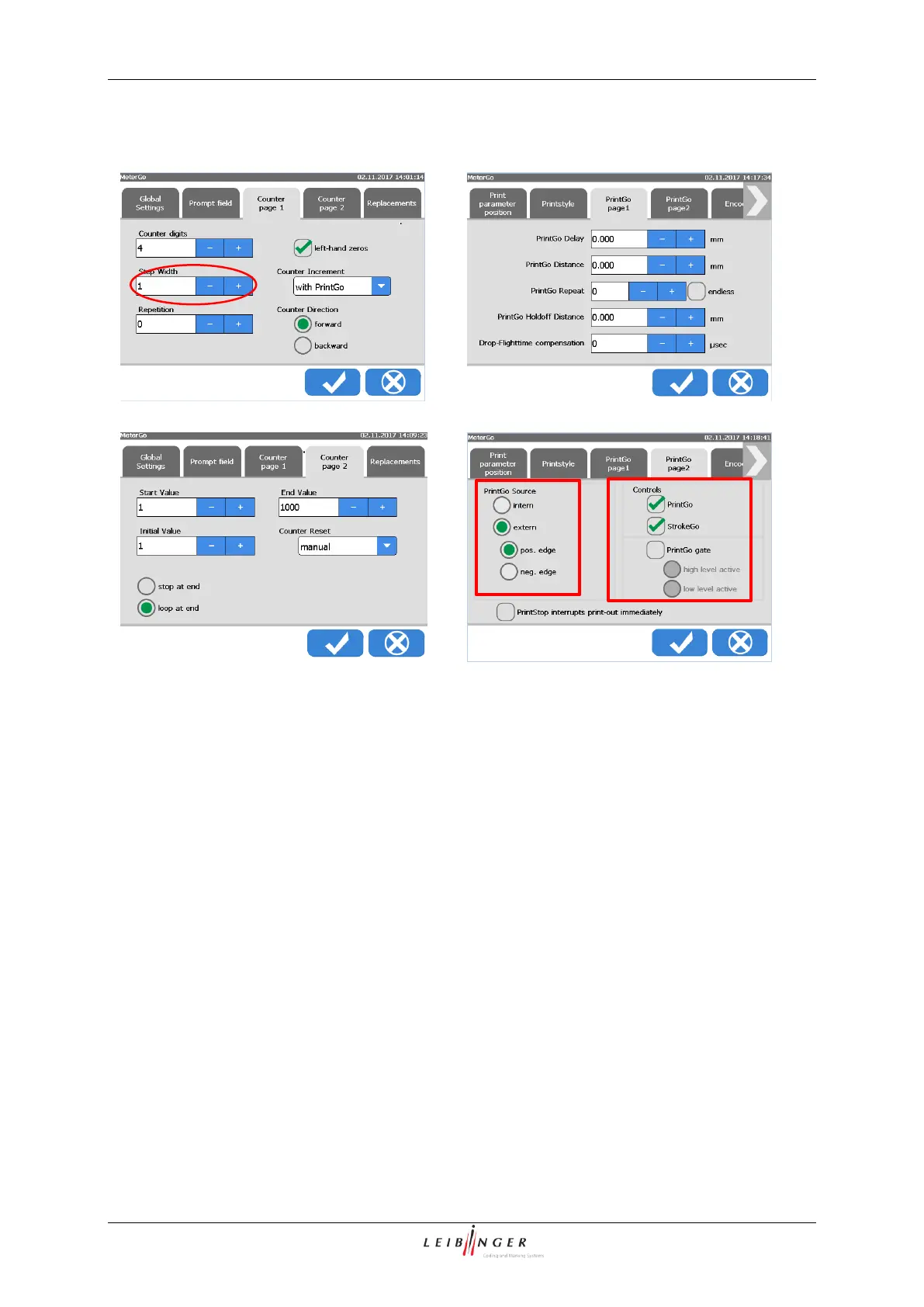
Picture 1 Counter settings page 1
Picture 2 Counter settings page 2
Picture 3 PrintGo parameter page 1
Picture 4 PrintGo parameter page 2
The crucial setting for the “Meter Go
function” within the parameters for the
counter object is the setting for the
<Counter Increment>. This value has
to be set to with PrintGo.
Please see example for details.
For printing length specifications on
cables, pipes etc. use the parameters
shown above. These settings are true
while using an external PrintGo signal.
Please see example for details.
Example MeterGo function:
Assumptions and pre settings for this example:
- The JET2neo printer is used for continuously printing on a cable emerging from a cable
extruder device.
- The cable extruder mustn’t stop even if the printout fails.
- After a print interruption, the printout should continue with the correct meter number.



 To Next Page