Service
Tables
SERVICE PROGRAM MODE TABLES
SM 5-45 B079/B082
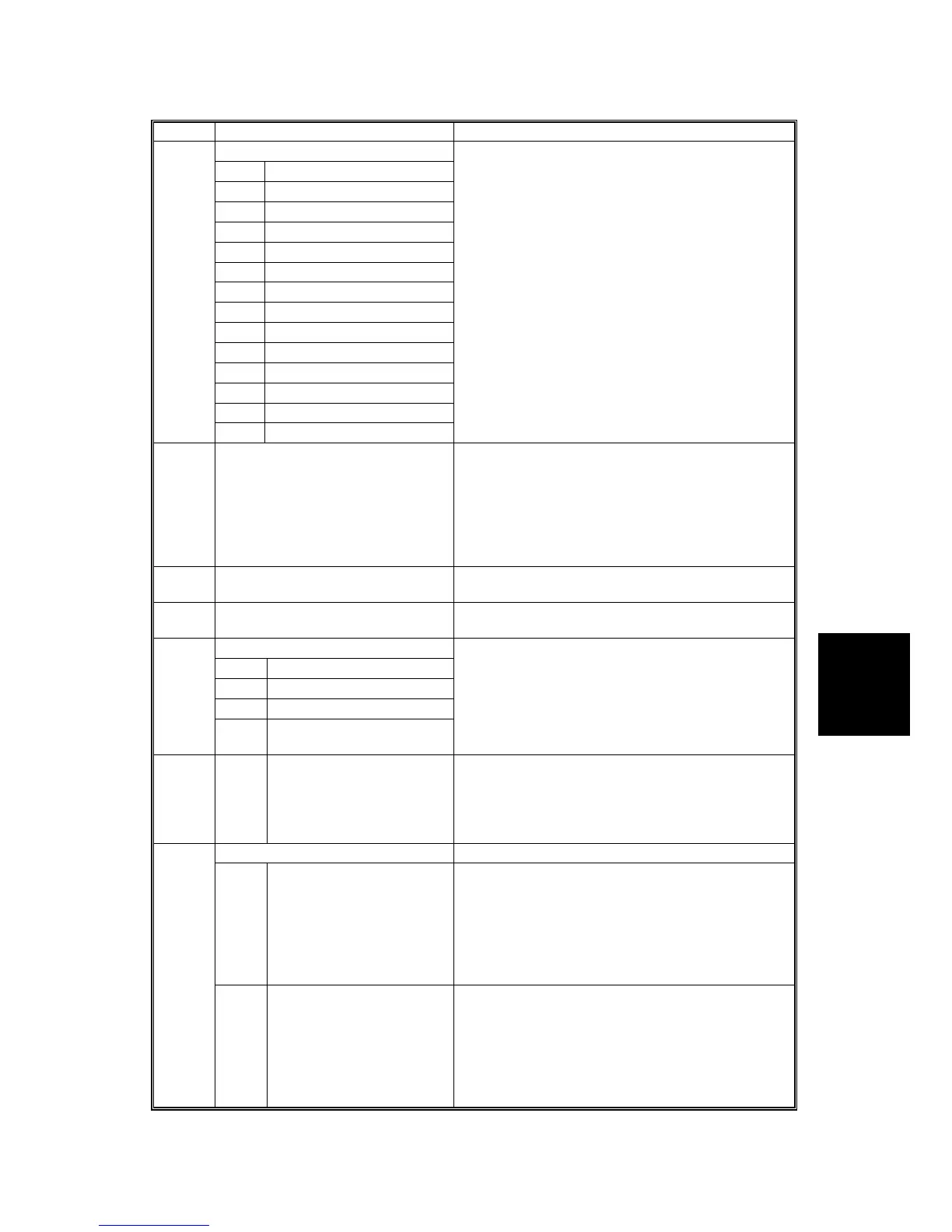
SP5 Mode Number Function and [Setting]
Memory Clear
1 All Clear
2 Engine
3 SCS
4 1 MH Memory Clear
5 MCS
6 Copier Application
7 Fax Application
8 Printer Application
9 Scanner Application
10 Network Application
11 NCS
12 R-Fax
14 Clear DCS Settings
5801*
15 Clear VCS Settings
Resets all correction data for process control and
all software counters, and returns all modes and
adjustments to their default values. (! 5.1.8)
Use this SP only after replacing the NVRAM, or
after the copier has malfunctioned due to a
damaged NVRAM.
5802* Printer Free Run Performs a free run. The scanner scans once and
the printer prints the number of copies requested.
To perform the free run, after selecting “1”, press
the Copy Window to enter copy mode, input the
number of copies, and then press the Start key
twice. To stop the free run, press .
0: Off, 1: On
5803 Input Check Displays the signals received from sensors and
switches. (! 5.1.5)
5804 Output Check Turns on the electrical components individually for
test purposes. (! 5.1.6)
Option Connection Check
1 ARDF
2 Bank (Paper Tray Unit)
3 LCT
5807
4 Finisher (1000-sheet,
Two-Tray finisher)
Checks the connectors to the optional peripheral
devices. Execution will return either a “1” or “0”:
0: Device not connected correctly.
1: Device connected correctly.
5811* 1* Machine Serial Number Use to input the machine serial number. This is
normally done at the factory.
If you want to know the serial number, print the
system parameter list. Press
and then input
“A”.
5812* Service Tel. No. Setting
1* Service Tel. Number Use this to input the telephone number of the
service representative. Enter the number and
press #. This number is displayed when a service
call condition occurs.
Press the
key to input a pause. Press the
“Clear modes” key to delete the telephone
number.
2* SMC Report Transfer
Fax. No.
Use this to input the fax number of the service
representative. Enter the number and press #.
This number is printed on the Counter Report
(UP: System No. 19)
Press the
key to input a pause. Press the
“Clear modes” key to delete the telephone
number.












 To Next Page