RTC6 boards
Doc. Rev. 1.0.21 en-US
7 Basic Functions for Scan Head Control and Laser Control
138
Ellipse Commands
The RTC6 command set also provides commands for
marking elliptical arcs.
Here (unlike marking of vectors or circular arcs), you
generally need to call two commands: set_ellipse as
well as mark_ellipse_abs or mark_ellipse_rel
(1)
.
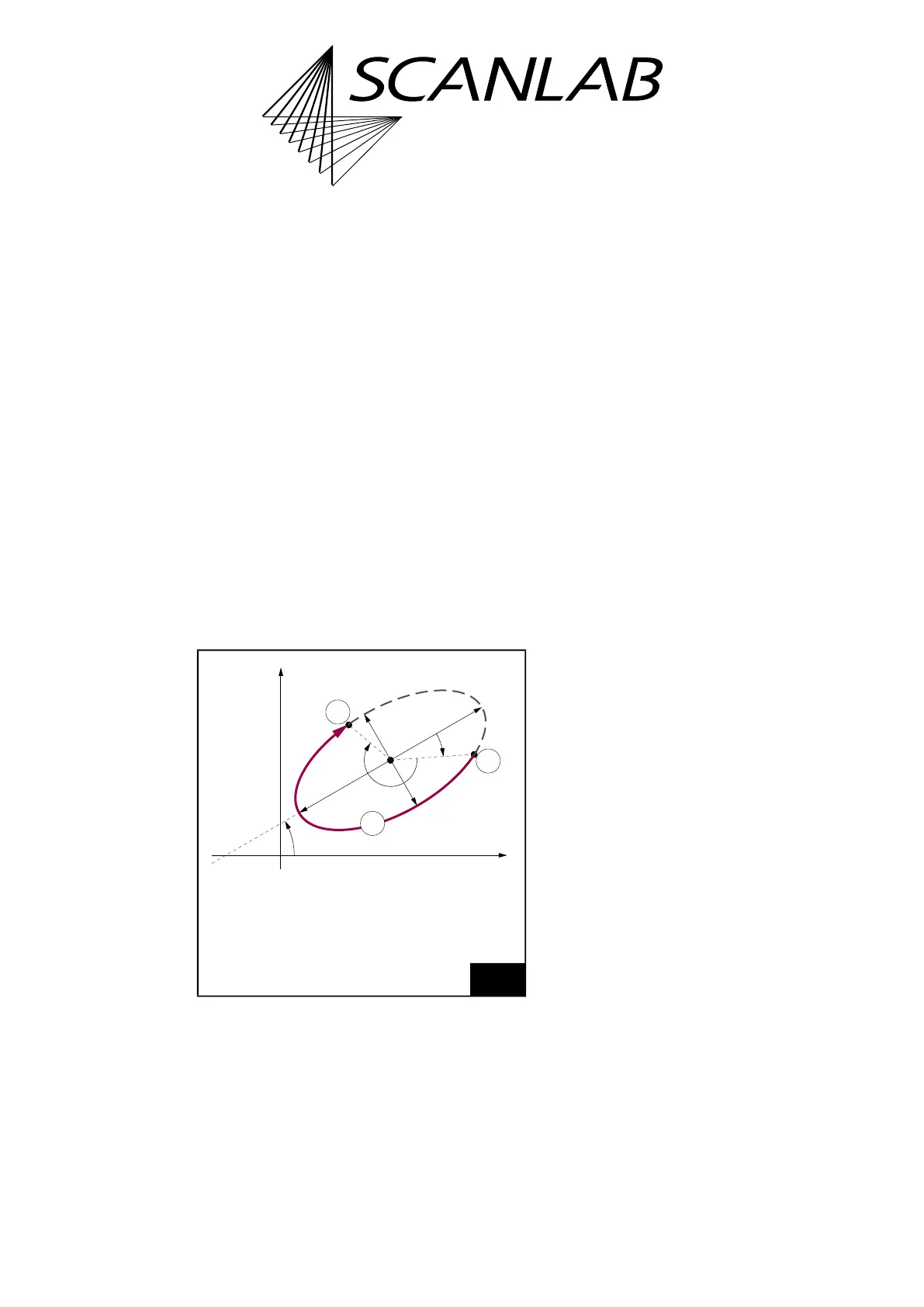
By set_ellipse the arc shape is specified, see
Figure 33:
• Lengths
a
and
b
of the ellipse half-axes
• The beginning phase angle
Phi0
(and thereby the
arc starting point position relative to the end
point of half-axis
a
)
• The arc angle
Phi
(and thereby the length of the
to-be-marked ellipse section)
By mark_ellipse_abs or mark_ellipse_rel, position
and orientation of the to-be-executed arc is specified,
see Figure 33:
• The coordinates
(X,Y)
of the ellipse midpoint
• The angle
Alpha
between the ellipse half-axis
a
and the x axis
Notes
• By
a
, you can specify either the short or long half-
axis (then use
b
for the other axis).
Phi0
,
Phi
and
Alpha
are always relative to axis
a
.
•
Phi0
and
Phi
are counted positively clockwise (in
contrast to mathematical convention). In
contrast,
Alpha
is counterclockwise (in
accordance with mathematical convention).
• As with Mark Commands and Arc Commands,
the laser focus moves with the specified
mark speed along the specified arc when the
Ellipse command is executed. The Signals for
“Laser Active” Operation are automatically
switched on at the beginning of an
“Arc” Command, see also Section ”Polylines”,
page 137.
• set_ellipse is a short list command, see also
Section ”Normal, Short, Variable and Multiple
List Commands”, page 302. Therefore, it can be
called between a Mark Command and an
Ellipse command without thereby interrupting
the Polyline (the laser remains on).
• Ellipse Commands always begin marking at the
starting point determined by the above-
mentioned parameters (in contrast to
Mark Commands and Arc Commands which
automatically begin marking at the current
output position). If the starting point and current
position do not match, then a Hard Jump to the
starting point is executed at the beginning of
marking (without a Jump Delay becoming
effective).
(1) For using abs and rel commands, see Section
”“AbsCalls””, page 114.
33
Marking ellipse-shaped arcs.
Legend
1 Starting point
2 Marked arc
3 End point



 To Next Page