RTC6 boards
Doc. Rev. 1.0.21 en-US
8 Advanced Functions for Scan Head Control and Laser Control
224
8.2 Coordinate Transformations
For precise set-up of the scan system relative to the
Image Field (or, if the Option “Second Scan Head
Control” is enabled, two scan heads can be adjusted
relative to a common Image Field), a linear coordinate
transformation can be defined (separately for the
first and second scan head connectors) for all x and
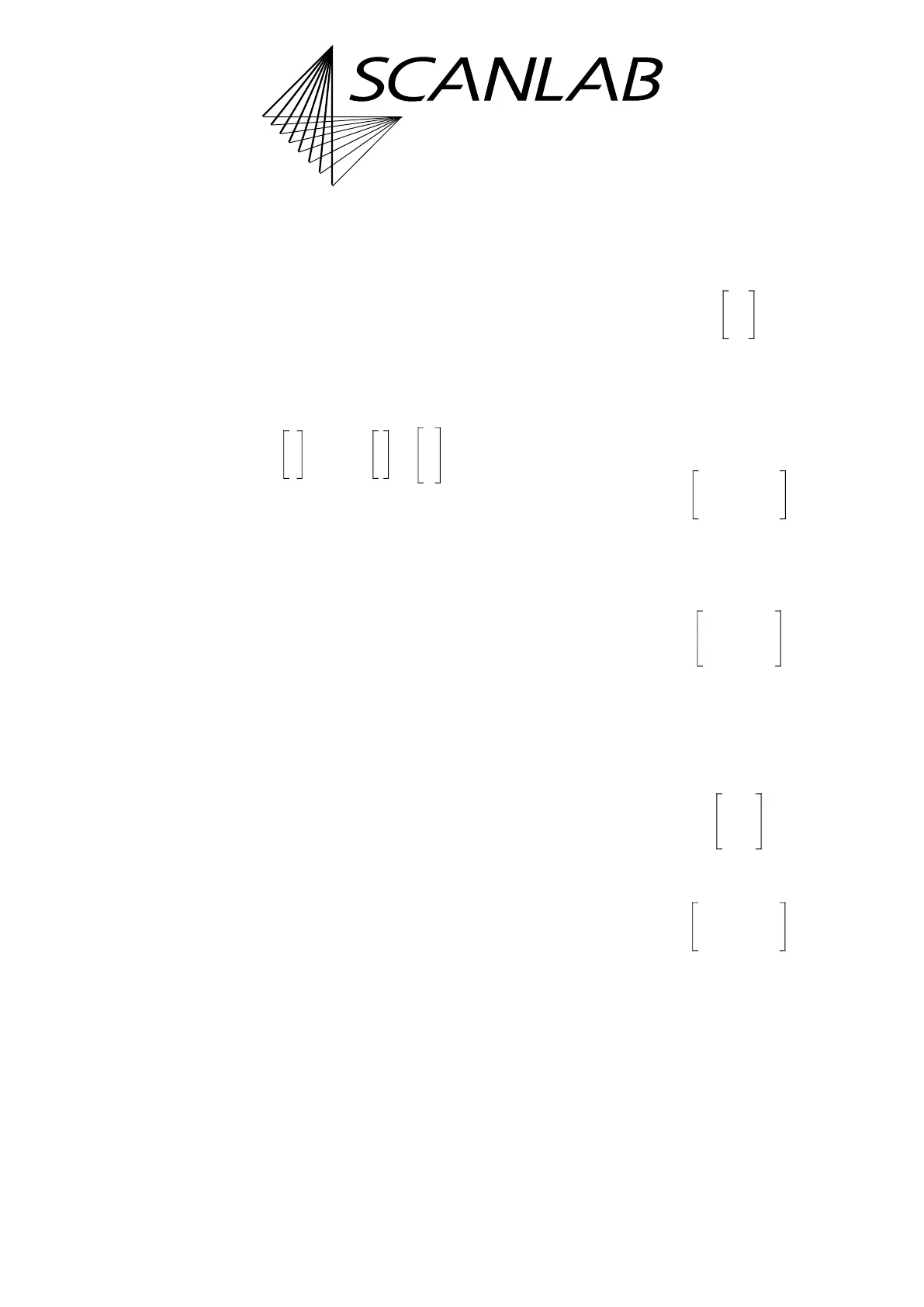
y output coordinates (x|y) defined by
Vector Commands or “Arc” Commands:
The (2 x 2) total matrix M is thereby automatically
calculated by the RTC6 PCIe Board as a product of a
scaling matrix M
S
, a rotation matrix M
R
and a general
transformation matrix M
T
:
The coefficients of the three matrices (M
T
, M
R
, and
M
S
) and the offset values (x
0
|y
0
) can be individually
defined for the first and second scan head connector.
The offset (x
0
|y
0
) is set by set_offset or
set_offset_list.
For 3-axis scan systems, set_offset_xyz or
set_offset_xyz_list enables setting of an offset z
0
for
the z coordinate, too (z
0
has the opposite effect of
set_defocus or set_defocus_list).
The following applies:
The coefficients of the scaling matrix M
S
are set by
set_scale or set_scale_list using a scaling factor k
that is common to both axes:
The coefficients of the rotation matrix M
R
are set by
set_angle or set_angle_list by specifying a rotation
angle (in accordance with mathematical
convention: positive angles produce
counterclockwise rotation):
The coefficients m
11
…m
22
of the general
transformation matrix M
T
are set by set_matrix or
set_matrix_list:
With the general transformation matrix M
T
, the two
above matrices (M
S
and M
R
, as special case) as well
as further transformations for scaling, rotating,
mirroring or skewing objects can be defined:
• Scaling by the factors k
x
and k
y
:
• Rotation by the angle :
Example:
set_matrix( 1, 0.5, -0.866, 0.866, 0.5, 1 )
defines a rotation by 60° (counterclockwise)
around the center of the Image Field for the first
scan head connector.
This can also be achieved by
set_angle(1,60)
.
x'
y'
M
x
y
x
0
y
0
+=
M M
T
M
R
M
S
=
z' z z
0
+=
M
S
k 0
0 k
=
M
R
cos sin–
sin cos
=
M
T
m
11
m
12
m
21
m
22
=
M
T
k
x
0
0 k
y
=
M
T
cos sin–
sin cos
=



 To Next Page