4 - 5
IPN 074-397-P1G
HAPSITE Smart Operating Manual
4.5 Establishing Communication
Wireless communication for the HAPSITE Smart is set up at the factory. Table 4-3
and Table 4-4 can be used to verify the set up or correct any communication
issues.
HINT: Setting up communications in Smart IQ requires the user to be in Advanced
Mode. Table 4-2 gives directions to set up this mode.
4.5.1 Setting the User Access Level
The HAPSITE Smart leaves the factory in Normal operating mode. Setting up
communication requires the user to be in Advanced Mode. For information on
setting the user level, see Table 4-2.
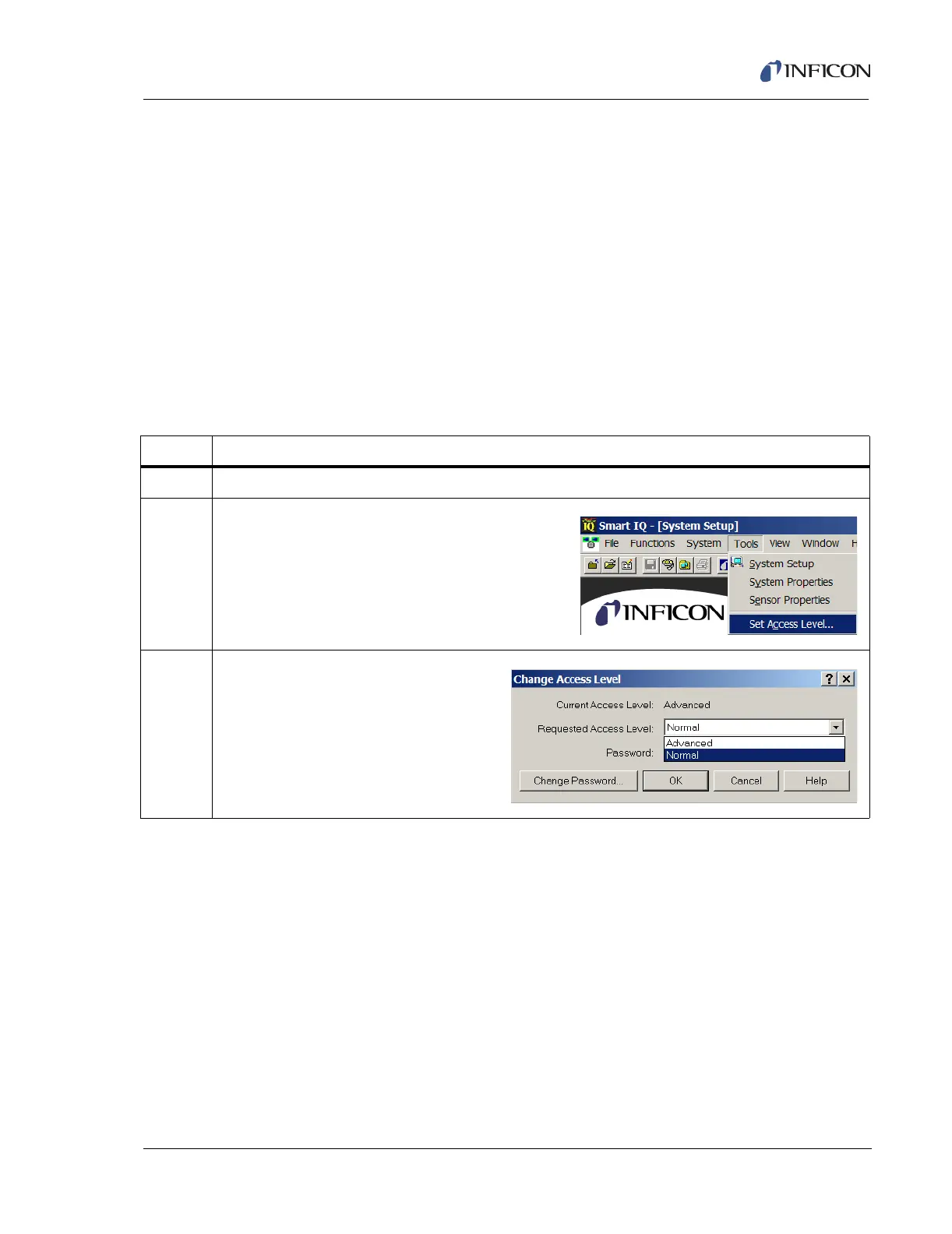
Table 4-2 Setting User Access Level
Step Description
1 Open the Smart IQ software.
2 From the System Setup page, click on Tools >>
Set Access Level.
3 The Change Access Level window will
appear. Click on the drop down menu.
Highlight Advanced, then select OK.













 To Next Page