8 - 34
IPN 074-397-P1G
HAPSITE Smart Operating Manual
8.10 Access Levels
There are two user Access Levels which can be set in Smart IQ: Normal and
Advanced. Neither Access Level is installed with a password.
Normal users can run samples, view results and reports, and perform basic
operations with HAPSITE Smart.
Advanced is a higher level which allows access to all user operations, including
everything a Normal user is allowed plus Tune, Method Editor, and some service
actions.
The default access level is Normal, and no password is set by default. To restrict
access to advanced functions, an Advanced user password should be set. Once
the password is set, the password must be entered each time the Smart IQ
program is restarted, or whenever the access level is changed from Normal to
Advanced.
8.10.1 Changing Access Levels
NOTE: When Normal access level is selected, a message will appear stating that
some areas of Smart IQ will be restricted from access.
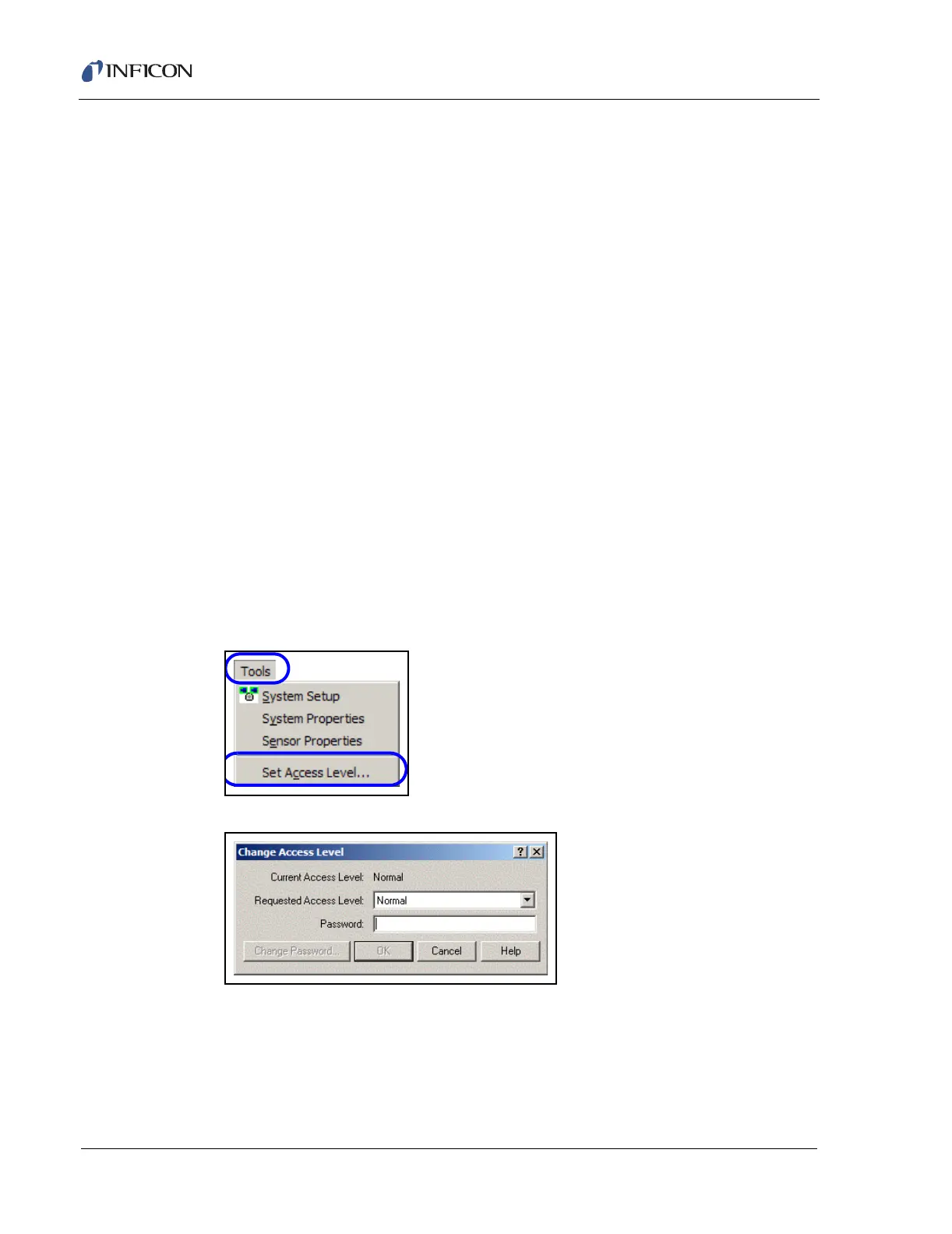
1 To change the access level, click on Tools on the System Startup Page.
1a Select Set Access Level.... See Figure 8-59.
Figure 8-59 Choose Set Access Level.... from Tools Menu
Figure 8-60 Change Access Level Window
2 To select advanced access, click on the Requested Access Level pull-down
menu and select Advanced. If a password has been entered, the current
password will need to be entered in the Password box before pressing OK.
See Figure 8-60.













 To Next Page