3 WLAN Mode
3.5 Spurious Emissions Measurement
Dependencies In measurements that support the I/Q inputs, unavailable when I/Q is the selected input. Replaced by
the Range tab in that case
Dual-Attenuator Configurations
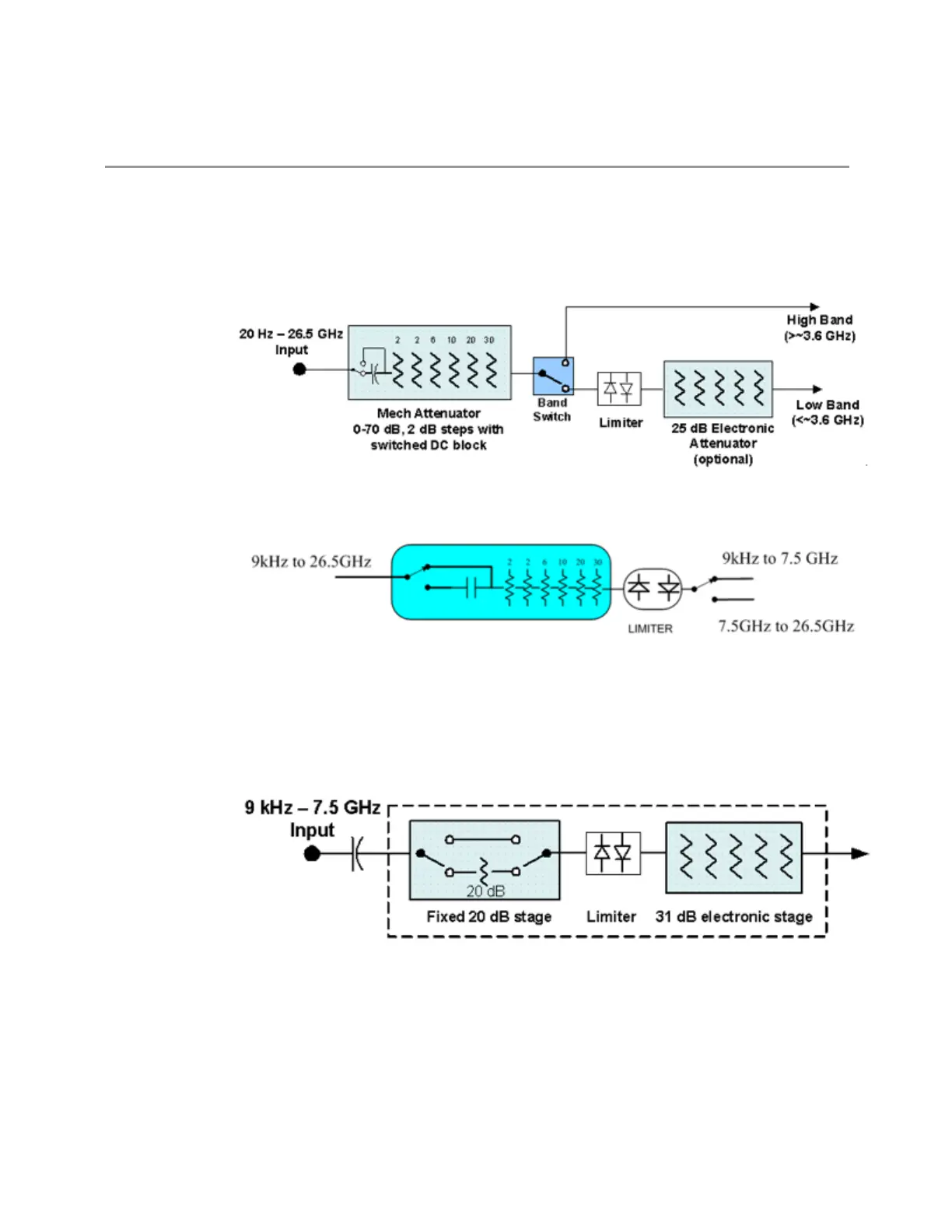
Configuration 1: Mechanical attenuator + optional electronic attenuator
Configuration 2: Mechanical attenuator, no optional electronic attenuator
Note that Configuration2 is not strictly speaking a dual-section attenuator, since
there is no electronic section available. However, it behaves exactly like
Configuration 1 without the Electronic Attenuator Option EA3, therefore for the sake
of this document it is grouped into the “Dual-Attenuator” configuration.
Single-Attenuator Configuration
You can tell which attenuator configuration you have by pressing the Attenuation
tab, which (in most Modes) opens the Attenuation menu. If the first control in the
Attenuation menu says Mech Atten you have the Dual-Attenuator configuration. If
the first control says Atten you have the Single-Attenuator configuration.
683 WLAN Mode User's &Programmer's Reference












 To Next Page