3 WLAN Mode
3.6 Modulation Analysis Measurement
Note that Configuration2 is not strictly speaking a dual-section attenuator, since
there is no electronic section available. However, it behaves exactly like
Configuration 1 without the Electronic Attenuator Option EA3, therefore for the sake
of this document it is grouped into the “Dual-Attenuator” configuration.
Single-Attenuator Configuration
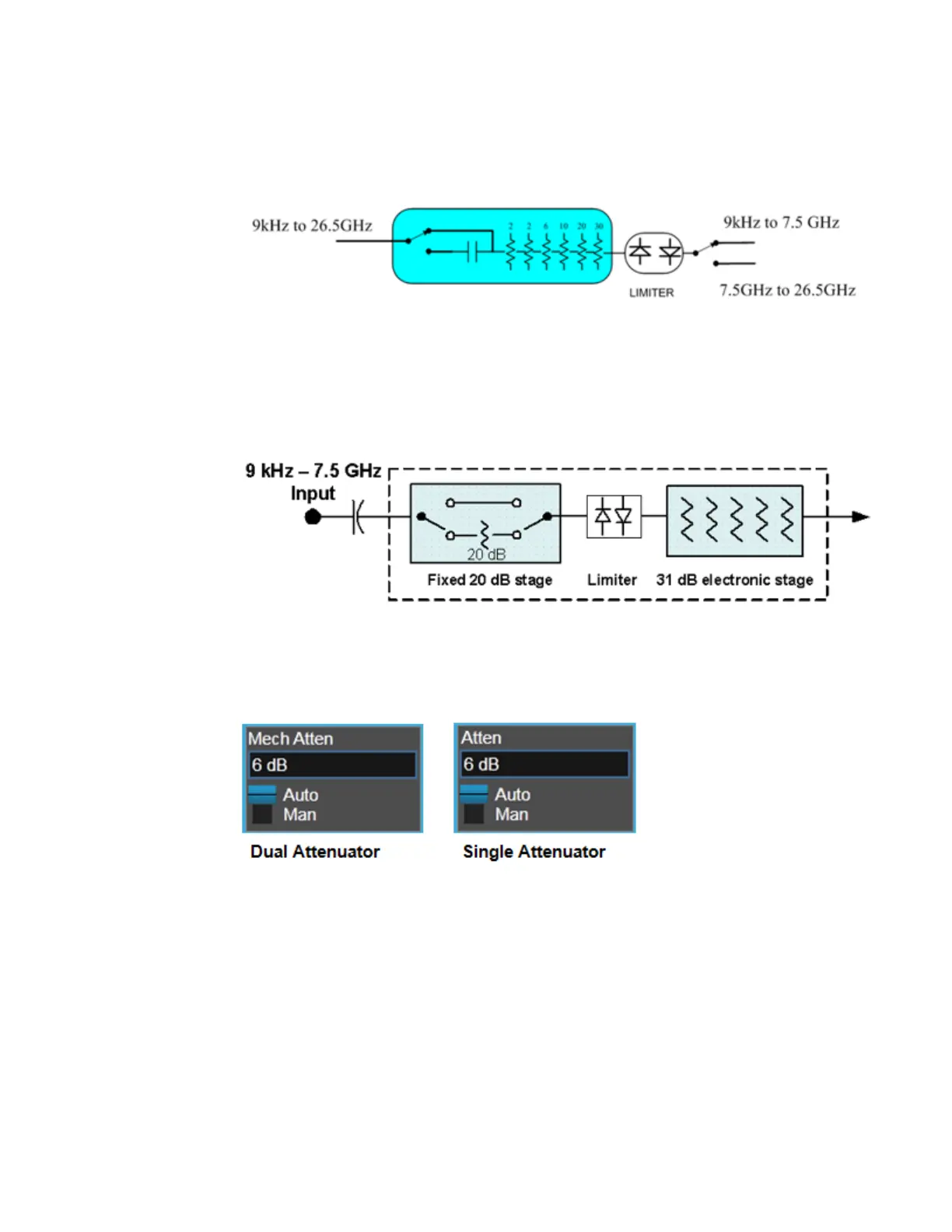
You can tell which attenuator configuration you have by pressing the Attenuation
tab, which (in most Modes) opens the Attenuation menu. If the first control in the
Attenuation menu says Mech Atten you have the Dual-Attenuator configuration. If
the first control says Atten you have the Single-Attenuator configuration.
(Note that depending on the measurement, there may be no Auto/Man functionality
on the Mech Atten control.)
In the Single-Attenuator configuration, you control the attenuation with a single
control, as the fixed stage has only two states. In the Dual-Attenuator configuration,
both stages have significant range, so you are given separate control of the
mechanical and electronic attenuator stages.
When you have the Dual-Attenuator configuration, you may still have only a Single-
Attenuator, because unless Option EA3 (the Electronic Attenuator option) is
available, and you purchase it, you will have only the mechanical attenuator.
WLAN Mode User's &Programmer's Reference 894












 To Next Page